SECTION 4 HOW TO USE HEMOTEK2
HTEK 2_UM Eng_R4.0_Feb. 2016 Page 23 of 28
NOTE: Hemotek 2 can start the donation even if you leave open the clamp. However, to
avoid any entrance of ambient into the tubing and the bag is better to keep the clamp
closed until the needle is in the vein: first pinch tubing by pressing CLAMP, second
remove needle protection and make the vein puncture and finally press START to begin
the collection.
4.4 Starting the Collection
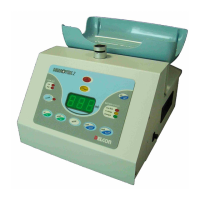
After having properly placed the bag and the tubing make the puncture and then press START.
The mixer will calculate immediately the tare to zero for the bag weight starting the agitation.
The indication of the collecting volume is updated on the display by each tray revolution.
4.5 Pause the Collection
At any time, it’s possible to pause the donation by pressing the keys STOP/PAUSE or CLAMP.
Pressing STOP/PAUSE you stop mixing but the clamp remains open (blood is coming), while if
you press CLAMP happens exactly the opposite: agitation still running the clamp is closed (no
blood can come).
In both cases to normally start again the donation press START/ENTER or if you wish to
definitely terminate the collection press the STOP/PAUSE key. In any case please keep
the clamp closed as less then possible, because the blood inside the tubing is not in
contact with any anticoagulant and may create some clot.
4.6 Flow Alarms
The mixer controls that during all the donation time the flow stay inside a safety range. If any
wrong flow is detected, an alarm for low or high flow is activate.
The alarms flow values are preset by the manufacturer respectively at 20 and 120 ml/min but
any time is possible to change these value whenever the condition would require that. To
change the flow alarms levels please do as follow:
FLOW MAXIMUM
- Press MODE and with the arrows key reach P2: press START/ENTER.
- P2 represents the value of the maximum accepted flow in ml/min. To change move the
arrows up or down. When you reached the desired value press START/ENTER to confirm.
- Press STOP/PAUSE to quit program mode.
FLOW LOW
- Press MODE and with the arrows key reach P3: press START/ENTER.
- P3 represents the value of the minimum accepted flow in ml/min. To change move the
arrows up or down. When you reached the desired value press START/ENTER to confirm.
- Press STOP/PAUSE to quit program mode.
4.7 Control and Adjustment of the Time Out function
Hemotek 2 includes as standard a programmable timer with function of donation time out.
Practically it’s possible to set a maximum donation time that cannot be over passed. If this
time is reached for any reason during any single donation, Hemotek 2 will terminate
automatically the donation for time out independently by the collected volume. The time out is
adjustable from 0 to 20 minutes, where 0 means infinite time or function disabled (no control).


 To Next Page
 Loading...