Operating your monitor │ 51
Icon Menu and
submenus
Description
Rename Inputs
Allows you to rename the name of each input source.
Reset Input
Source
Resets your monitor input settings to the factory settings.
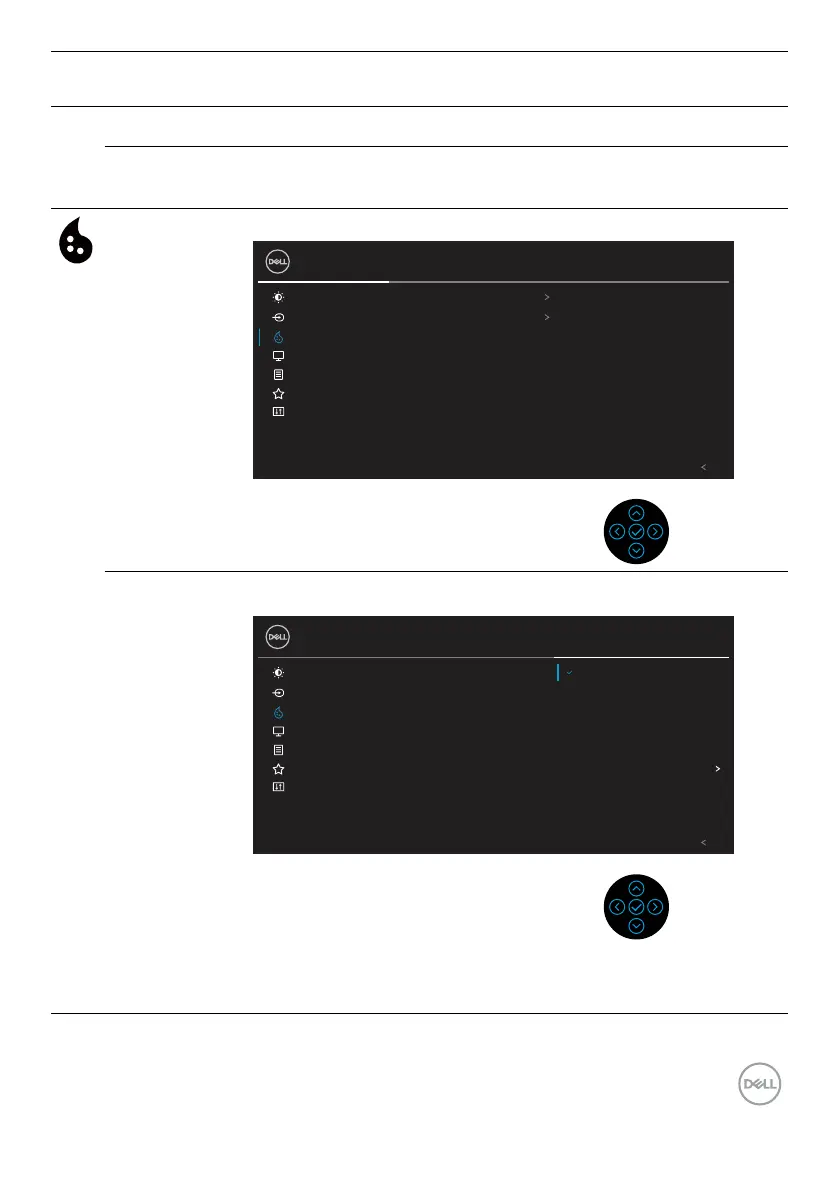
Color Use Color menu to adjust the color setting mode.
Brightness/Contrast Preset Modes
Input Source Input Color Format
27 Monitor
Color Reset Color
Display
Standard
Menu
RGB
Personalize
Others
Exit
Preset Modes Allows you to choose from a list of preset color modes.
Brightness/Contrast Preset Modes
Input Source MovieInput Color Format
27 Monitor
Color GameReset Color
Display Warm
Standard
Menu Cool
Personalize Custom Color
Others
Exit
• Standard: Loads the monitor's default color settings. This is
the default preset mode.


 To Next Page