16 A Tour of Your Computer
www.dell.com | support.dell.com
If the computer stops responding, press and hold the power button until the computer turns off completely
(which may take several seconds).
D
ELL™ ACCESSDIRECT™ BUTTON — Press this button to launch a frequently used program, such as
support and educational tools. You can reprogram the button to launch a program of your choice. For more
information, see page 37.
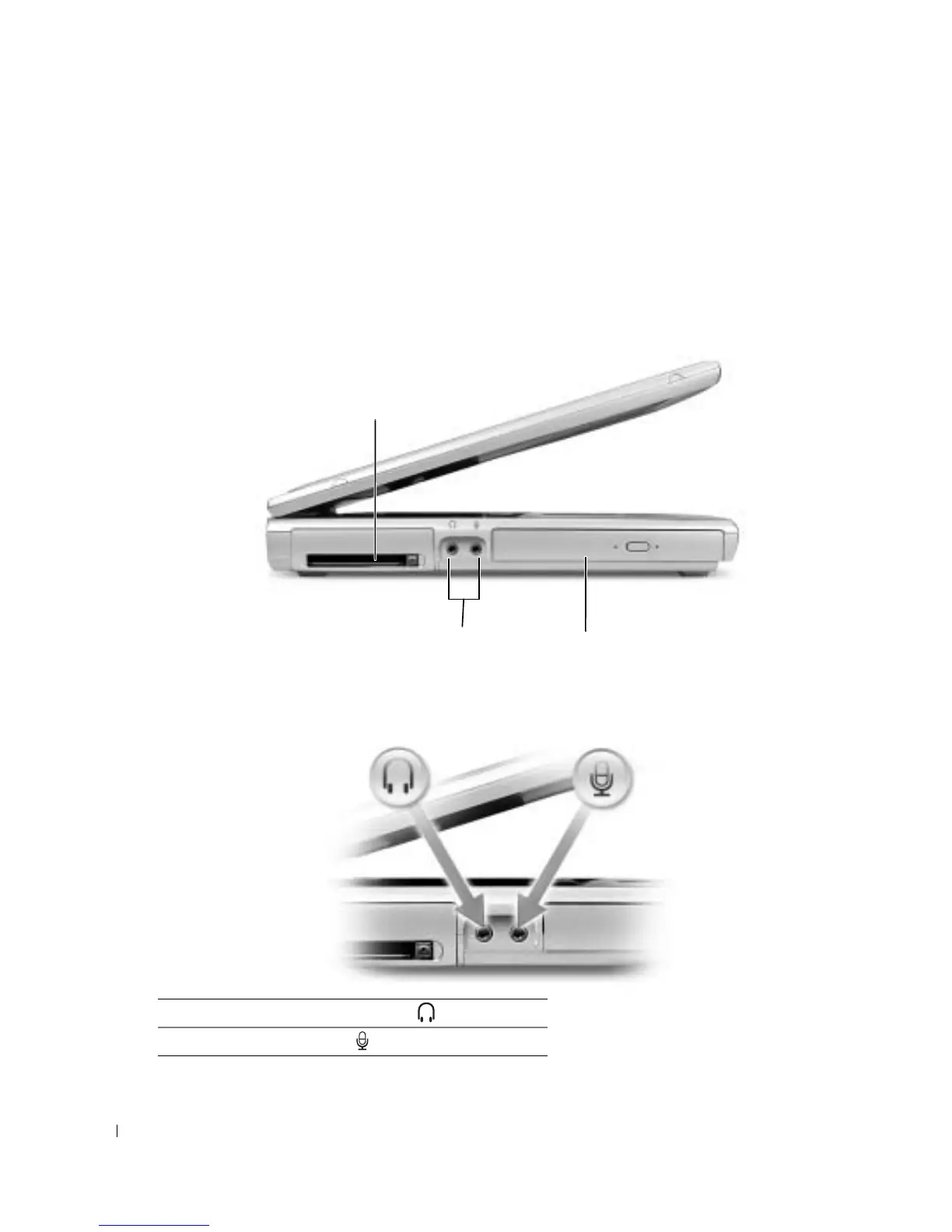
Left Side View
PC CARD SLOT — Supports one PC Card, such as a modem or network adapter. For more information,
see "Using PC Cards" in the Dell Inspiron Help file. To access the help file, see page 10.
A
UDIO CONNECTORS
OPTICAL DRIVE — Accommodates a DVD drive, a DVD/RW+R drive, or DVD/CD-RW combo drive.
Attach headphones or speakers to the connector.
Attach a microphone to the connector.
PC Card slot
audio connectors (2) optical drive









 To Next Page