82 Adding and Replacing Parts
www.dell.com | support.dell.com
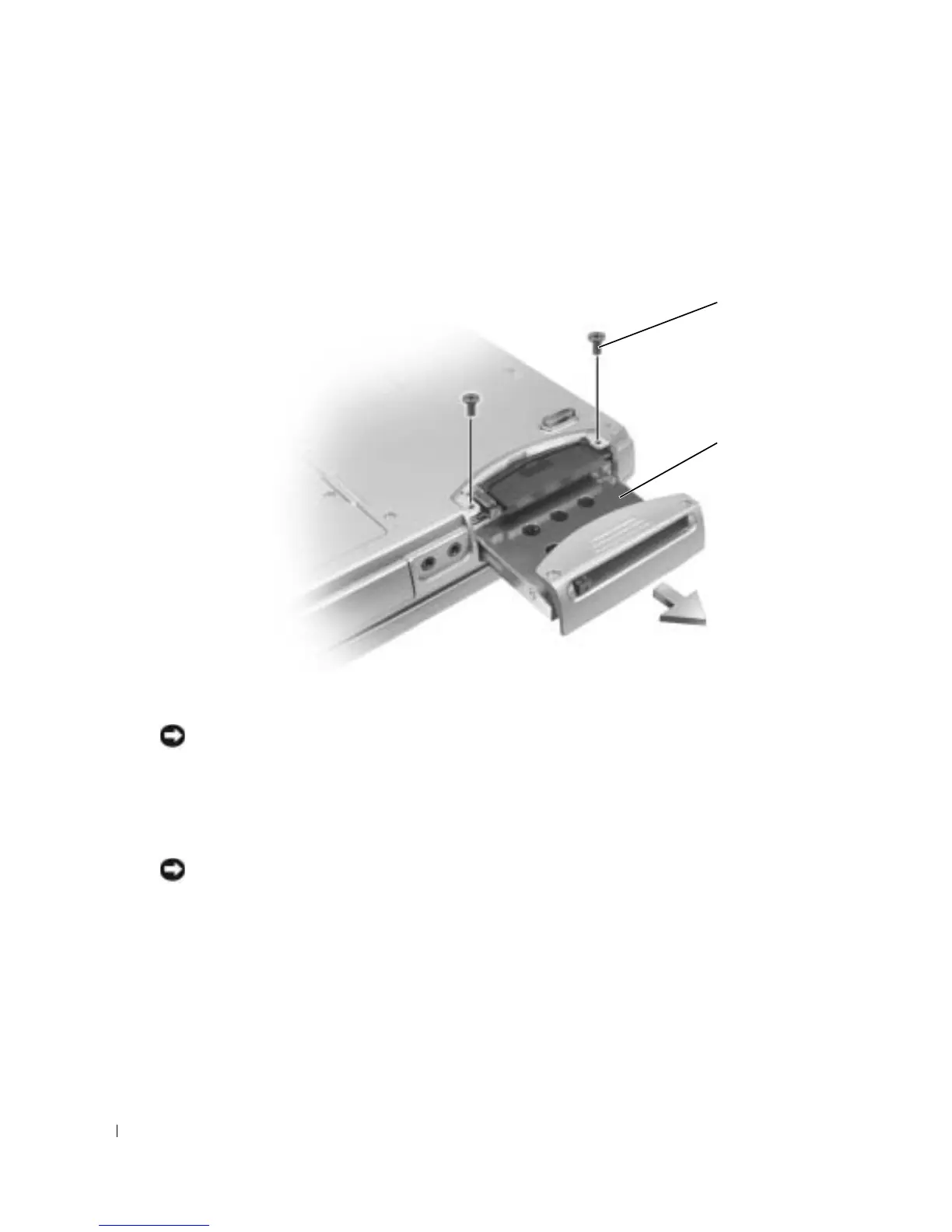
To replace the hard drive in the hard drive bay:
1
Follow the procedures in "Before You Begin" on page 79.
2
Turn the computer over, and remove the hard drive screws.
NOTICE: When the hard drive is not in the computer, store it in protective antistatic packaging. See
"Protecting Against Electrostatic Discharge" in the Product Information Guide.
3
Slide the hard drive out of the computer.
4
Remove the new drive from its packaging.
Save the original packaging for storing or shipping the hard drive.
NOTICE: Use firm and even pressure to slide the drive into place. If you use excessive force, you may
damage the connector.
5
Slide the hard drive into the bay until it is fully seated.
6
Replace and tighten the screws.
7
Reinstall the operating system, drivers, and utilities.
screws (2)
hard drive









 To Next Page