88 Adding and Replacing Parts
www.dell.com | support.dell.com
4
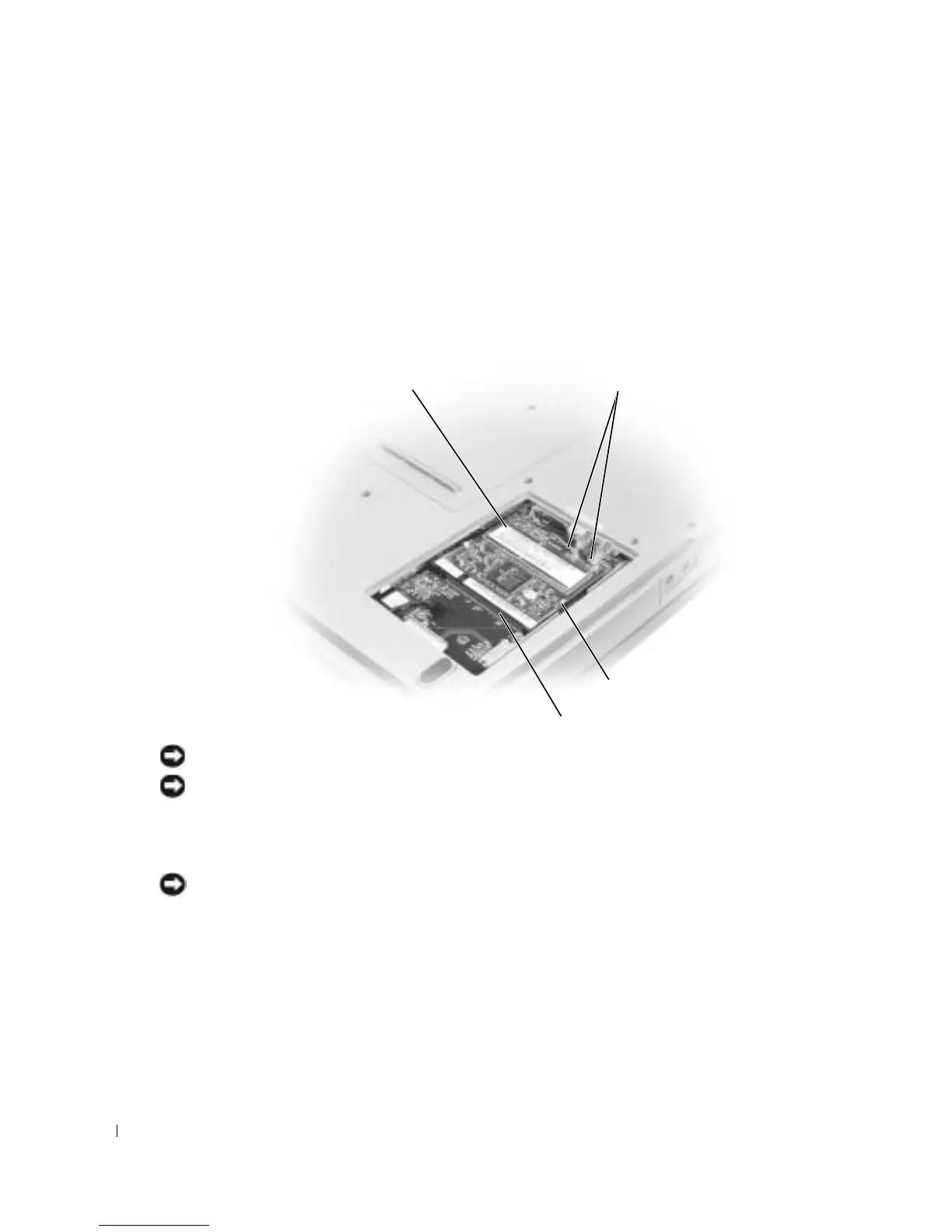
If a Mini PCI card is not already installed, go to step 5. If you are replacing a Mini PCI card,
remove the existing card:
a
Disconnect the Mini PCI card from any attached cables.
b
Release the Mini PCI card by spreading the metal securing tabs until the card pops up
slightly.
c
Lift the Mini PCI card out of its connector.
NOTICE: To avoid damaging the Mini PCI card, never place cables on top of or under the card.
NOTICE: The connectors are keyed to ensure correct insertion. If you feel resistance, check the
connectors and realign the card.
5
Align the Mini PCI card with the connector at a 45-degree angle, and press the Mini PCI card
into the connector until you hear a click.
NOTICE: To avoid damaging the Mini PCI card, never place cables on top of or under the card.
6
Connect the antenna cables to the Mini PCI card.
Mini PCI card
Mini PCI card connector
antenna cables
metal securing tabs (2)









 To Next Page