Supported Paper and Media
Dell 7330 Mono Laser Printer
4-7
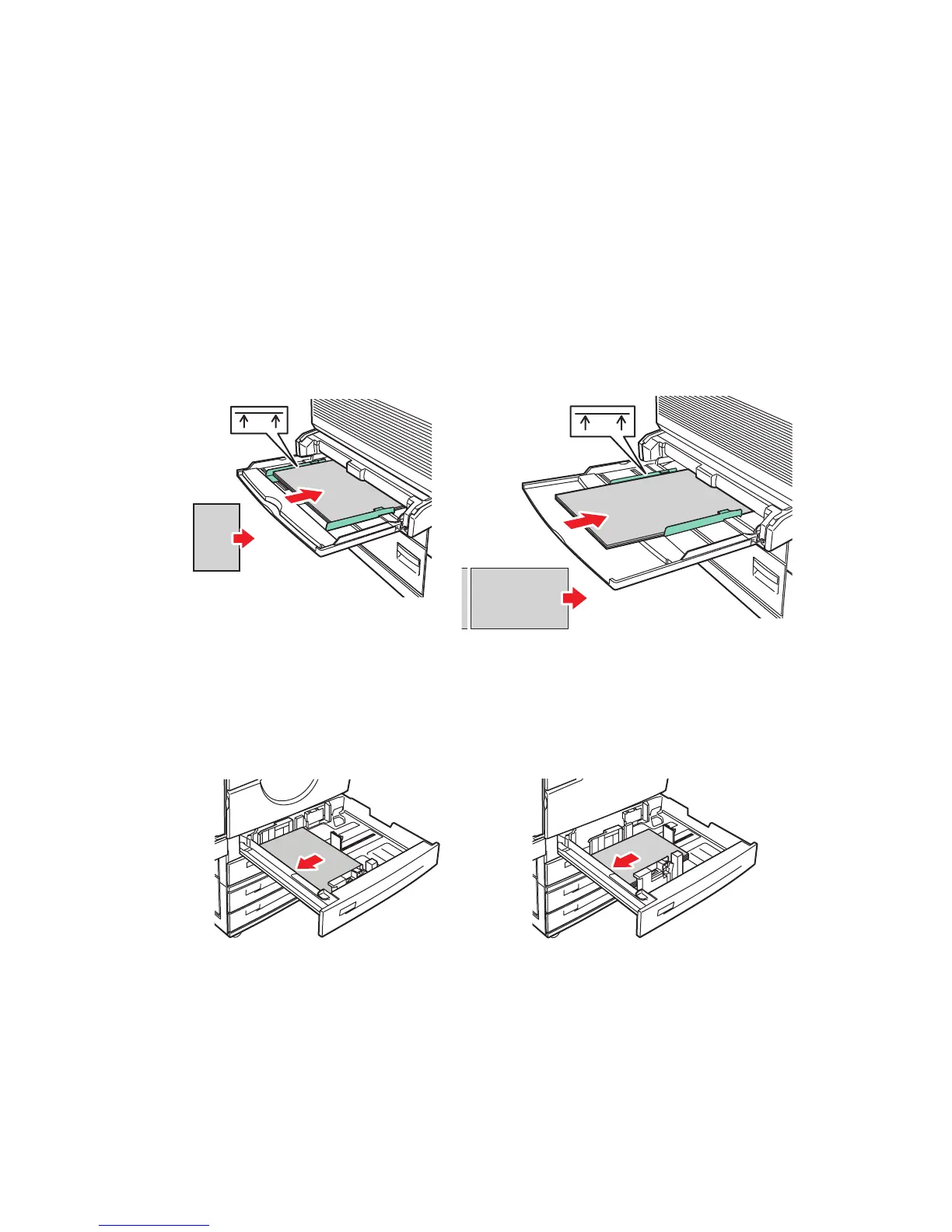
Tray Setup
When loading paper, transparencies, or other specialty media in a tray:
■ Adjust the width and length guides, if loading paper with a different width or length.
■ Fan the paper, transparencies, or other specialty media before loading in the paper tray.
■ Do not overload the paper tray. Do not load paper or transparencies above the fill lines
inside the tray.
■ Slide the length and side guides firmly against the paper or other specialty media.
■ Push the tray completely to the back of printer.
■ Set the paper size and type if prompted by the control panel.
Tray 1 (MPT)
Trays 2-5
Tray 1 (MPT) Long-Edge Feed
(Recommended)
Tray 1 (MPT) Short-Edge Feed
Trays 2-5 Long-Edge Feed
(Recommended)
Trays 2-5 Short-Edge Feed
7330-100
MAX
7330-101
MAX
7330-101
MAX
7330-102
7330-106














 To Next Page