DELL
Model No. /
Modelo /型號
/
型号
/
모델명
: C5517Hc
輸入電源/输入电源/정격입력
:
100-240V 50/60Hz 2.5A
Q40G055N-700-03A
XXXXXXXXXXX
MSIP-REM-TPF-C5517Hc
신청인/제조자:TPV Electronics (Fujian) Co., Ltd.
XXXXXX-X X
CAN ICES-3 (B)/NMB-3(B)
The equipment must be connected to an earthed mains socket-outlet.
L'appareil doit être branché sur une prise de courant munie d'une mise à la terre.
Удельная мощность рабочего режима - X.XXX Вт/см²
Потребляемая мощность изделием в режиме ожидания - X.XX Вт
Потребляемая мощность изделием в выключенном режиме - X.XX Вт
Service Tag:1NGTQV1
Express SVC code:359 576 607 7
S/N: CN-0 P2NYV-64180-46D-001T
REV A00
生产日期/Manufactured Date: Apr.2016
中国制造
Made in China
IS 13252(Part1)/
IEC 60950-1
R-41018660
S&E
R33037
RoHS
警語:使用過度恐傷害視力。
1
2
3
4
5
DELL
Model No. /
Modelo /型號
/
型号
/
모델명
: C5517Hc
輸入電源/输入电源/정격입력
:
100-240V 50/60Hz 2.5A
Q40G055N-700-03A
XXXXXXXXXXX
MSIP-REM-TPF-C5517Hc
신청인/제조자:TPV Electronics (Fujian) Co., Ltd.
XXXXXX-X X
CAN ICES-3 (B)/NMB-3(B)
The equipment must be connected to an earthed mains socket-outlet.
L'appareil doit être branché sur une prise de courant munie d'une mise à la terre.
Удельная мощность рабочего режима - X.XXX Вт/см²
Потребляемая мощность изделием в режиме ожидания - X.XX Вт
Потребляемая мощность изделием в выключенном режиме - X.XX Вт
Service Tag:1NGTQV1
Express SVC code:359 576 607 7
S/N: CN-0 P2NYV-64180-46D-001T
REV A00
生产日期/Manufactured Date: Apr.2016
中国制造
Made in China
IS 13252(Part1)/
IEC 60950-1
R-41018660
S&E
R33037
RoHS
警語:使用過度恐傷害視力。
6
7
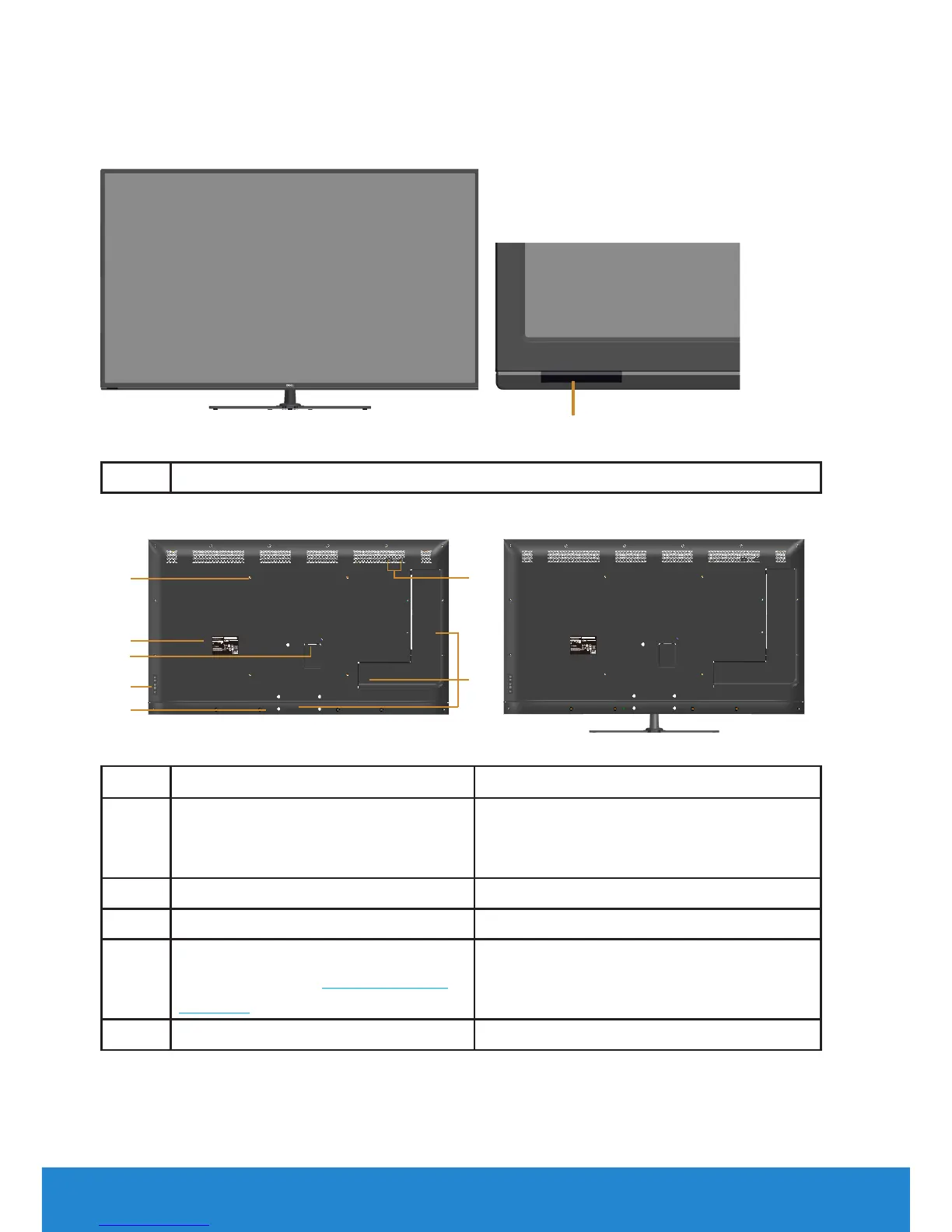
Back View with monitor stand
Label Description Use
1 VESA mounting holes (400 mm x
400 mm)
Wall mount monitor using VESA-
compatible wall mount kit (400 mm x
400 mm).
2 Regulatory label Lists the regulatory approvals.
3 AC power connector To connect the monitor power cable.
4 Function buttons (For more
information, see Operating the
Monitor)
Use the keys on the back of the
monitor to adjust the image settings.
5 Security lock slot Secures monitor with security lock.













 To Next Page