Scanning 355
FILE LOCATION: C:\Users\fxstdpc-
admin\Desktop\0630_UG??\Mioga_AIO_UG_FM\Mioga_AIO_UG_FM\section19.fm
DELL CONFIDENTIAL – PRELIMINARY 9/13/10 - FOR PROOF ONLY
7
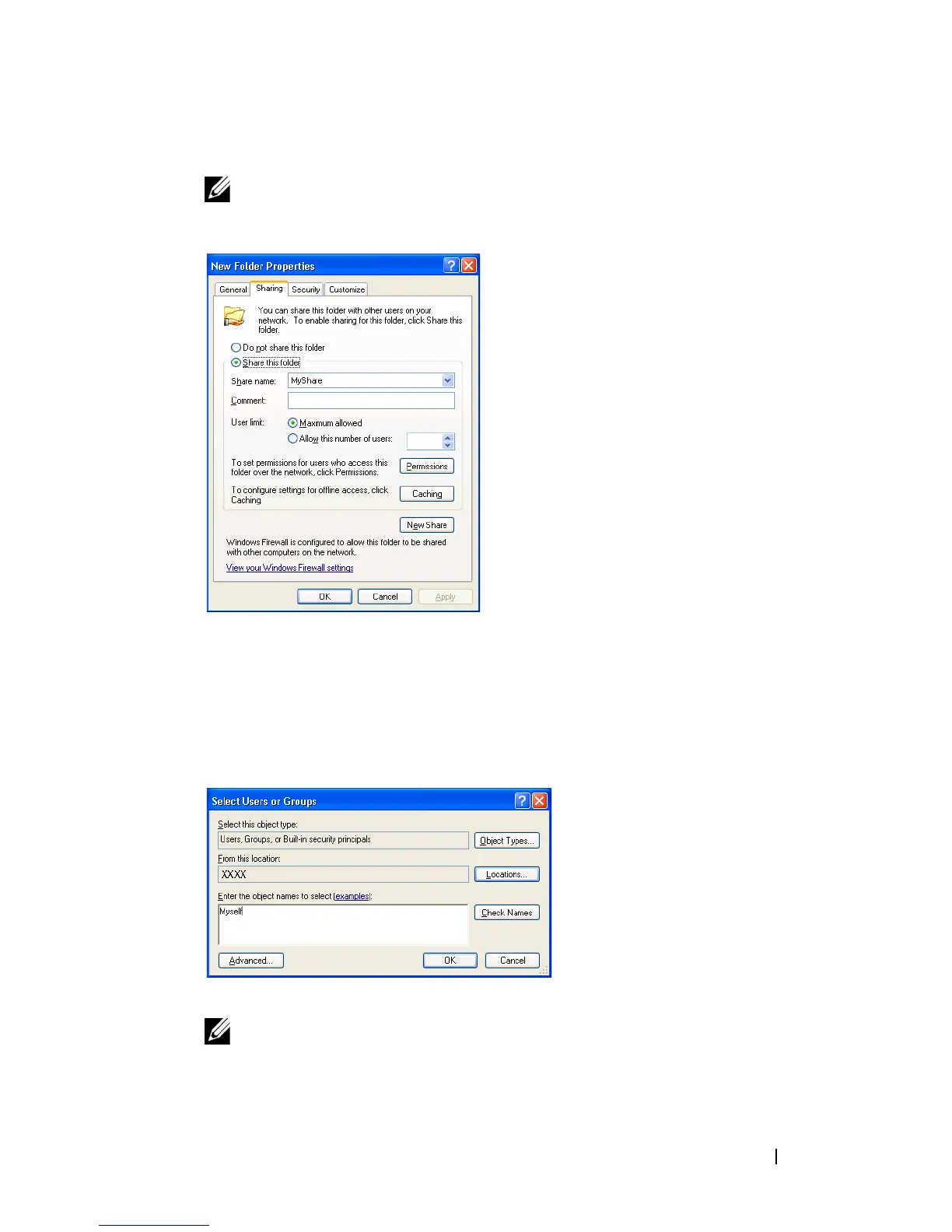
Enter a shared name in the
Share name
box.
NOTE: Write down this shared name because you will use this name in the
next setting procedure.
8
Click on
Permissions
to create a write permission for this folder.
9
Click
Add
.
10
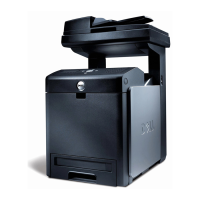
Search user login name by clicking
Advanced
, or enter the user login name
in
Enter the object names to select
box and click
Check Names
to confirm
(Example of user login name,
Myself
).
11
Click
OK
.
NOTE: Do not use Everyone as the user login name.






 To Next Page