About your monitor │ 23
• When transporting the monitor, avoid any sudden shock or vibration to it.
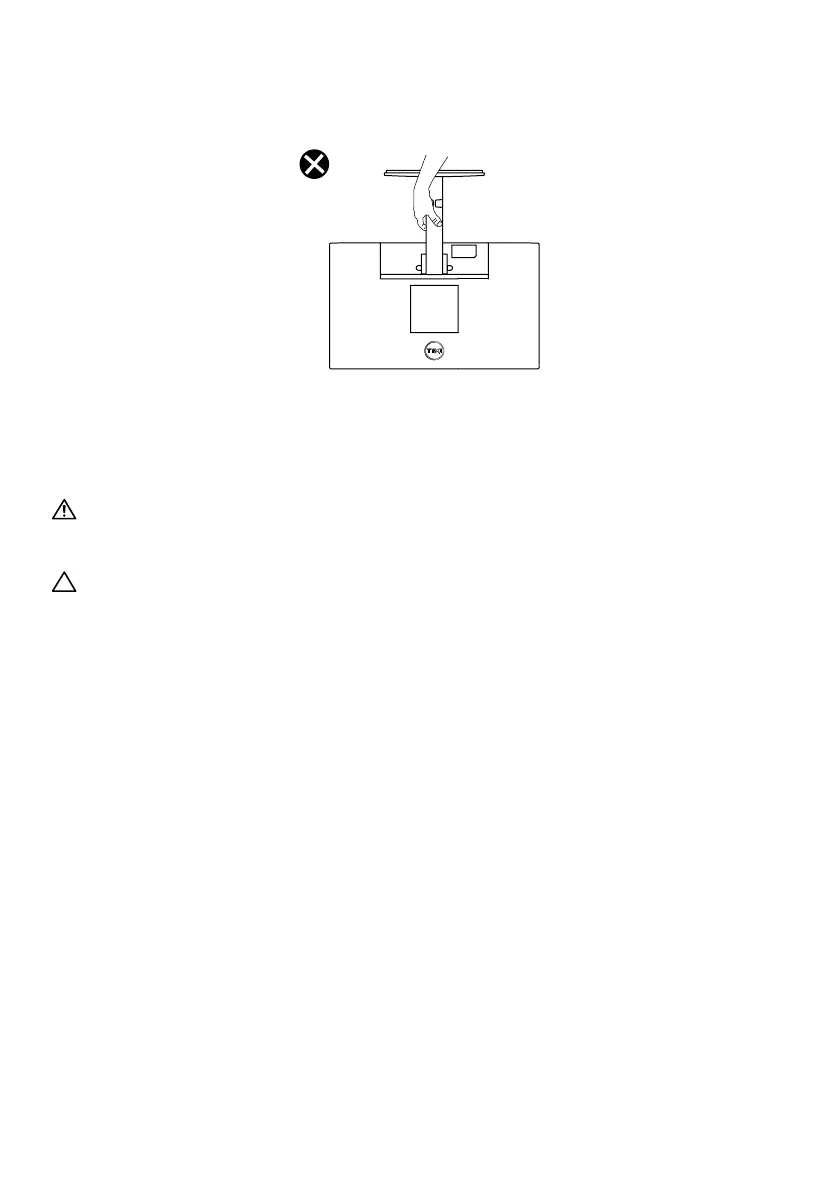
• When lifting or moving the monitor, do not turn the monitor upside down while holding the
stand base or stand riser. This may result in accidental damage to the monitor or cause
personal injury.
Maintenance guidelines
Cleaning your monitor
WARNING: Before cleaning the monitor, unplug the monitor power cable
from the electrical outlet.
CAUTION: Read and follow the Safety instructions before cleaning the
monitor.
For best practices, follow these instructions in the list below while unpacking, cleaning or
handling your monitor:
• To clean your screen, lightly dampen a soft and clean cloth with water. If possible, use a
special screen-cleaning, tissue or solution suitable for the anti- static coating. Do not use
benzene, thinner, ammonia, abrasive cleaners, or compressed air.
• Use a lightly-dampened cloth to clean the monitor. Avoid using detergent of any kind as
some detergents leave a milky film on the monitor.
• If you notice white powder when you unpack your monitor, wipe it off with a cloth.
• Handle your monitor with care as the black-colored monitor may get scratched.
• To help maintain the best image quality on your monitor, use a dynamically changing screen
saver and turn off your monitor when not in use.



 To Next Page