26 │ Setting up the monitor
Connecting your monitor
WARNING: Before you begin any of the procedures in this section, follow
the Safety instructions.
WARNING: For your safety, be sure that the grounded power outlet you plug
the power cord into easily accessible to operator and located as close to the
equipment as possible.
To disconnect power from the equipment, unplug the power cord from the
power outlet by grasping the plug firmly. Never pull on the cord.
WARNING: A certified power supply cord has to be used with this equipment.
The relevant national installation and/or equipment regulations shall be
considered. A certified power supply cord not lighter than ordinary polyvinyl
chloride flexible cord according to IEC 60227 (designation H05VV-F 3G
0.75mm² or H05VVH2-F2 3G 0.75mm²) shall be used. An alternative flexible
cord is synthetic rubber.
NOTE: Do not connect all cables to the computer at the same time. It is
recommended to route the cables through the cable-management slot
before you connect them to the monitor.
NOTE: Dell monitors are designed to work optimally with Dell supplied inbox
cables. Dell does not guarantee the video quality and performance when
using non-Dell cables.
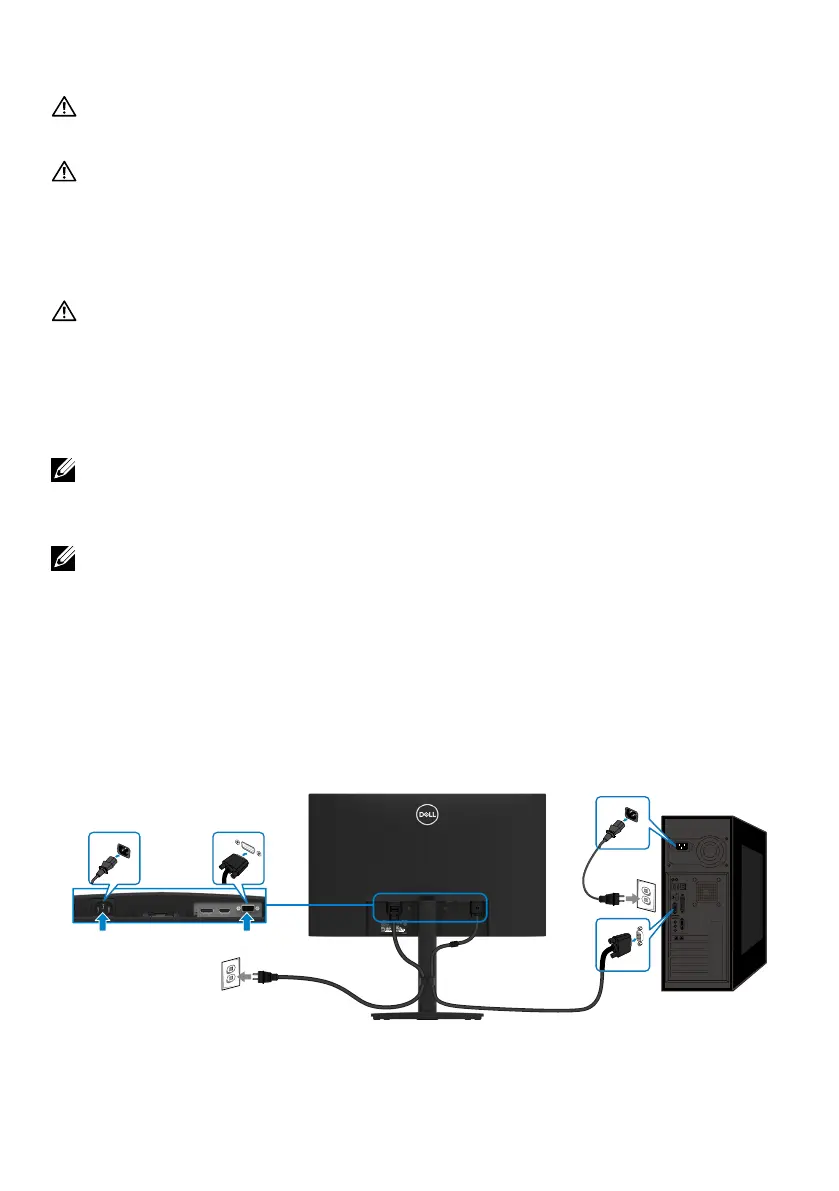
To connect your monitor to the computer:
1. Turn off your computer and disconnect the power cable.
2. Connect VGA or DP or HDMI cable from your monitor to the computer.
Connecting VGA cable
VGA
VGA



 To Next Page