About your monitor │ 11
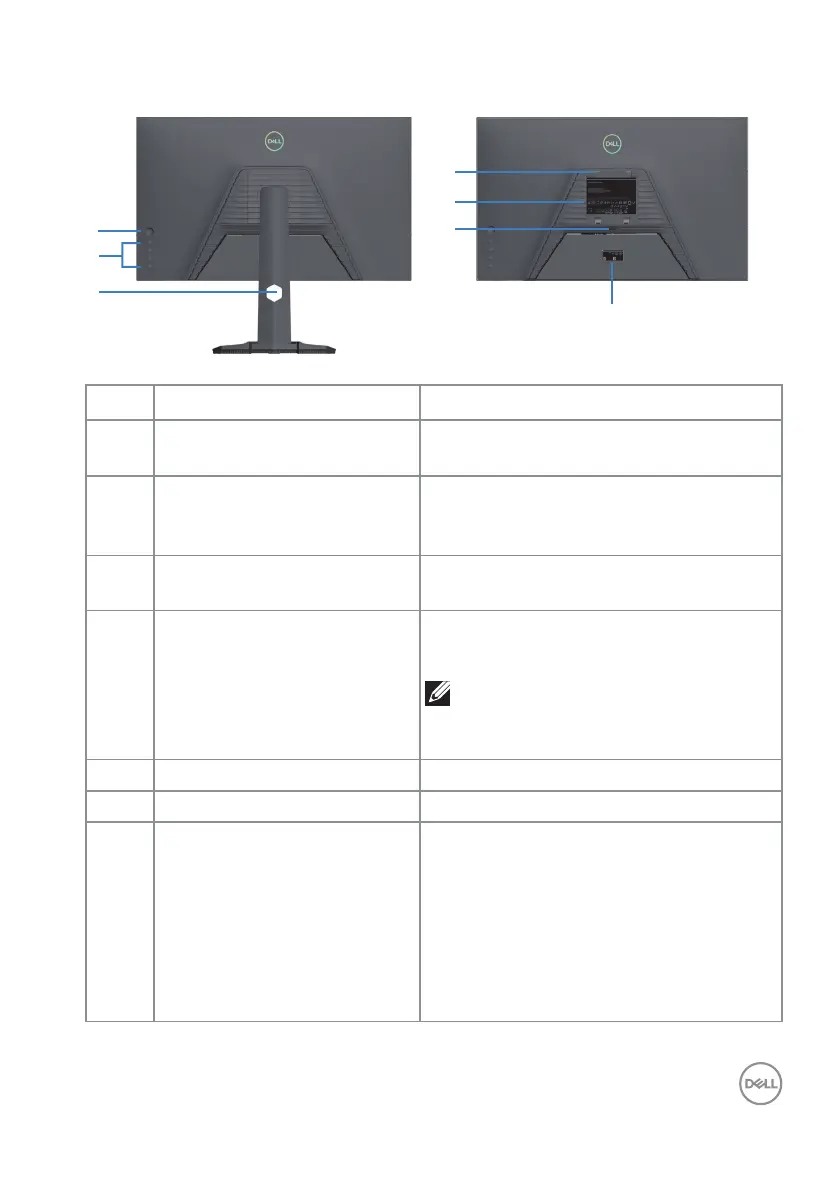
Back view
5
7
6
4
3
SVC Tag:
1234567
Express Service
Code:
123 456 789 0
S/N: CN-06JT85
-TV100-2CN-001U
-A00
Date of Mfg/⭕ӝᰛᵕ⭕⭘ᰛᵕ: Dec. 2022
Q40G027N-700-18A XX P
DELL G2724D
⏨Წᱴ⽰ಞ
ශ:G2724D
䗉ޛ⭫Ⓠ:
100-240V 50/60Hz,1.5A
ѣള䙖
Q40G027N-700-17A XX P
DELL G2724D
Flat Panel Monitor /Monitor Plano Panel /Moniteur écran plat /⏢Ღ亟⽪ಘ
Model No. /Modelo /N°de modelo /모델명/モデル番/ර㲏: G2724Dc
/정격입력/Entrada de energía:100-240V 50/60Hz, 1.5A
䕨ޕ䴫ⓀӔ⍱䴫༃100-240Կ⢩,1.5ᆹษ,50/60䎛㥢
Consumo de energía en operación: xx.x Wh
Удельная мощность рабочего режима - x.xxxxВт/см²
Потребляемая мощность изделием в режиме ожидания - xxxxВт
Потребляемая мощность изделием в выключенном режиме - xxxx Вт
The equipment must be connected to an earthed mains socket-outlet.
L'appareil doit être branché sur une prise de courant munie d'une mise à la terre.
сделанный в Китай /Fabriqué en Chine /ѣു㼳䙖
Made in China/중국제조 䆜䃔ֵ⭞䚄ᓜᚆۭᇩ㿌࣑Ⱦ
www.dell.com/regulatory_compliance Raheen Business Park Limerick Ireland (for EU Only)
CAN ICES-003 (B)/NMB-003(B)
(1) this device may not cause harmful interference, and
XXXXXXXX
R-R-E2K-G2724Dc
㥐㦤㣄ڕTPV Electronics (Fujian) Co., Ltd.(For Korea)
㐔㷡㢬ڕDELL INC.(For Korea)
080-200-3800
R33037
RoHS
For UK only: One Creechurch Place, London EC3A 5AF
XXXXX
XXXXXXXX
ޛ࣑100 V~, 1.5 A, 50/60 Hz
䝕䝹䞉䝔䜽䝜䝻䝆䞊䝈
XXXXXXXXX
Label Description Use
1 Joystick Use to control the OSD menu. For more
information, see Operating your monitor.
2 Function buttons Press the function buttons to adjust items
in the OSD menu. For more information,
see Operating your monitor.
3 Cable management slot Use to organize cables by routing them
through the slot.
4 VESA mounting holes (100
mm x 100 mm - behind the
VESA cover)
Wall-mount the monitor using VESA-
compatible wall-mount kit.
NOTE: Wall-mount kit is not
shipped with your monitor and is
sold separately.
5 Regulatory information label Lists the regulatory approvals.
6 Stand release button Releases the stand from the monitor.
7 Regulatory label (including
barcode, serial number and
Service Tag label)
Lists the regulatory approvals. Refer
to this label if you need to contact
Dell for technical support. The Service
Tag is a unique alphanumeric identifier
that enables Dell service technicians
to identify the hardware components
in your computer and access warranty
information.



 To Next Page