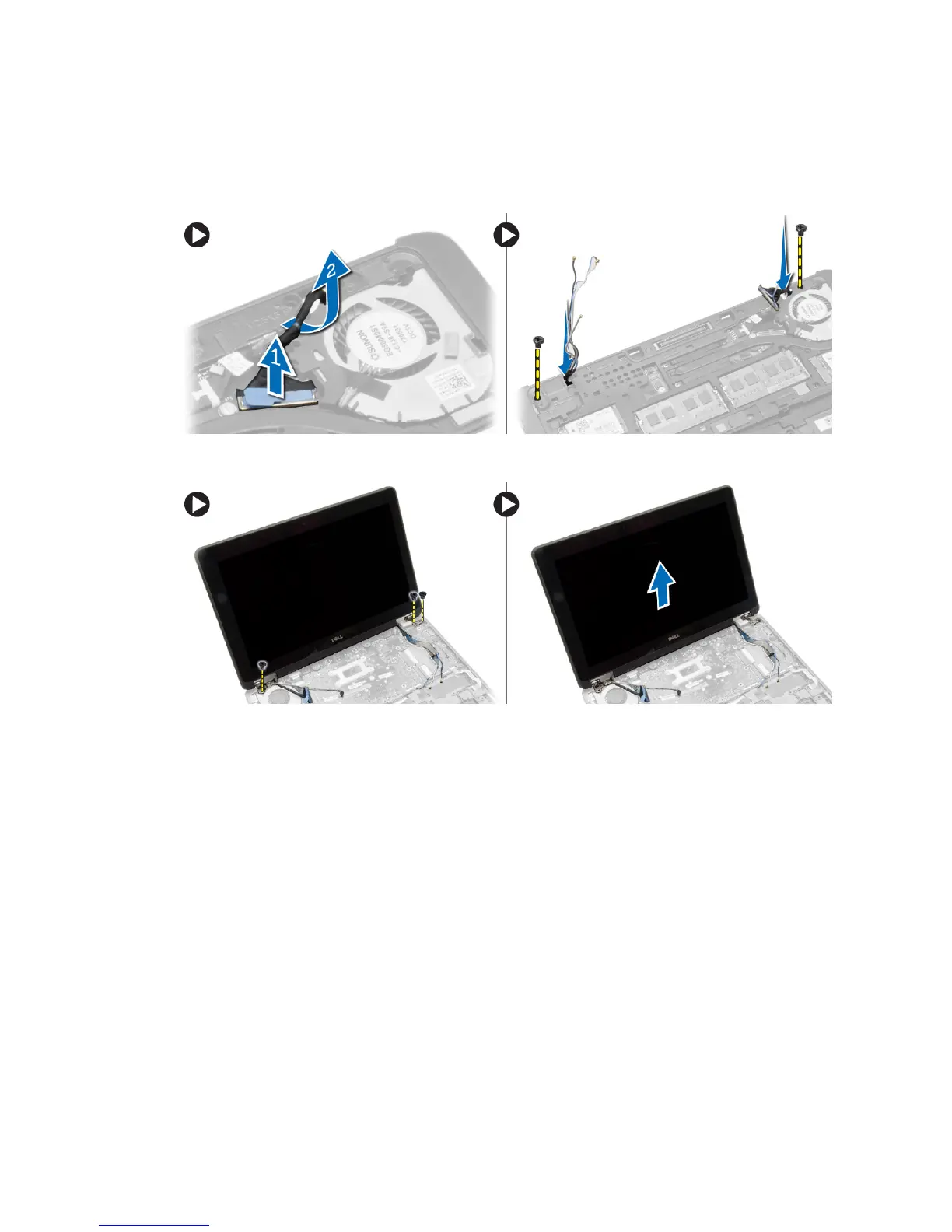
4. Perform the following steps as shown in the illustration: Disconnect the antenna cables from the wireless solution.
a. Disconnect the LVDS cable from the system board [1].
b. Unroute the cable from the slot [2].
c. Remove the screws and pull the antenna cables from the holes on the base chassis that secure the display
assembly to the computer.
5. Remove the screws that secure the display assembly to the computer and lift the display assembly from the
computer.
Installing the Display Assembly
1. Insert the LVDS and wireless antenna cables through the holes on the base chassis and connect them.
2. Place the display assembly onto the computer.
3. Tighten the screws on both sides to secure the display assembly.
4. Tighten the screw that secures heatsink to the computer.
5. Route and connect the LVDS cables through the routing channel.
6. Connect the WLAN cable to the computer.
7. Install:
a. palmrest
b. keyboard
c. base cover
d. SD card
e. battery
8. Follow the procedures in
After Working Inside Your Computer
.
29














 To Next Page