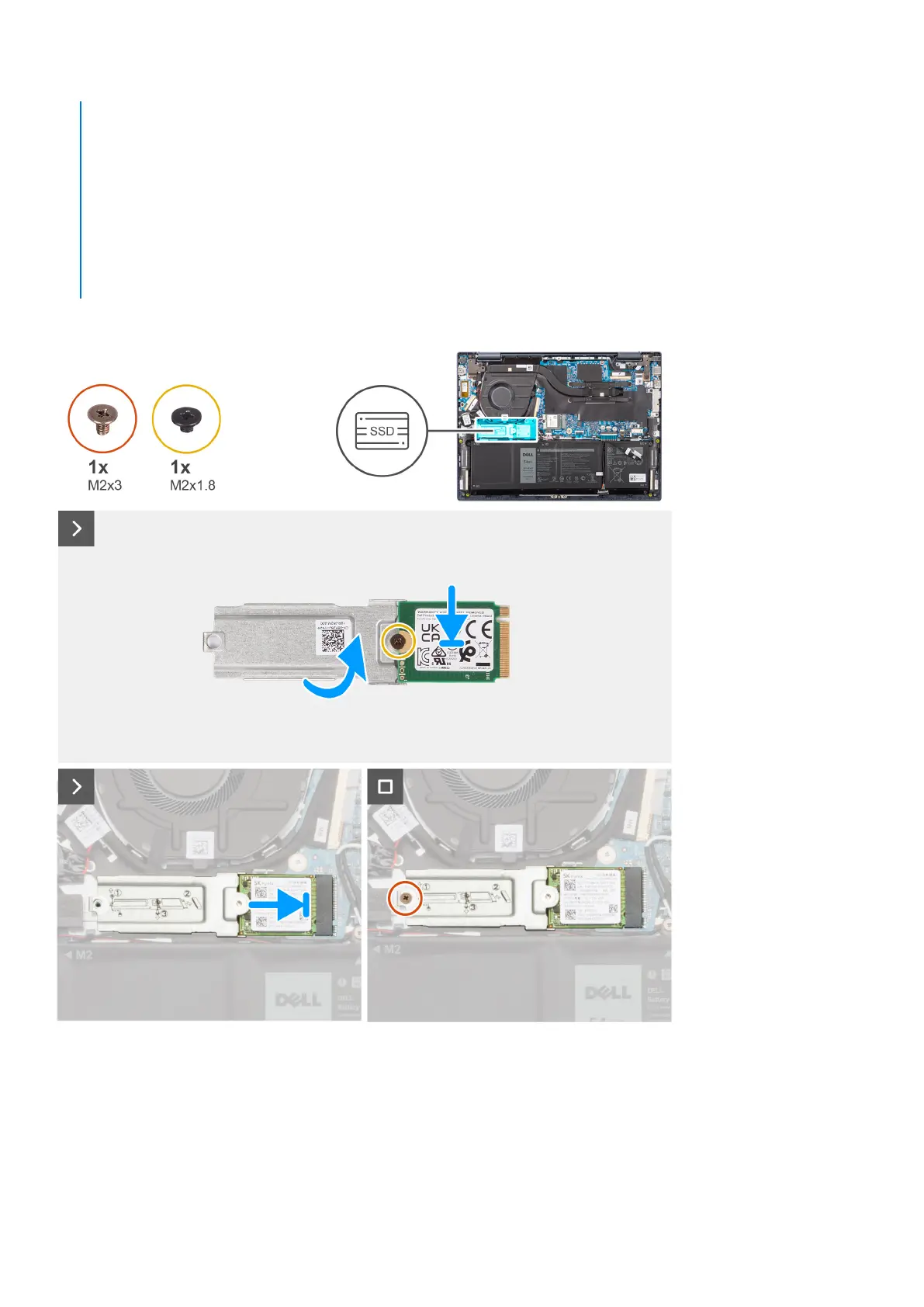
A mounting bracket for the M.2 2230 solid-state drive is required. The mounting bracket is provided if the M.2 2230
solid-state is shipped with the computer.
If you are replacing the M.2 2230 solid-state drive with a new M.2 2230 solid-state drive, use the existing mounting
bracket to install the latter.
● M.2 2280 solid-state drive
If you are replacing the M.2 2280 solid-state drive (shipped with the computer) with an M.2 2230 solid-state drive, a
mounting bracket for the M.2 2230 solid-state drive is required. Contact Dell support to purchase the mounting bracket
for the M.2 2230 solid-state drive.
The following images indicate the location of the M.2 2230 solid-state drive and provide a visual representation of the
installation procedure.
Steps
1. Align the round notch on the M.2 2230 solid-state drive to the screw hole on the M.2 2230 solid-state drive bracket.
2. Replace the screw (M2x1.8) to secure the M.2 2230 solid-state drive to the M.2 2230 solid-state drive bracket.
3. Turn over the M.2 2230 solid-state drive bracket.
4. Align the notch on the M.2 2230 solid-state drive with the tab on the M.2 card slot on the system board.
Removing and installing Customer Replaceable Units (CRUs)
41



 To Next Page