Connect to a TV, external display or another HDMI-in enabled device. Provides video and audio output.
4. USB 3.2 Gen 1 port
Connect devices such as external storage devices and printers. Provides data transfer speeds up to 5 Gbps.
5. USB 3.2 Gen 2 Type-C port with DisplayPort 1.4 and Power Delivery
Connect devices such as external storage devices, printers, and external displays.
Supports Power Delivery that enables two-way power supply between devices. Provides up to 15 W power output that
enables faster charging.
NOTE: A USB Type-C to DisplayPort adapter (sold separately) is required to connect a DisplayPort device.
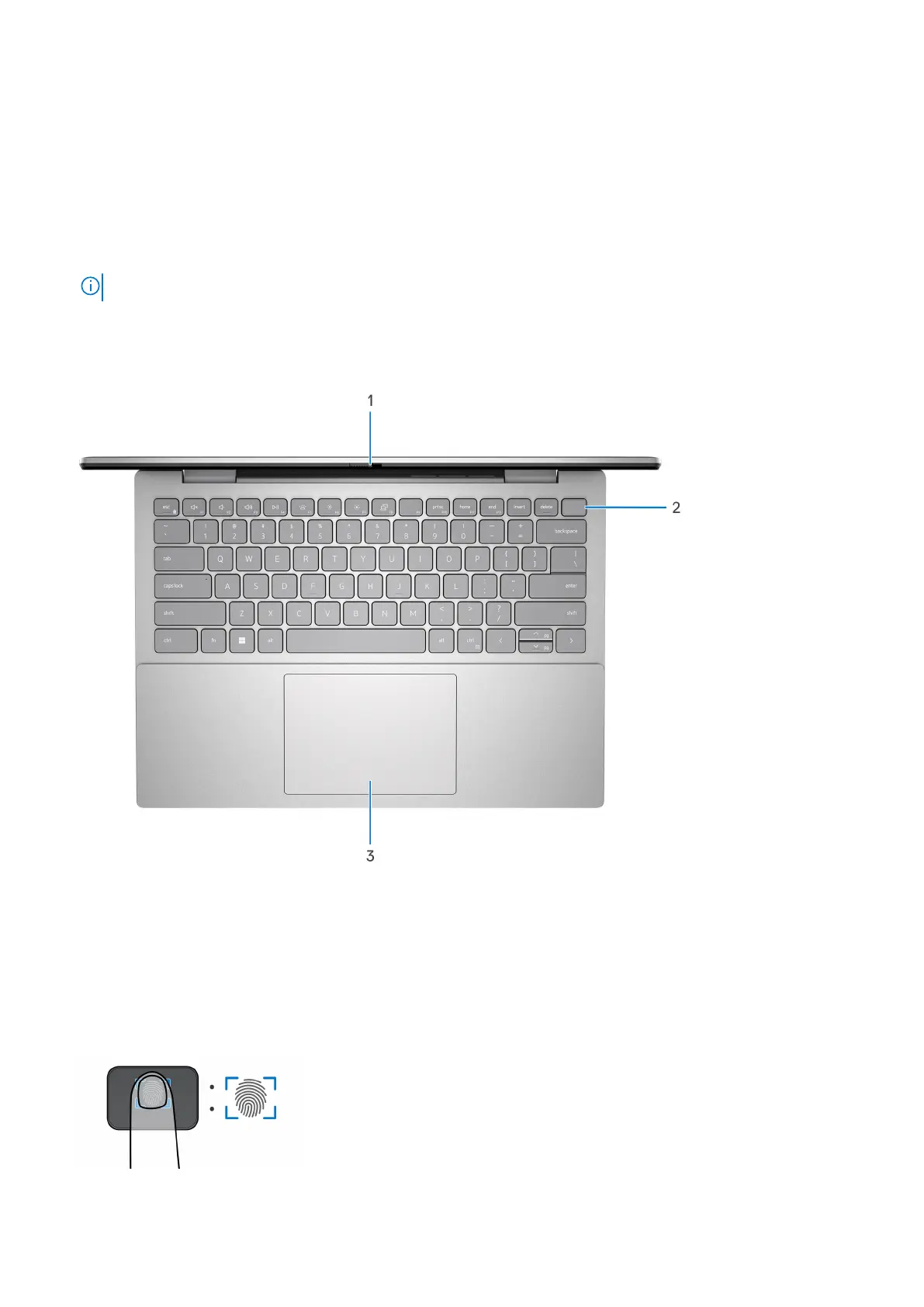
Top
1. Privacy shutter
Slide the privacy shutter to cover the camera lens and protect your privacy when the camera is not in use.
2. Power button with optional fingerprint reader
Press to turn on the computer if it is turned off, in sleep state, or in hibernate state.
When the computer is turned on, press the power button to put the computer into sleep state; press and hold the power
button for four seconds to force shut-down the computer.
If the power button has a fingerprint reader, place your finger on the power button to log in.
8
Views of Inspiron 14 5435



 To Next Page