32 | Operating the monitor
Icon Menu and
submenus
Description
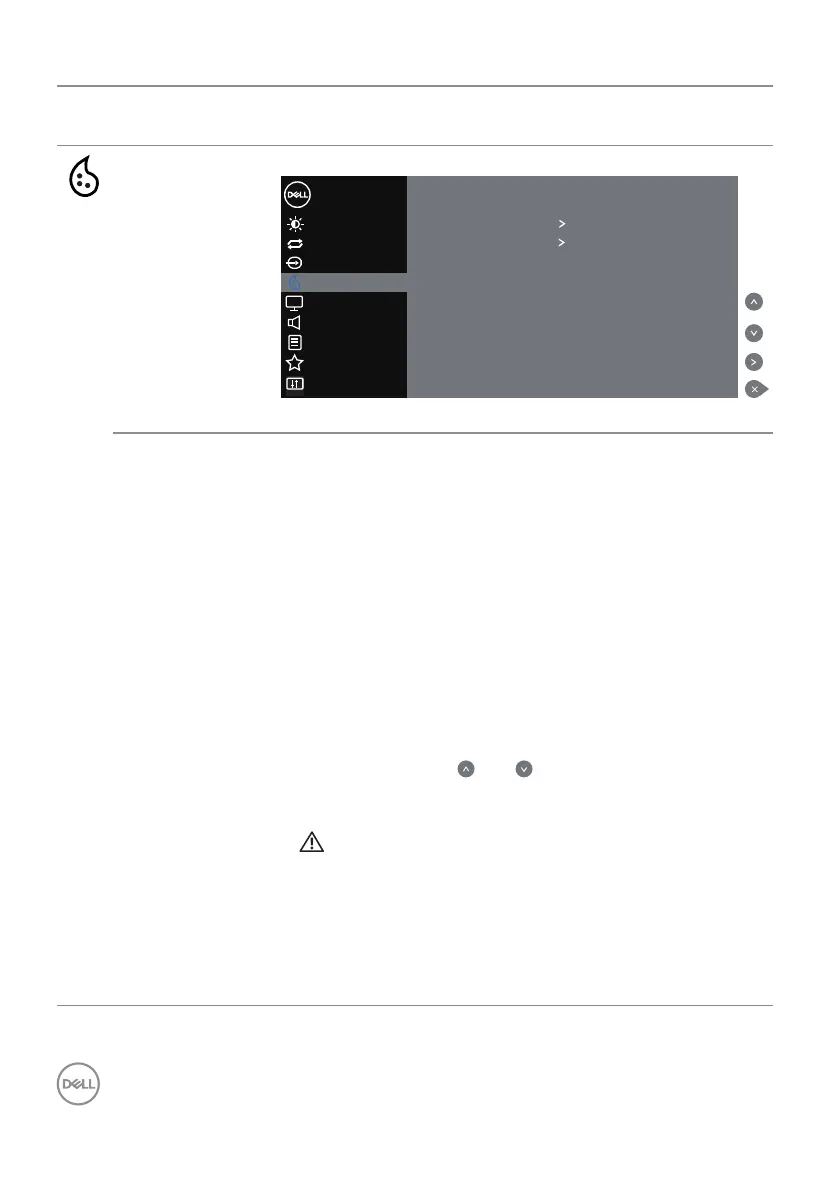
Color Use the Color menu to adjust the monitor's color settings.
Others
Personalize
Menu
Brightness/Contrast
Dell 55 Monitor
Auto Adjust
Input Source
Preset Modes Standard
Input Color Format RGB
Reset Color
Color
Display
Audio
Preset Modes When you select preset modes, you can choose Standard,
ComfortView, Color temp or Custom Color from the list.
• Standard: Loads the monitor's default color settings.
This is the default preset mode.
• ComfortView: Decreases the level of blue light emitted
from the screen to make viewing more comfortable for
your eyes.
• Color temp.: Adjusts the Color temperature as 5000K,
5700K, 6500K, 7500K, 9300K, 10000K. The screen
appears warmer with a red/yellow tint with slider set
at 5,000K or cooler with blue tint with slider set at
10,000K.
• Custom Color: Allows you to manually adjust the color
settings. Press the and keys to adjust the Red,
Green, and Blue values and create your own preset color
mode.
WARNING: The possible long-term effects of
blue light emission from the monitor may cause
personal injury such as digital eye strain, eye
fatigue and damage to the eyes. Using monitor
for extended periods of time may also cause pain
in parts of body such as neck, arm, back and
shoulder.



 To Next Page