17 │ Checking the battery
Checking the battery
Checking battery-charge status
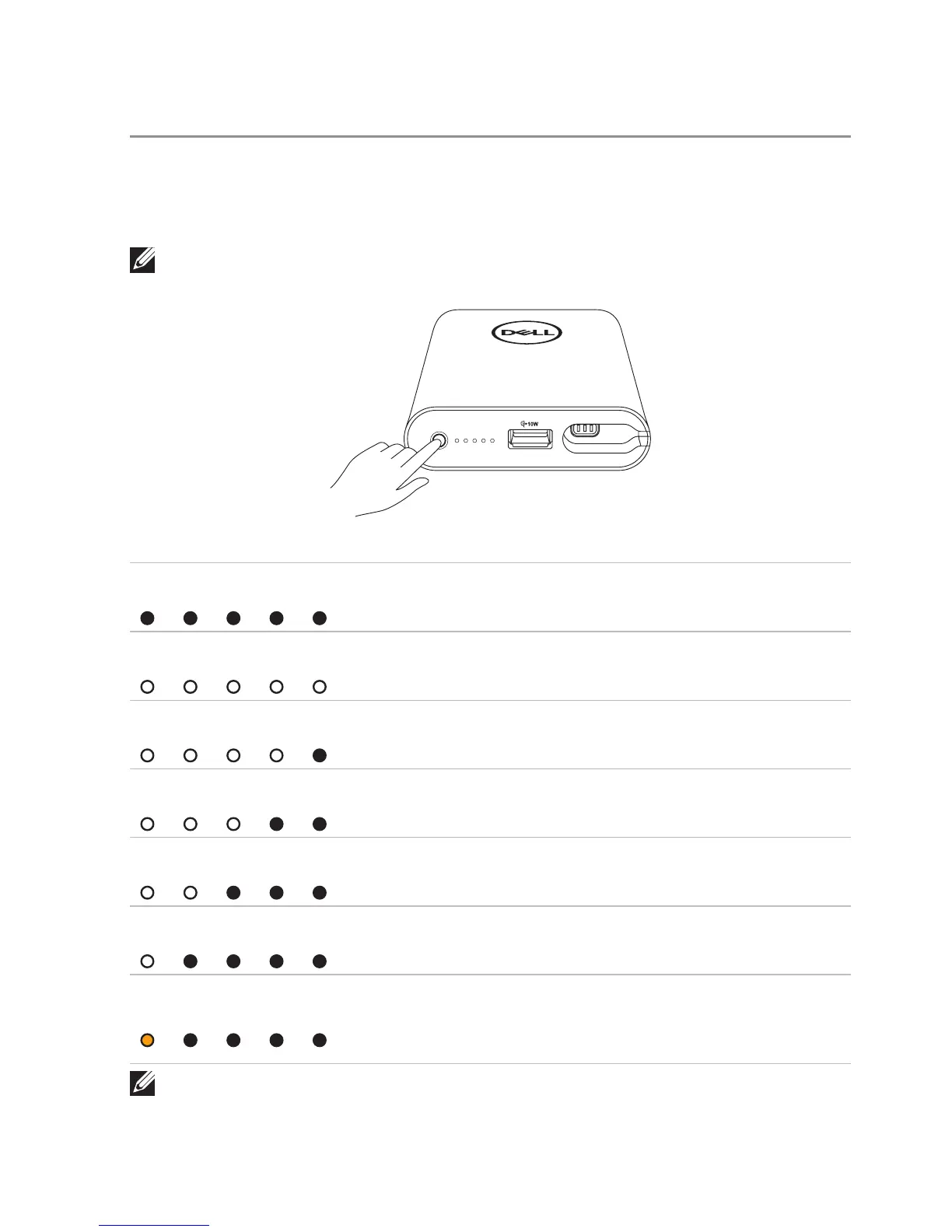
Press the power button to check the battery status of the power bank. The battery-status
lights turn on indicating the battery-charge status of the power bank.
NOTE: The battery-status lights remain illuminated for 5 seconds after you release the
power button.
Battery-status light LED color and behavior Battery capacity status
All 5 battery-status lights
are off
Off 100%
All 5 battery-status lights
are on
White (solid) 81% – 99%
1
st
-4
th
battery-status lights
are on
White (solid) 61% – 80%
1
st
-3
rd
battery-status lights
are on
White (solid) 41% – 60%
1
st
-2
nd
battery-status lights
are on
White (solid) 21% – 40%
1
st
battery-status light
is on
White (solid) 11% – 20%
1
st
battery-status light
is on
Amber (solid)
1-10%
(battery low state)
NOTE: All five battery-status lights turn off when the battery is fully
charged.



 To Next Page