EasyManua.ls Logo

Dell S2317HJ - Audio Source; Power Button

Dell S2317HJ
52 pages
Print Icon
To Next Page IconTo Next Page
To Previous Page IconTo Previous Page
Loading...
26 | Operating Your Monitor
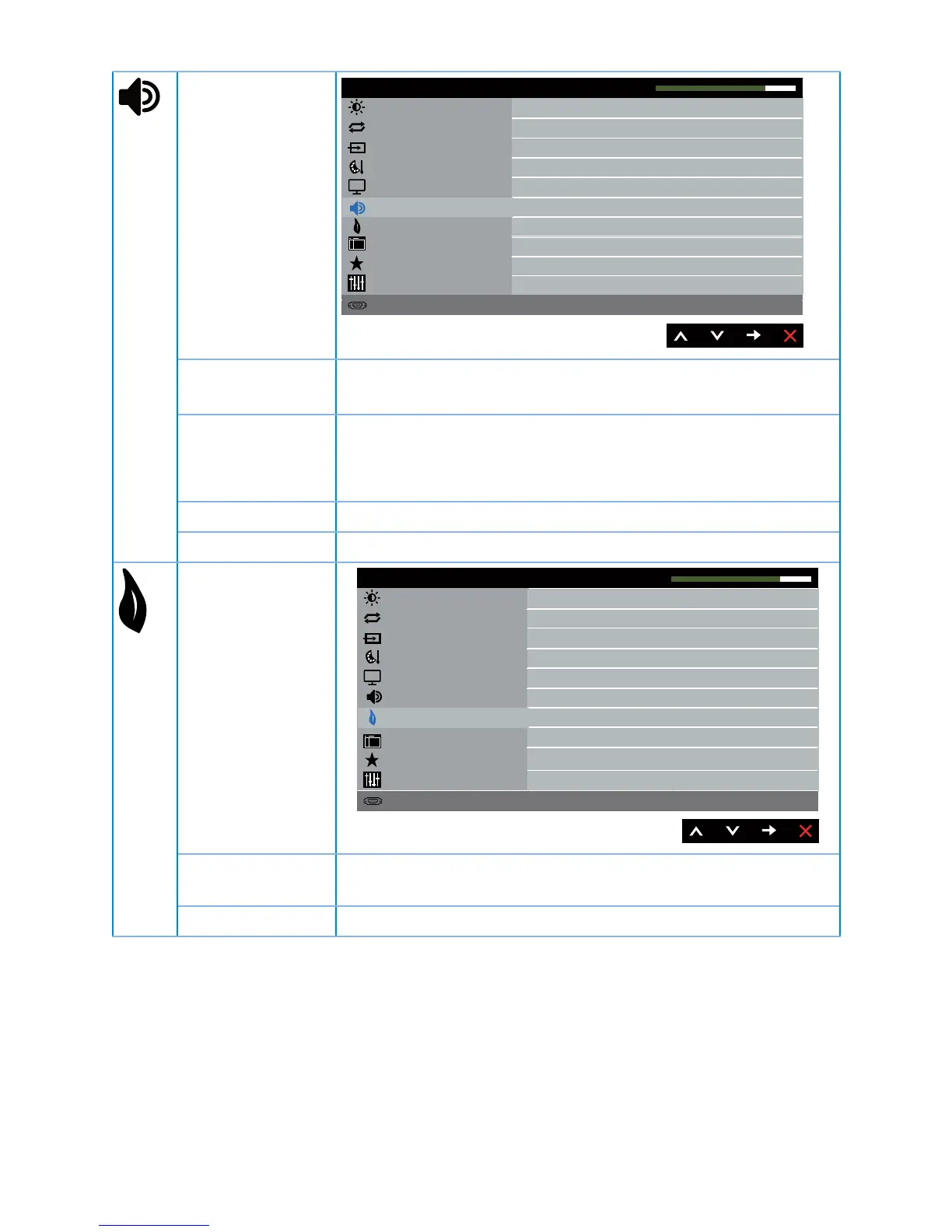
Audio
Brightness / Contrast
Display
Energy
Menu
Personalize
Others
Reso lution: 1920x1080, 60Hz
De ll S2317HJ Energy Use
Volume
Auto Adjust
Input Source
50
PC Audio
Audio Source
Speaker
Audio
Reset Audio
Enable
Color
Volume Use the buttons to adjust the volume. Minimum is 0 (-).
Maximum is 100 (+).
Audio Source Allows you to set the Audio Source mode to:
PC Audio
HDMI
Speaker Allows you to enable or disable speaker function.
Reset Audio Select this option to restore default display settings.
Energy
Brightness / Contrast
Display
Menu
Personalize
Others
Reso lution: 1920x1080, 60Hz
De ll S2317HJ Energy Use
Power Button LED
Auto Adjust
Input Source
Color
On During Active
Energy
Rese t Energy
Audio
Power Button
LED
Allows you to set the power LED indicator On During
Active or Off During Active to save energy.
Reset Energy Select this option to restore default Energy settings.

Related product manuals