Back to Contents Page
Setting Up the Monitor
Dell™S2409WFlatPanelMonitorUser's Guide
Connecting the Monitor
Organizing Your Cables
Attaching the Soundbar (optional)
Connecting Your Monitor
To connect your monitor to the computer perform the following steps/instructions:
1. Turnoffyourcomputeranddisconnectthepowercable.
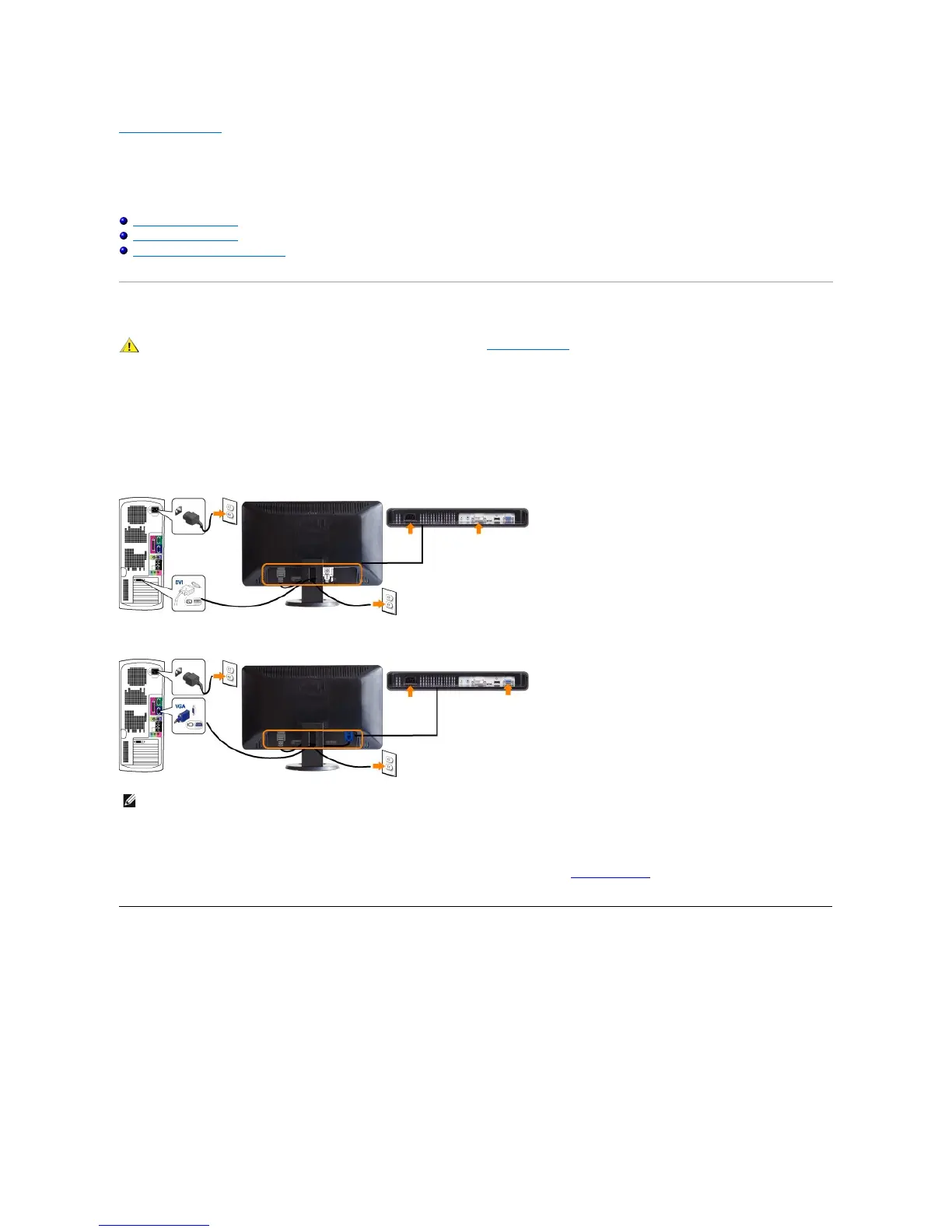
2. Connect either the white (digital DVI-D) or the blue (analog VGA) display connector cable to the corresponding video port on the back of your
computer.Donotusebothcablesonthesamecomputer.Useboththecablesonlywhentheyareconnectedtotwodifferentcomputerswith
appropriatevideosystems.
Connecting the white DVI cable
Connecting the blue VGA cable
After you have completed connecting the DVI/VGA cable, follow the procedure below to complete your monitor setup:
1. Plugthepowercablesforyourcomputerandmonitorintoanearbyoutlet.
2. Turn on the monitor and the computer.
If your monitor displays an image, installation is complete. If it does not display an image, see Solving Problems.
3. Use the cable management slot on the monitor stand to organize the cables.
Organizing Your Cables


 To Next Page