42 Setting up for local printing
www.dell.com/supplies | support.dell.com
A local printer is a printer attached to your computer using a USB or parallel cable. If your
printer is attached to a network instead of your computer, skip this step and go on to "Setting
up for network printing" on page 55.
All Microsoft® Windows® operating systems support parallel connections. However, only
the Windows 98 SE, Windows Me, Windows 2000, and Windows XP operating systems
support USB connections.
Some UNIX® and Linux computers also support USB connections. Refer to your computer
operating system documentation to see if your system supports USB.
To attach the printer to a computer:
1 Make sure the printer, computer, and any other attached devices are turned off and
unplugged.
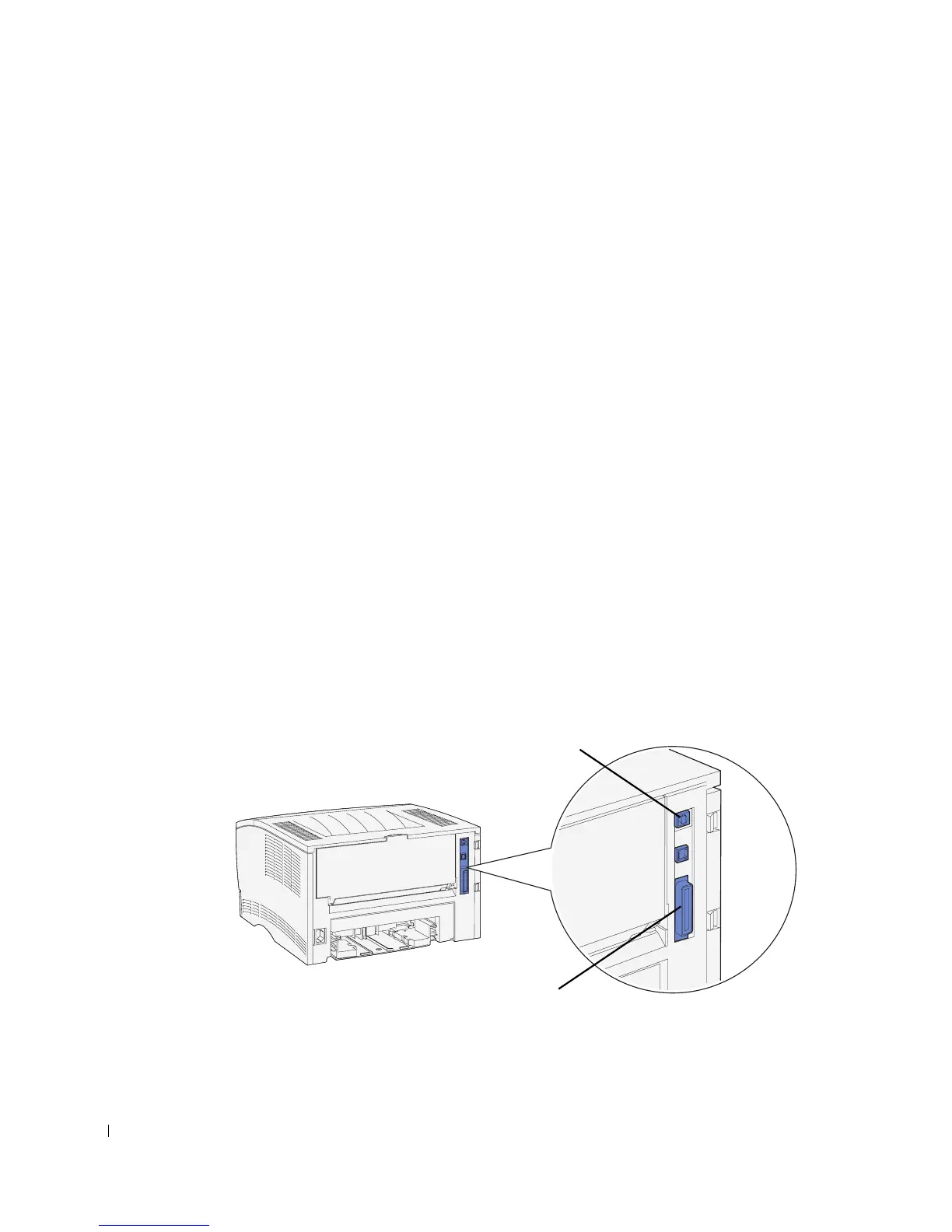
2 Connect the printer to the computer using a USB or parallel cable, but do not use
both.
• A USB port requires a USB cable. Be sure to match the USB symbol on the cable
to the USB symbol on the printer.
Plug the other end of the cable into a USB port on the back of the computer, not
the USB keyboard.
• A parallel port requires an IEEE-1284 compliant parallel cable.
Parallel port
USB port



 To Next Page