32 | Operating the Monitor
Icon Menu and
Submenus
Description
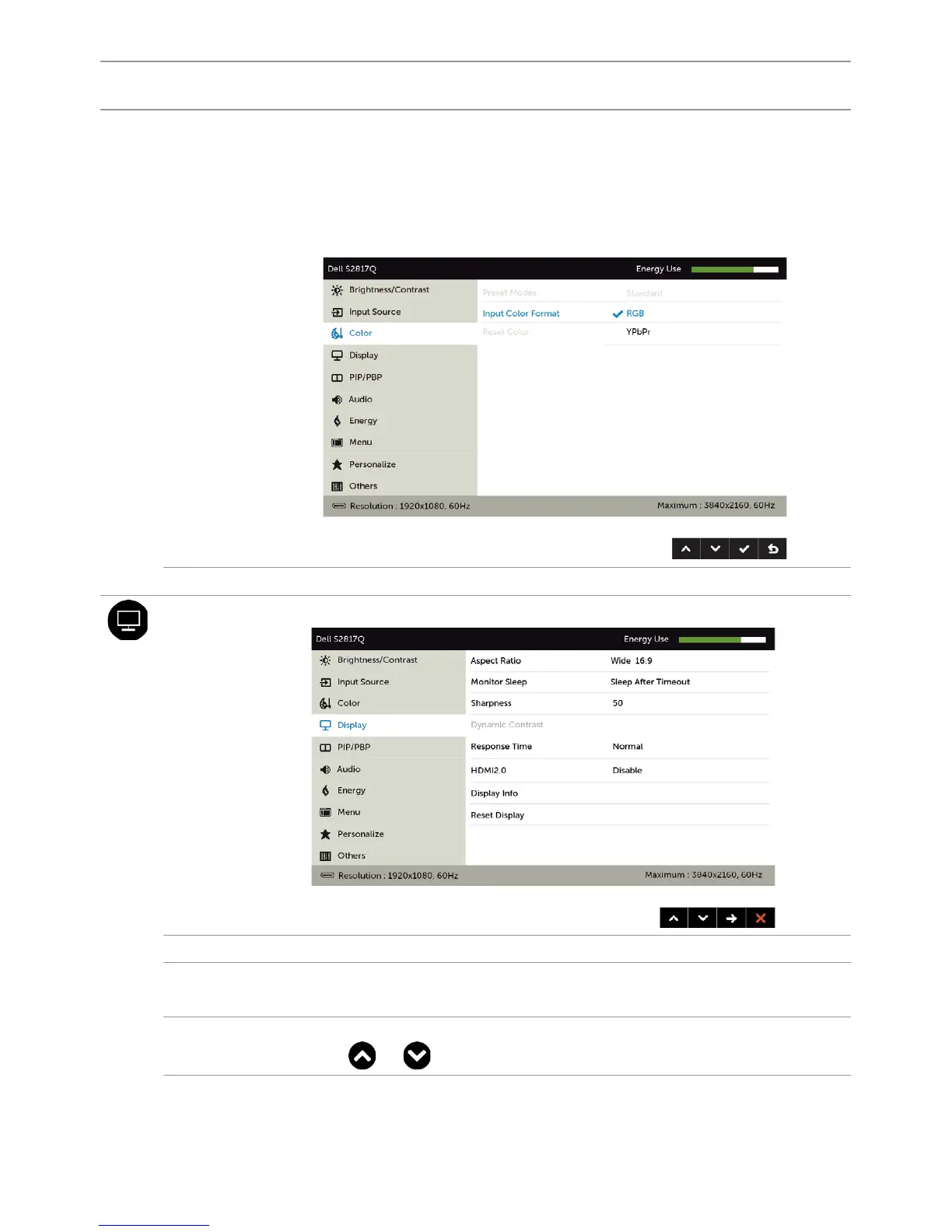
Input Color
Format
Allows you to set the video input mode to:
•RGB: Select this option if your monitor is connected to a
computer (or DVD player) using the HDMI, DP-mDP cable or
MHL devices using the MHL cable.
•YPbPr: Select this option if your DVD player supports only
YPbPr output.
Reset Color Resets your monitor’s color settings to the factory defaults.
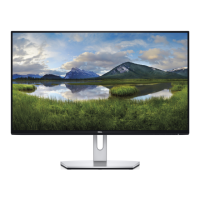
Display Use the Display menu to adjust image.
Aspect Ratio Adjust the image ratio to Wide 16:9, 4:3, or 5:4.
Monitor
Sleep
Sleep After Timeout: Monitor goes into sleep after timeout.
Never: Monitor never goes into sleep.
Sharpness Makes the image look sharper or softer.
Use or to adjust the sharpness from ‘0’ to ‘100’.


 To Next Page