EasyManua.ls Logo

Dell ST2220T - Operating the Monitor; Turning On the Monitor; Front Panel Controls

Dell ST2220T
33 pages
Print Icon
To Next Page IconTo Next Page
To Previous Page IconTo Previous Page
Loading...
Back to Contents Page
Operating the Monitor
Dell™ST2220T monitor User's Guide
Turn On the Monitor
Using the Front Panel Controls
Using the On-Screen Display (OSD) Menu
Setting the Maximum Resolution
Configure the monitor to the desired position to use
Using the Touch Screen
Turn On the Monitor
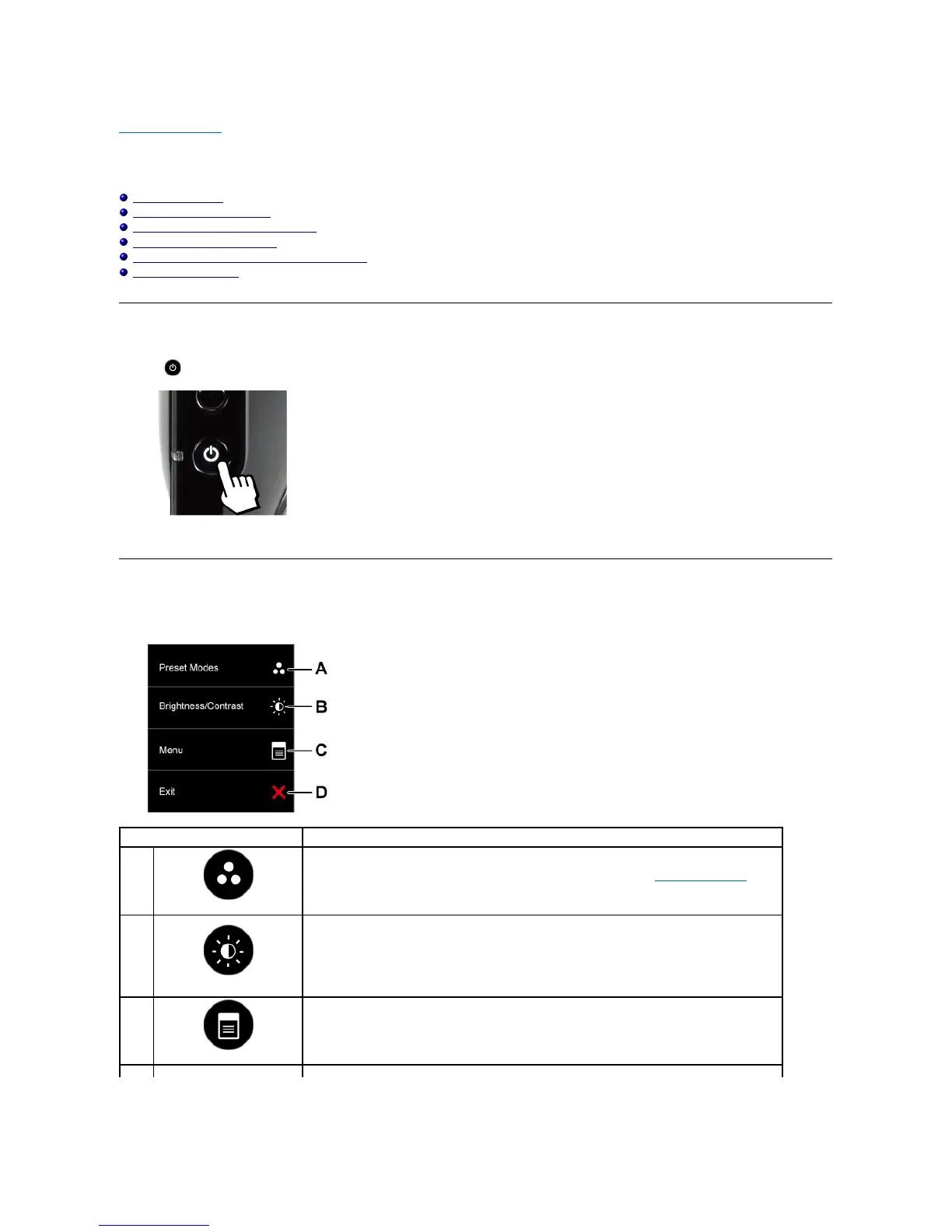
Press the buttontoturnonthemonitor

Using the Front Panel OSD Controls
Usethebuttonsonthesideofthemonitortoadjusttheimagesettings.

Side panel button
Description
A
Preset modes
Use the Preset modes button to choose from a list of preset color modes. See Using the OSD Menu.
B
Brightness / Contrast
Use the Brightness / Contrast button to direct access to the "Brightness" and "Contrast" control menu.
C
Menu

Use the Menu button to open the on-screen display OSD).
D

Other manuals for Dell ST2220T

Related product manuals