EasyManua.ls Logo

Dell ST2220T - Connector Pin Assignments

Dell ST2220T
33 pages
Print Icon
To Next Page IconTo Next Page
To Previous Page IconTo Previous Page
Loading...
ZeropowerconsumptioninOFFmodecanonlybeachievedbydisconnectingthemaincablefromthepoweradapter.
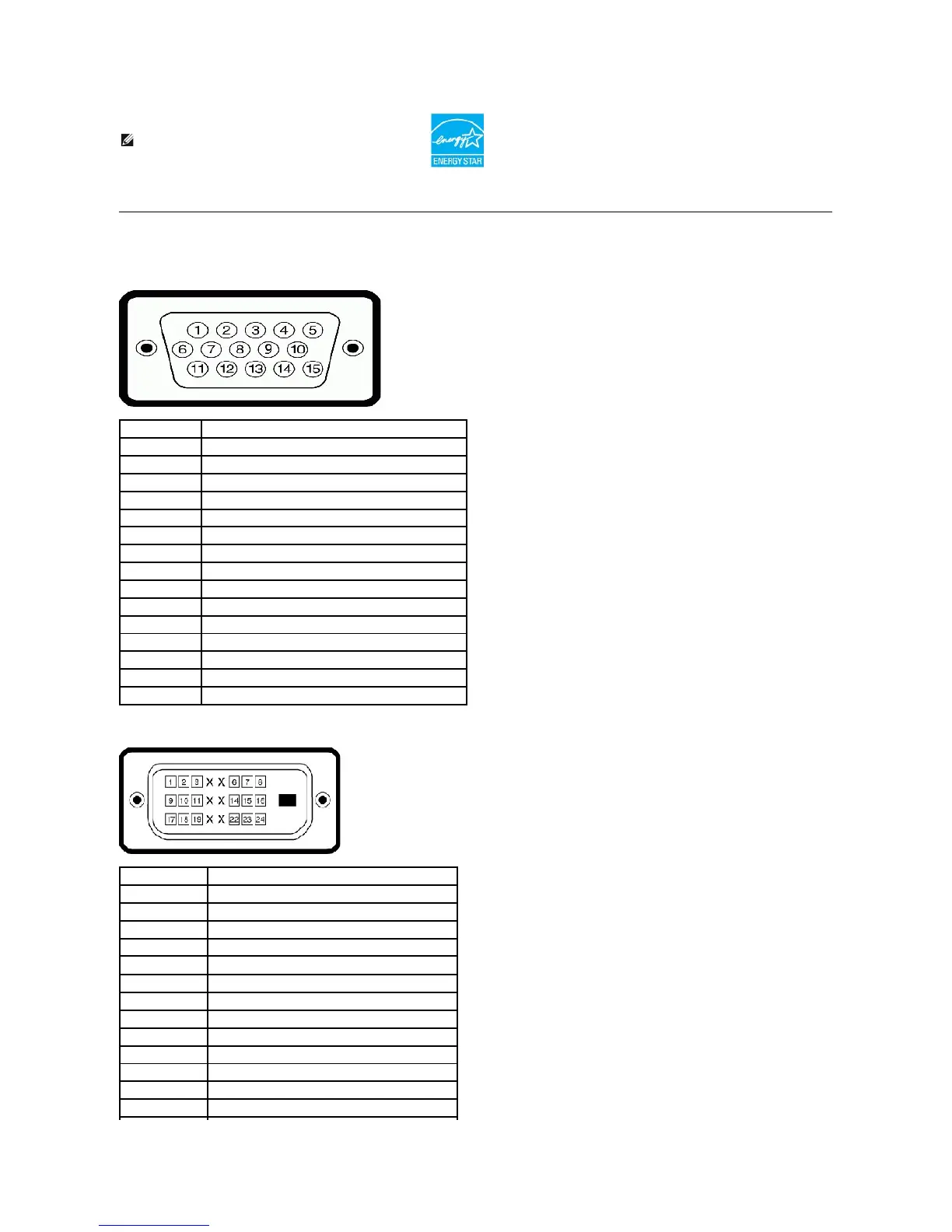
Pin Assignments
VGA Connector
DVIConnector
NOTE: This monitor is ENERGY STAR®-compliant.
Pin Number
15-pin Side of the Connected Signal Cable
1
Video-Red
2
Video-Green
3
Video-Blue
4
GND
5
Self-test
6
GND-R
7
GND-G
8
GND-B
9
Computer 5V
10
GND-sync
11
GND
12
DDC data
13
H-sync
14
V-sync
15
DDC clock
Pin Number
24-pin Side of the Connected Signal Cable
1
TMDS RX2-
2
TMDS RX2+
3
TMDS Ground
4
Floating
5
Floating
6
DDC Clock
7
DDC Data
8
Floating
9
TMDS RX1-
10
TMDS RX1+
11
TMDS Ground
12
Floating
13
Floating

Other manuals for Dell ST2220T

Related product manuals