EasyManua.ls Logo

Dell ST2220T - OSD Warning Messages

Dell ST2220T
33 pages
Print Icon
To Next Page IconTo Next Page
To Previous Page IconTo Previous Page
Loading...
OSD Warning Messages
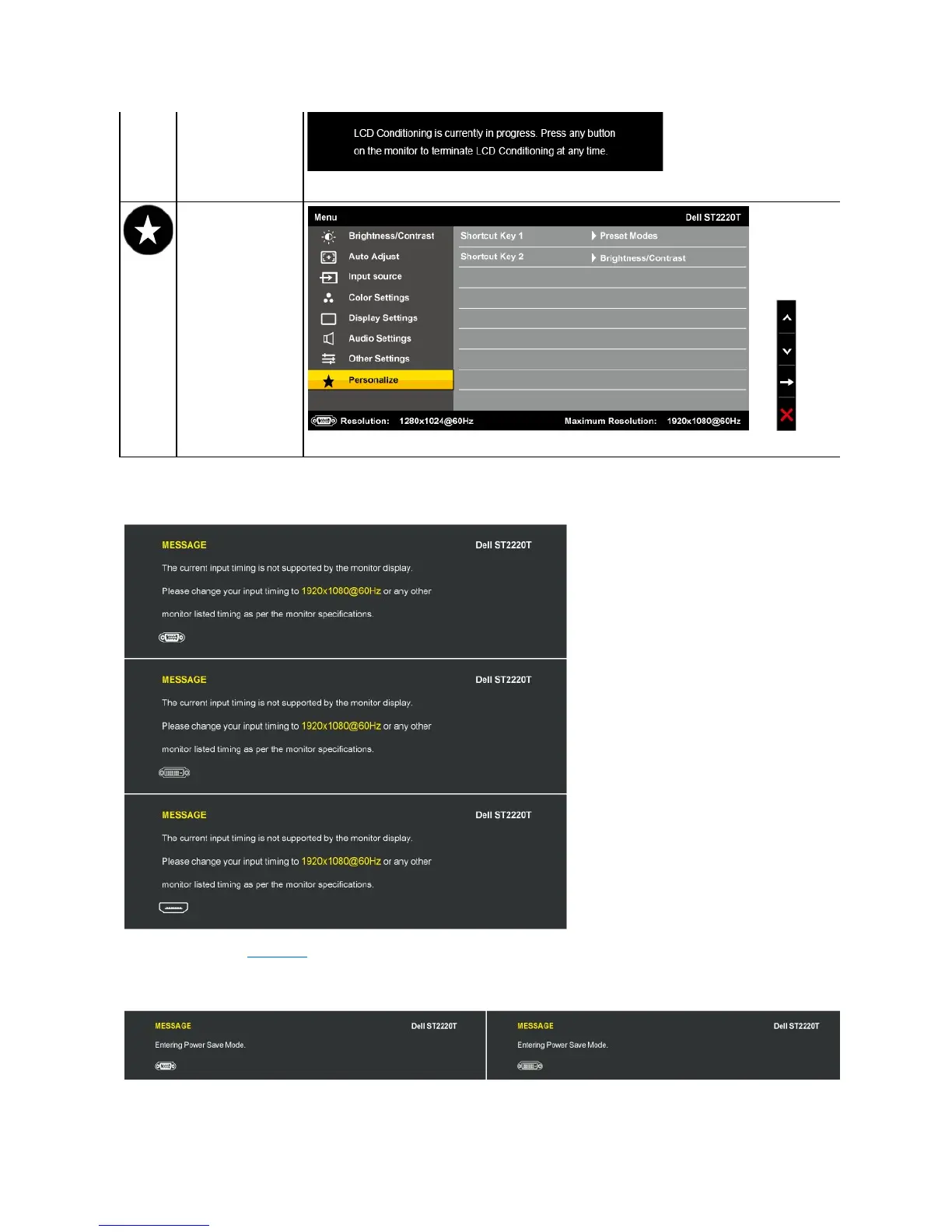
Factory Reset
ResetsallOSDsettingstothefactorypresetvalues.
PERSONALIZE
Allows you to adjust shortcut button for: 1. Brightness & Contrast 2. Preset Modes.
The following warning messages may appear on the screen to indicate that the monitor is out of synchronization.
This means that the monitor cannot synchronize with the signal that it is receiving from the computer. Either the signal is too high or too low
forthemonitortouse.SeeSpecificationsfortheHorizontalandVerticalfrequencyrangesaddressablebythismonitor.Recommendedmode
is 1920 X 1080 at 60Hz.
WhenthemonitorentersPowerSavemode,oneofthefollowingmessagesappears:

Other manuals for Dell ST2220T

Related product manuals