EasyManua.ls Logo

Dell ST2220T - Universal Serial Bus (USB) Interface; USB Upstream Connector

Dell ST2220T
33 pages
Print Icon
To Next Page IconTo Next Page
To Previous Page IconTo Previous Page
Loading...
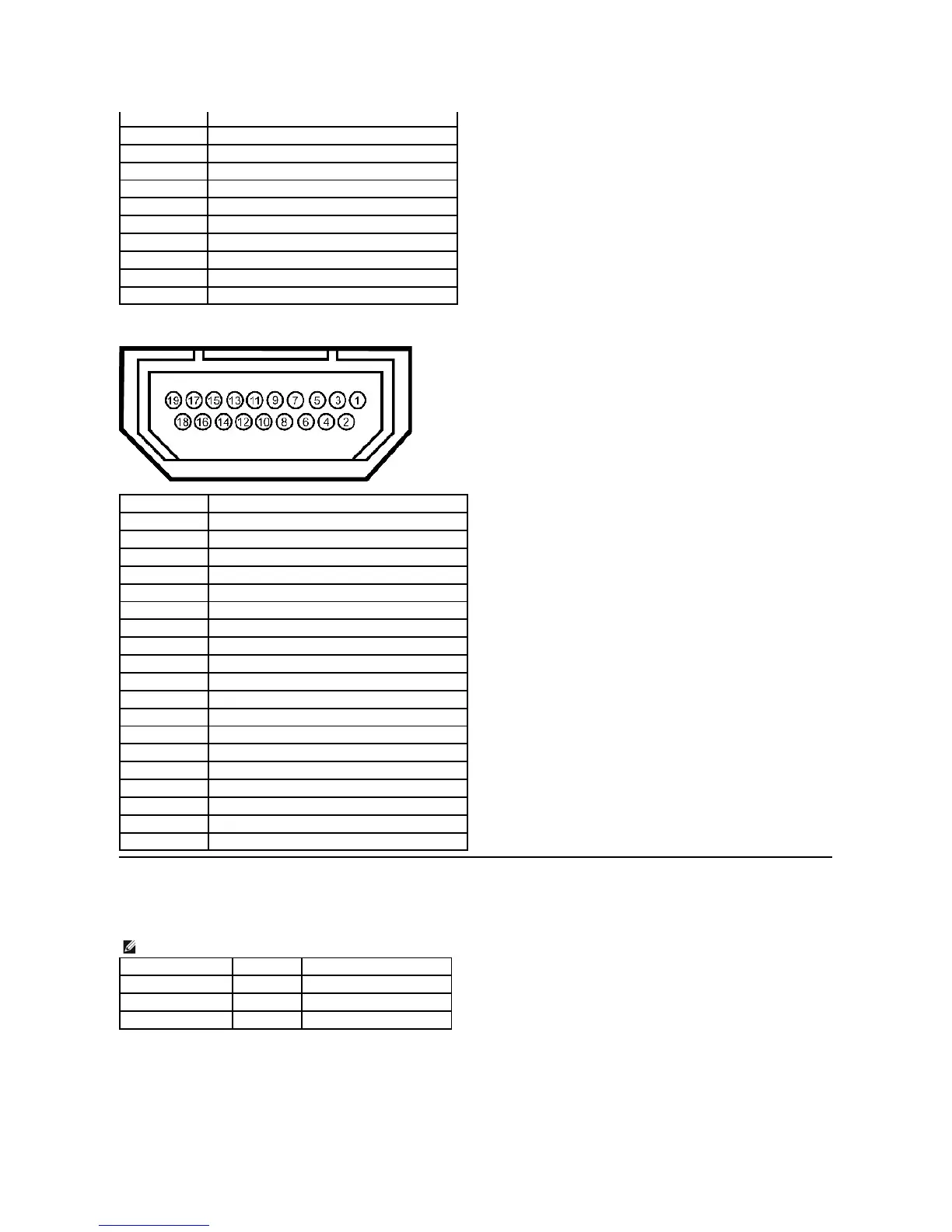
HDMIConnector
Universal Serial Bus (USB) Interface
This section gives you information about the USB ports that are available on the left side of your monitor.
USB Upstream Connector
14
+5V power
15
Selftest
16
Hot Plug Detect
17
TMDS RX0-
18
TMDS RX0+
19
TMDS Ground
20
Floating
21
Floating
22
TMDS Ground
23
TMDS Clock+
24
TMDS Clock-
Pin Number
19-pin Side of the Connected Signal Cable
1
T.M.D.S. Data 2-
2
T.M.D.S. Data 2 Shield
3
T.M.D.S. Data 2+
4
T.M.D.S. Data 1+
5
T.M.D.S. Data 1 Shield
6
T.M.D.S. Data 1-
7
T.M.D.S. Data 0+
8
T.M.D.S. Data 0 Shield
9
T.M.D.S. Data 0-
10
T.M.D.S. Clock +
11
T.M.D.S. Clock Shield
12
T.M.D.S. Clock -
13
CEC
14
Reserved (N.C. on device)
15
SCL
16
SDA
17
DDC/CEC Ground
18
+5V Power
19
Hot Plug Detect
NOTE: This monitor supports High-Speed Certified USB 2.0 interface
Transfer speed
Data Rate
Power Consumption
High speed
480 Mbps
2.5W(Max.,eachport)
Full speed
12 Mbps
2.5W(Max.,eachport)
Low speed
1.5 Mbps
2.5W(Max.,eachport)

Other manuals for Dell ST2220T

Related product manuals