Operating the Monitor | 43
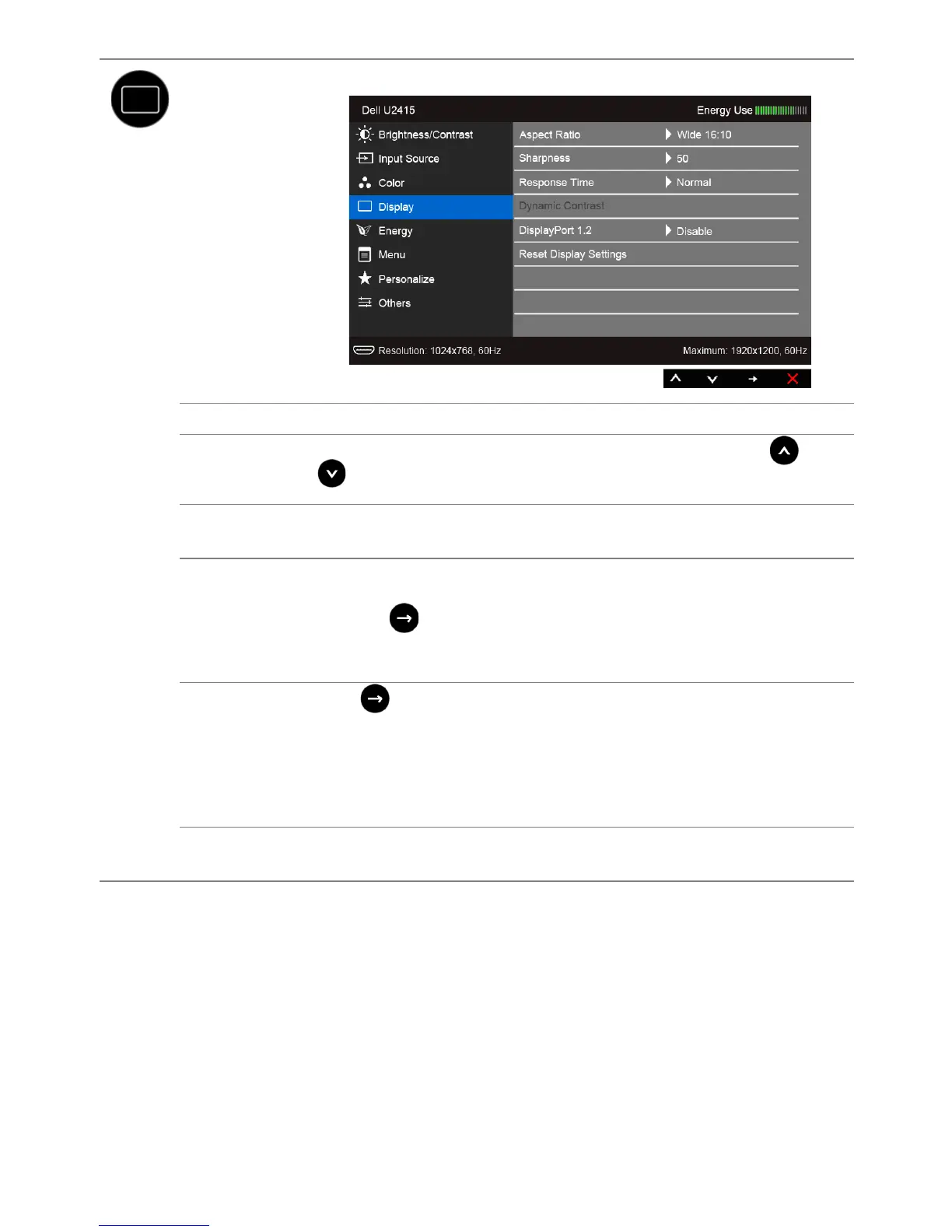
Display
Use the Display to adjust image.
Aspect Ratio
Adjusts the image ratio to Wide 16:10, 4:3, or 5:4.
Sharpness
This feature can make the image look sharper or softer. Use or
to adjust the sharpness from '0' to '100'.
Response
Time
Allows you to set the Response Time to Normal or Fast.
Dynamic
Contrast
Allows you to increase the level of contrast to provide sharper and more
detailed image quality.
Press the button to select the Dynamic Contrast "On" or "Off".
NOTE: Dynamic Contrast provides higher contrast if you select Game
or Movie preset mode.
DisplayPort
1.2
Press to enable or disable DisplayPort 1.2.
To use the DP MST (Daisy Chain) or HBR2 feature, enable DP 1.2.
NOTE: Ensure your Graphics Card can support these features before
selecting DP 1.2. Wrong setting may result in blank screen. Some
Graphics Cards do not support MCCS (Monitor Control Command Set)
at DP 1.2. In these cases, DDM (Dell Display Manager) may not run.
Reset Display
Settings
Select this option to restore default display settings.









 To Next Page