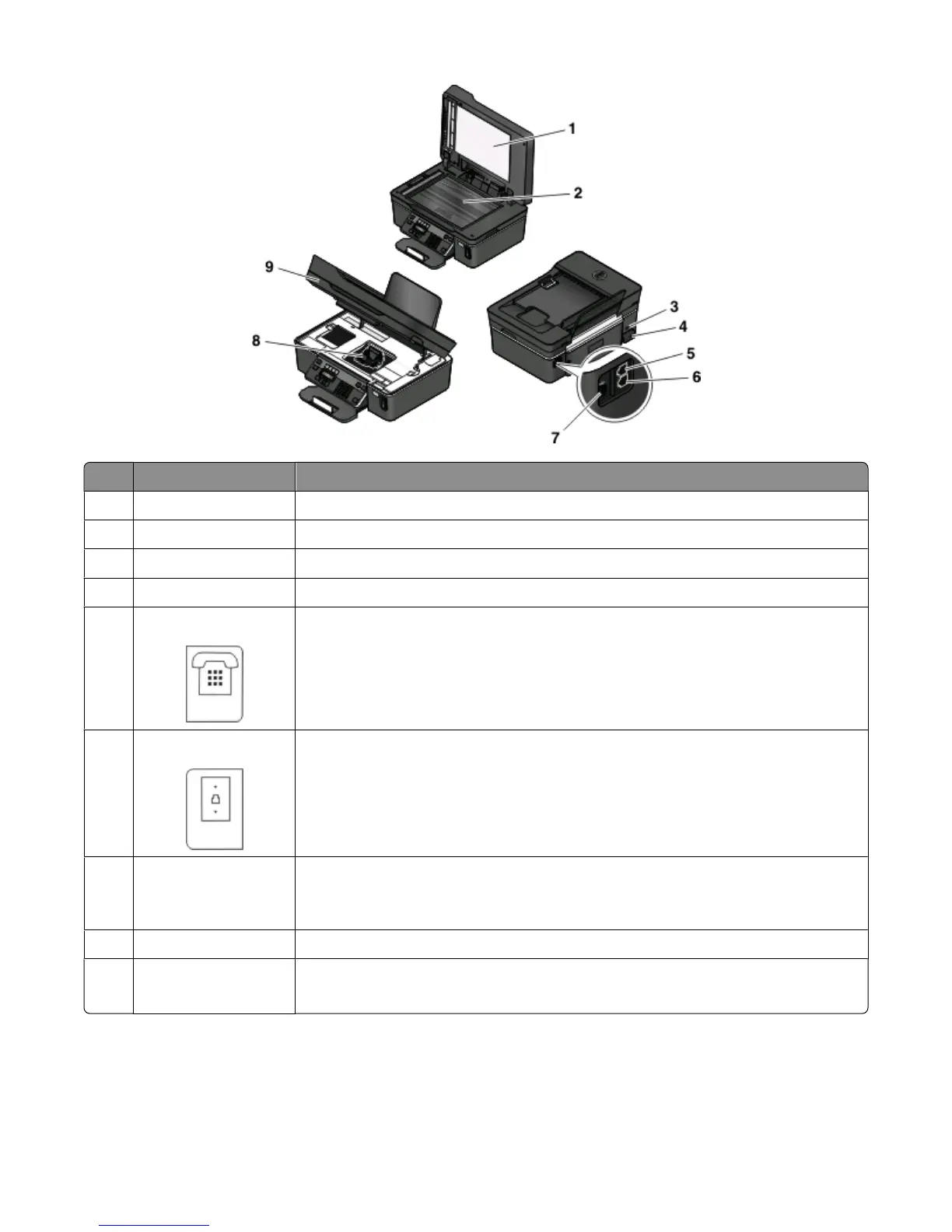
Use the To
1 Top cover Access the scanner glass.
2
Scanner glass Scan and copy photos and documents.
3
Security slot Install an anti-theft cable on your printer.
4 Power supply with port Connect the printer to a power source.
5
EXT Port Connect additional devices (telephone or answering machine) to the printer and the
telephone line. Use this port if you do not have a dedicated fax line for the printer, and
if this connection method is supported in your country or region.
Note: Remove the plug to access the port.
6
LINE Port Connect the printer to an active telephone line (through a standard wall jack, DSL filter,
or VoIP adapter) to send and receive faxes.
7
USB port Connect the printer to a computer using a USB cable.
Warning—Potential Damage: Do not touch the USB port except when plugging in or
removing a USB cable or installation cable.
8
Printhead Install, replace, or remove ink cartridges.
9
Scanner unit
• Access the ink cartridges and printhead.
• Remove paper jams.
About your printer
12











 To Next Page