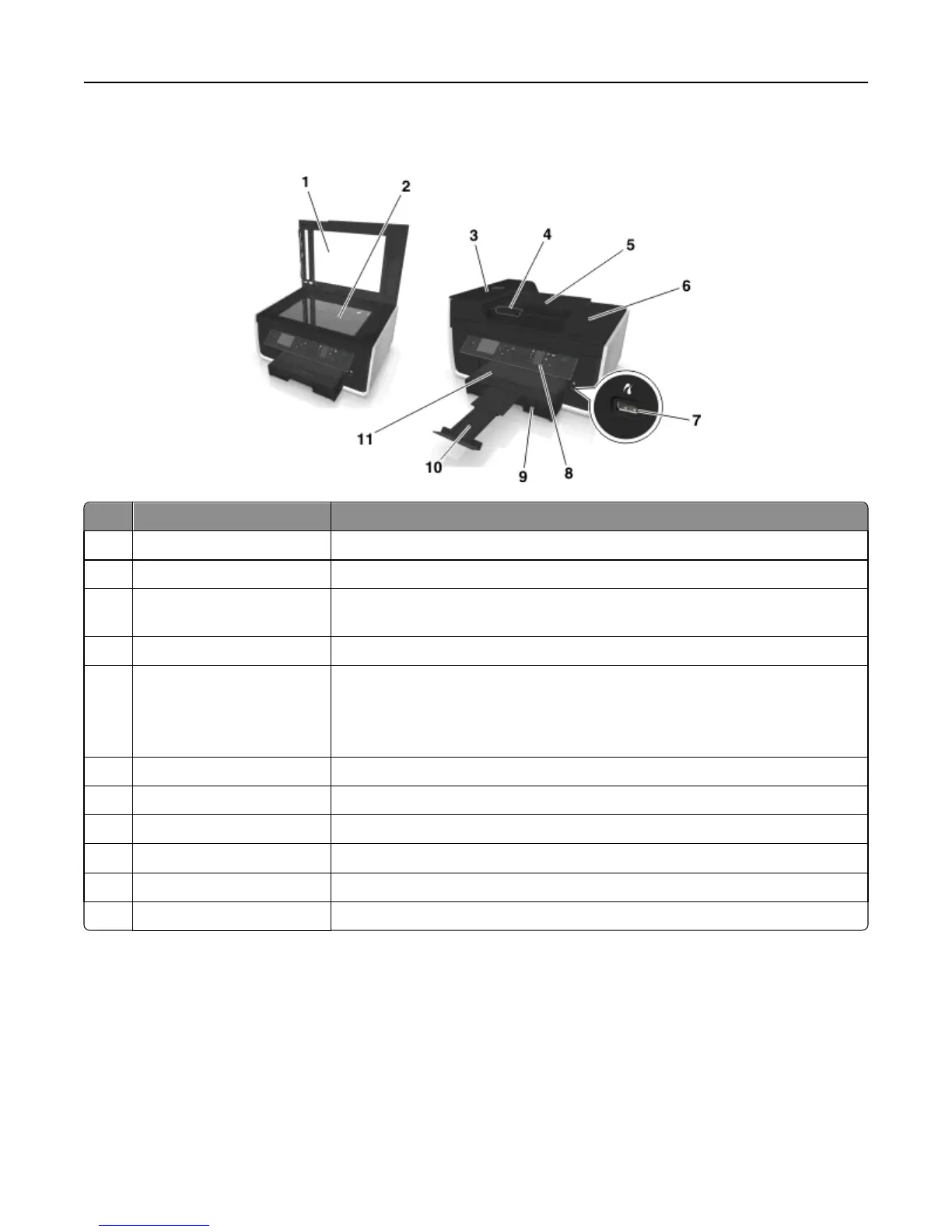
Understanding the parts of the printer
Use the To
1 Scanner cover Access the scanner glass.
2 Scanner glass Scan, copy or fax photos and documents.
3 Automatic Document Feeder
(ADF)
Scan, copy, or fax multiple‑page letter‑, legal‑, and A4‑size documents.
4 ADF paper guide Keep paper straight when feeding into the ADF.
5 ADF tray Load original documents into the ADF. This is recommended for scanning, copying,
or faxing multiple-page documents.
Note: Do not load postcards, photos, small items, or thin media (such as magazine
clippings) into the ADF. Place these items on the scanner glass.
6 ADF output tray Hold documents as they exit from the ADF.
7 PictBridge and USB port Connect a PictBridge‑enabled digital camera or a flash drive to the printer.
8 Printer control panel Operate the printer.
9 Paper tray Load paper.
10 Paper stop Catch the paper as it exits.
11 Paper exit tray Hold paper as it exits.
About your printer 10












 To Next Page