About Your TV 7
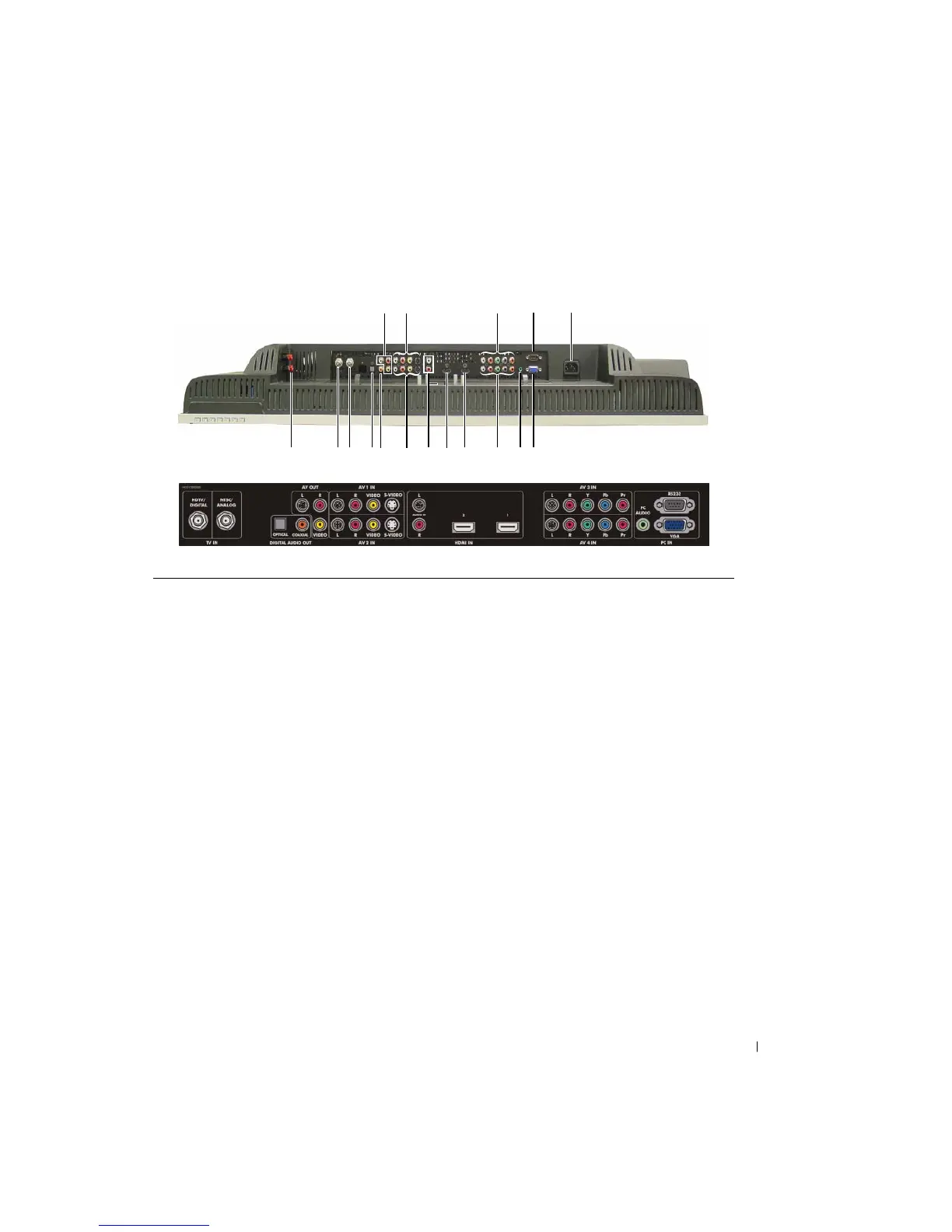
Bottom View
1 TV Speaker out connectors Connect speakers
2 HDTV connector (Digital) Connect an antenna for the digital tuner when using Digital TV
The ATSC/HDTV input can also be used as 2nd analog input (It
is a Digital/Analog combo tuner)
3 NTSC connector (Analog) Connect an antenna or a cable TV box using the coaxial cable
4 Optical digital audio out connector
(SPDIF)
Connect an optional audio decoder or audio/video receiver
5 Coaxial digital audio out connector Connect an optional audio decoder or audio/video receiver
6 Composite video and audio-out
connectors (Video/L/R)
Connect a device such as a VCR if you have connected an
antenna or cable TV through the NTSC or HDTV connector
7 Composite video (or S-Video) and
audio connectors (AV1 IN)
Connect a device such as a VCR or DVD player
8 Composite video (or S-Video) and
audio connectors (AV2 IN)
Connect a device such as a VCR or DVD player
9 Audio IN connectors for DVI (L/R) When connecting with the DVI jack on devices such as a DVD
player, set-top box or your computer to the HDMI connector,
connect the audio output jacks on devices.
1 23 45
8
91011 131516
6121417
7


 To Next Page