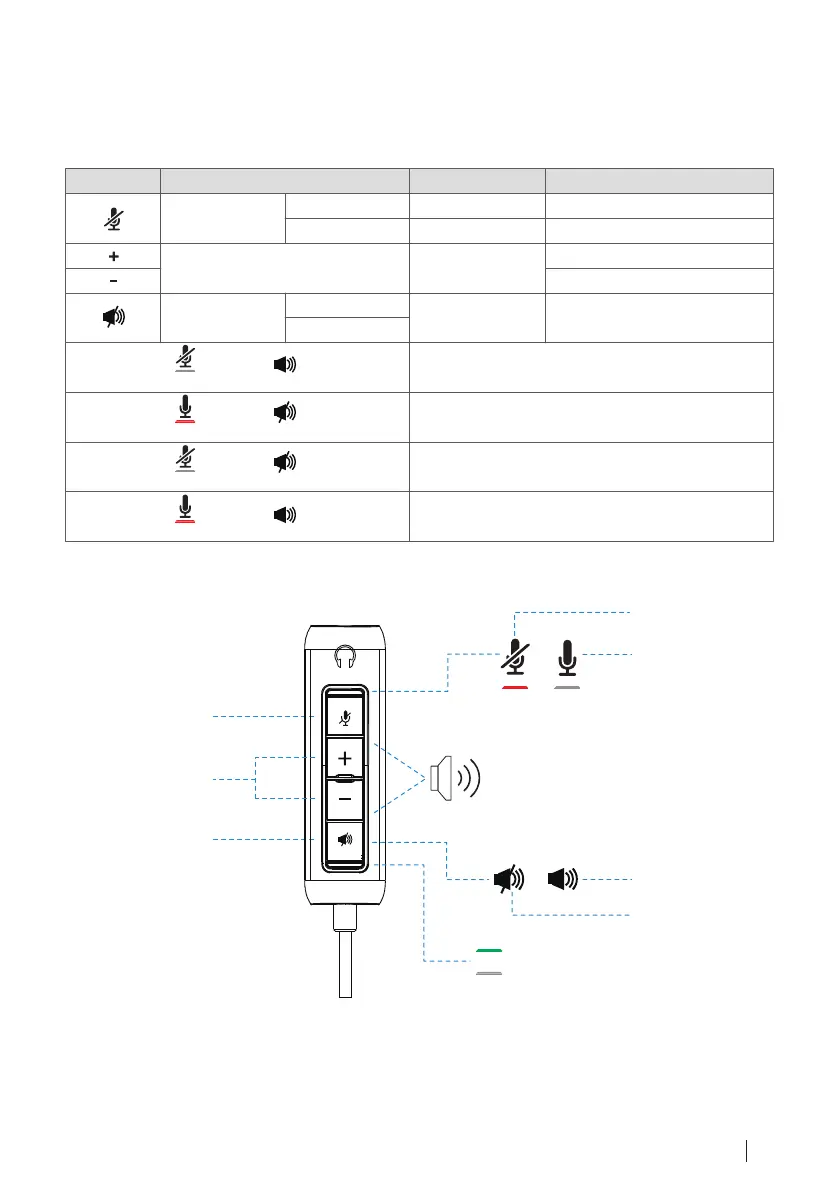
Mic mute on + Speaker mute o
Mic mute o + Speaker mute on
Mic mute on + Speaker mute on
Mic mute o + Speaker mute o
The user can hear the receiver,
but the receiver cannot hear the user.
The receiver can hear the user,
but the user cannot hear the receiver.
The user cannot hear the receiver,
but the receiver cannot hear the user.
Headset in-line controls and indicator light 9
Headset in-line controls and indicator light
Button Usage Indicator Light Action
Mic Mute
Volume
Speaker Mute
Mute On
Mute O
Mute On
Mute O
Solid Red
No Light
No Light
No Light
Short press to Mute On
Short press to Mute O
Short press to Volume Up
Short press to Volume Down
Short press to Mute / Unmute
The user can hear the receiver,
and the receiver can also hear the user.
Mic Mute
Volume
Speaker Mute
Mute On
Mute O
Speaker On
Speaker Mute
Power On
Power O



 To Next Page