29
Setting
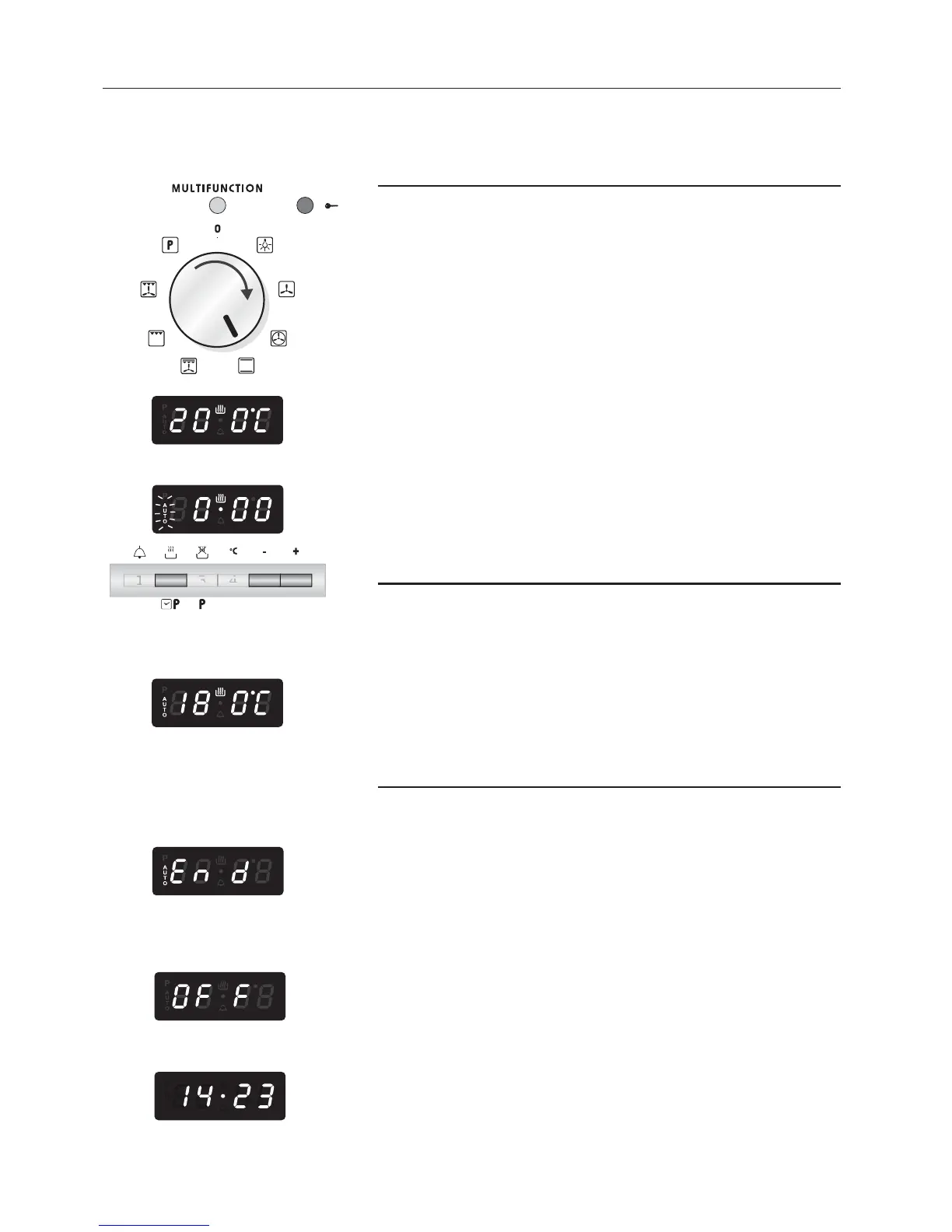
1. Set the cooking function by turning the oven
selector to the function required.
2. The cooking temperature appears on the display.
To change it proceed as described in the Setting
the cooking chapter
3. Press pushbutton 2. AUTO starts to flash and
0.00 appears.
4. Press pushbuttons 5 or 6 to set the cooking time
(cooking time in hours and minutes: set it to ten
minutes less than the time required because the
stored heat will complete the cooking).
5. On the display AUTO becomes steady and the
cooking programme starts.
During cooking
6. During the cooking cycle, the display shows the
oven temperature measured by the probe.
Press key 2 to display the time remaining until the
end of cooking.
The cooking time and temperature can be varied
at any time, as described above.
At the end of cooking
7. End appears on the display, AUTO flashes and
the audible signal sounds.
The cooking cycle has finished and the oven is
OFF.
8. Press any programmer pushbutton to stop the
audible signal.
9. OFF appears (oven OFF).
10. Turn the function selector to 0 (oven OFF).
11. The programmer display shows the time.
Note: At the end of the programme always turn the
function selector knob to 0 (oven OFF).



 To Next Page