30
Setting
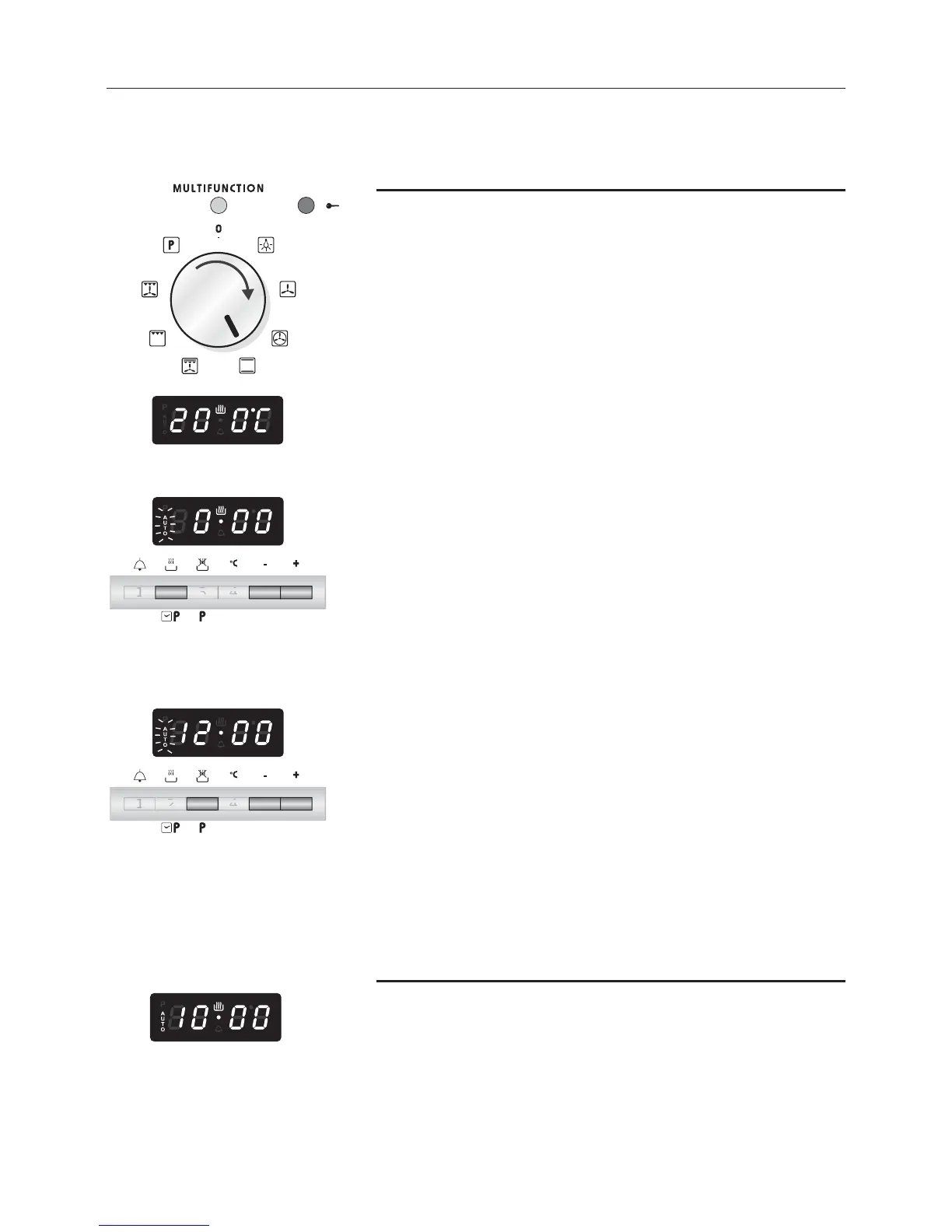
1. Set the cooking function by turning the oven selec-
tor to the function required.
2. The cooking temperature appears on the display. To
change it proceed as described in the Setting the
cooking chapter.
3. Press pushbutton 2. AUTO starts to flash and 0.00
appears.
4. Press pushbuttons 5 or 6 to set the cooking time
(cooking time in hours and minutes: set it to ten
minutes less than the time required because the
stored heat will complete the cooking).
5. On the display AUTO becomes steady and the
cooking programme starts.
6. Press pushbutton 3 (AUTO starts to flash).
7. Press pushbuttons 5 or 6 to set the time when the
cooking should finish.
The values set must be correct; e.g. if it is 08:00 a
cooking time of 3 hours, ending at 10:00, cannot be
set. In this case the programmer automatically sets
the end of cooking time for 11:00.
8. On the display AUTO becomes steady and the time
appears again. The cooking symbol goes out.
Starting cooking
9. The pan symbol lights up. The oven switches on and
the cooking cycle set starts.
AUTOMATIC COOKING
Start cooking at the programmed time and switch the oven off
automatically after the programmed cooking time
.



 To Next Page