7
•When the appliance is connected to the power supply for the first time, or after a power outage, four
dashes will appear on the display (--:--). In order to set the time of day, proceed as described below:
SECTION 2 - USING THE CONTROLS AND SETTING THE MODES
2.1 - SETTING THE CLOCK
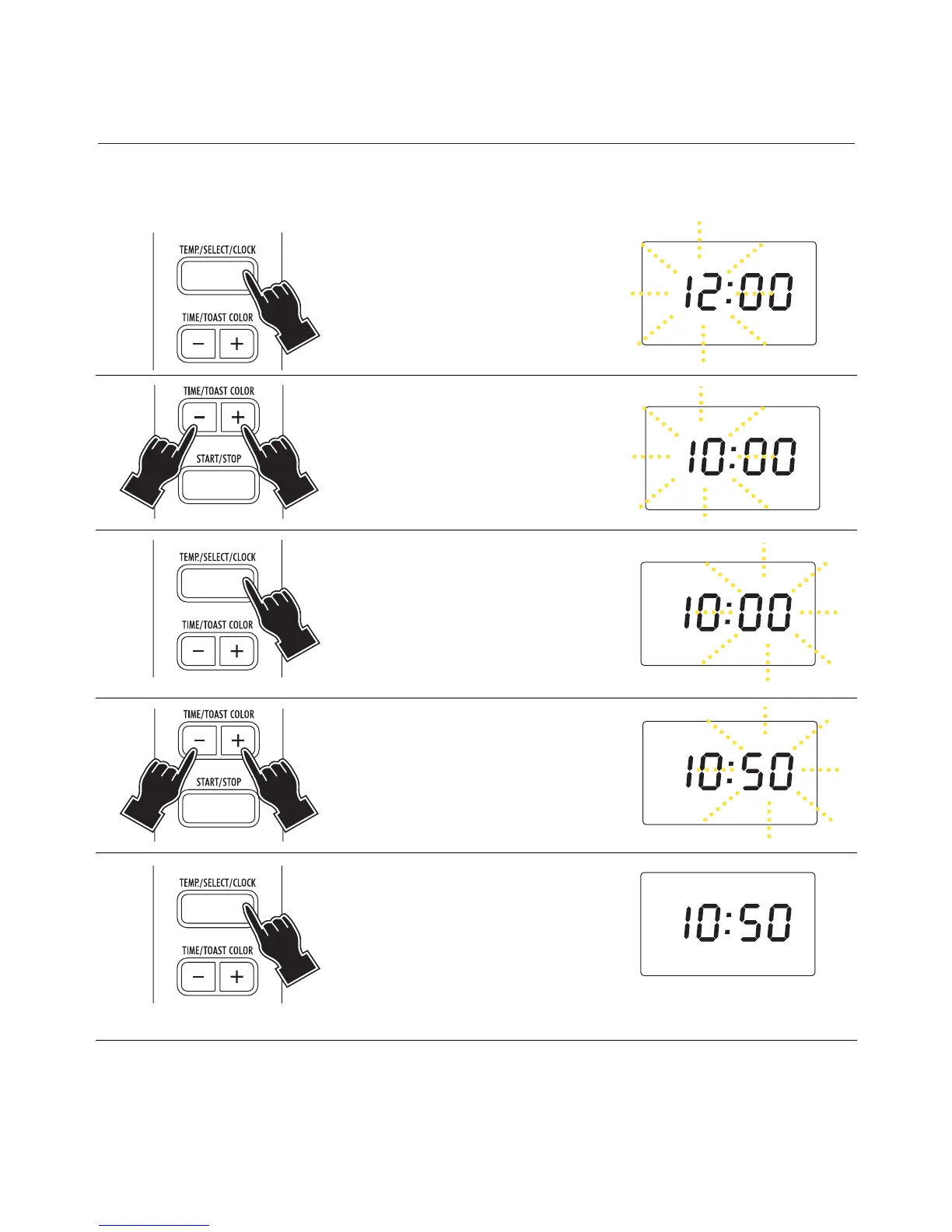
1Press for 5 seconds the
TEMP./SELECT/CLOCK but-
ton (7) (the hours flash on the
display).
2Press the TIME/TOAST
COLOR buttons (8) to the
desired time (hours). The time
set will begin blinking on the
display.
5Press the
TEMP./SELECT/CLOCK but-
ton (7) to confirm. It is pos-
sible to press the button at
any time during cooking to
display the current time (the
display shows the time set).
• If you wish to change the hour on the display once it has been set, press the TEMP./SELECT/CLOCK but-
ton (7) before proceeding to set the new time as described above.
• It is possible to display the current time even after starting a function, by pressing the
TEMP./SELECT/CLOCK button (7) (the time is displayed for 2 seconds).
3Press the
TEMP./SELECT/CLOCK but-
ton (7) (the minutes flash on
the display).
4Press the TIME/TOAST
COLOR buttons (8) to the
desired time (minutes). The
time set will begin blinking on
the display.



 To Next Page