8
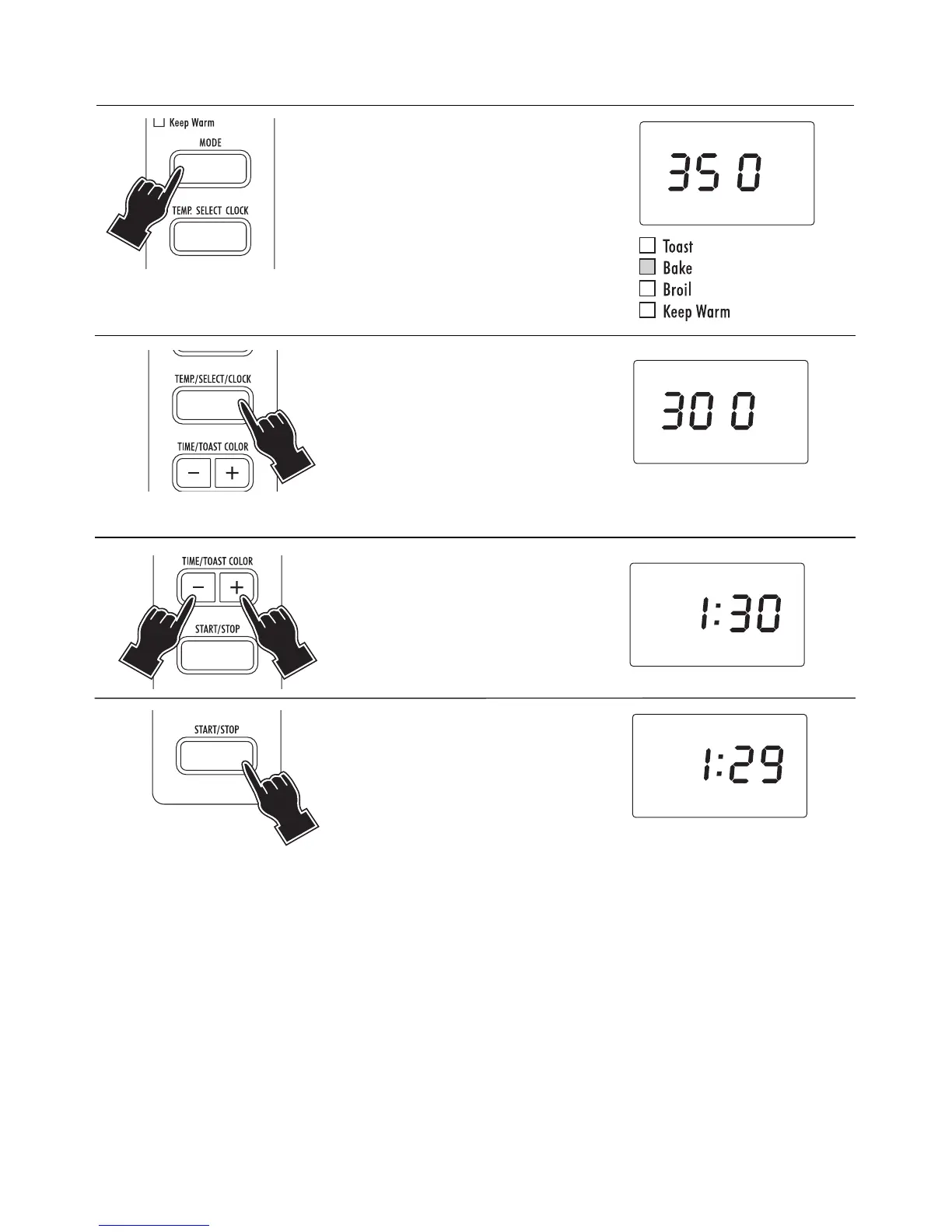
1Press the MODE button (6) until
the BAKE indicator light (3) is
on. The display will show the
temperature
3355 00 °° FF
.
2 If necessary, the desired tem-
perature can be modified by
pressing repeatedly the
TEMP./SELECT/CLOCK button
(7). The available temperatures
are: 200 - 250 - 275 - 300 -
325 - 350 - 375 - 400 - 425 -
450°F. The display will show
the chosen temperature.
2.2 - BAKE MODE
3 Set the cooking time (max 2
hours) by pressing the
TIME/TOAST COLOR buttons
(8).
4Press the START/STOP button
(9). The oven will start the count-
down. At the end of the set time
the control will emit 3 “beeps”
and the display will return to
stand-by (showing the time of
the day, if previously set).
NOTES:
• If the cooking time is not set (skipping point 3), the display will show the countdown starting from the
default duration of 30 minutes.
• The set time can be modified during cooking by simply repeating point 3. The countdown will automati-
cally restart 3 seconds after the last setting.
•To display the current temperature (during cooking), simply press the TEMP./SELECT/CLOCK button (7).
To modify the set temperature, press again, within 3 seconds, the TEMP./SELECT/CLOCK button until the
new desired setting is displayed.
• If the START/STOP button (9) is not pressed within 3 minutes from the previous setting, the control will
return to stand-by.



 To Next Page