7
Setting water hardness
14. Select the water hardness level on the display according to
the result of the measurement procedure described above,
and press “Ok”;
15. The water hardness selected will be saved in the machine
settings.
Please note:
The water hardness can be changed directly from the settings
menu (see “6.12 Water hardness”).
Installing the water softener lter
16. The machine prompts for installation of the water softener
lter (D4): press “Start” to proceed (to postpone the opera-
tion, press “Later” instead).
17. Remove the water tank (A9) (g. 2), ll to the MAX line
with fresh drinking water (g. 3) and press "Next".
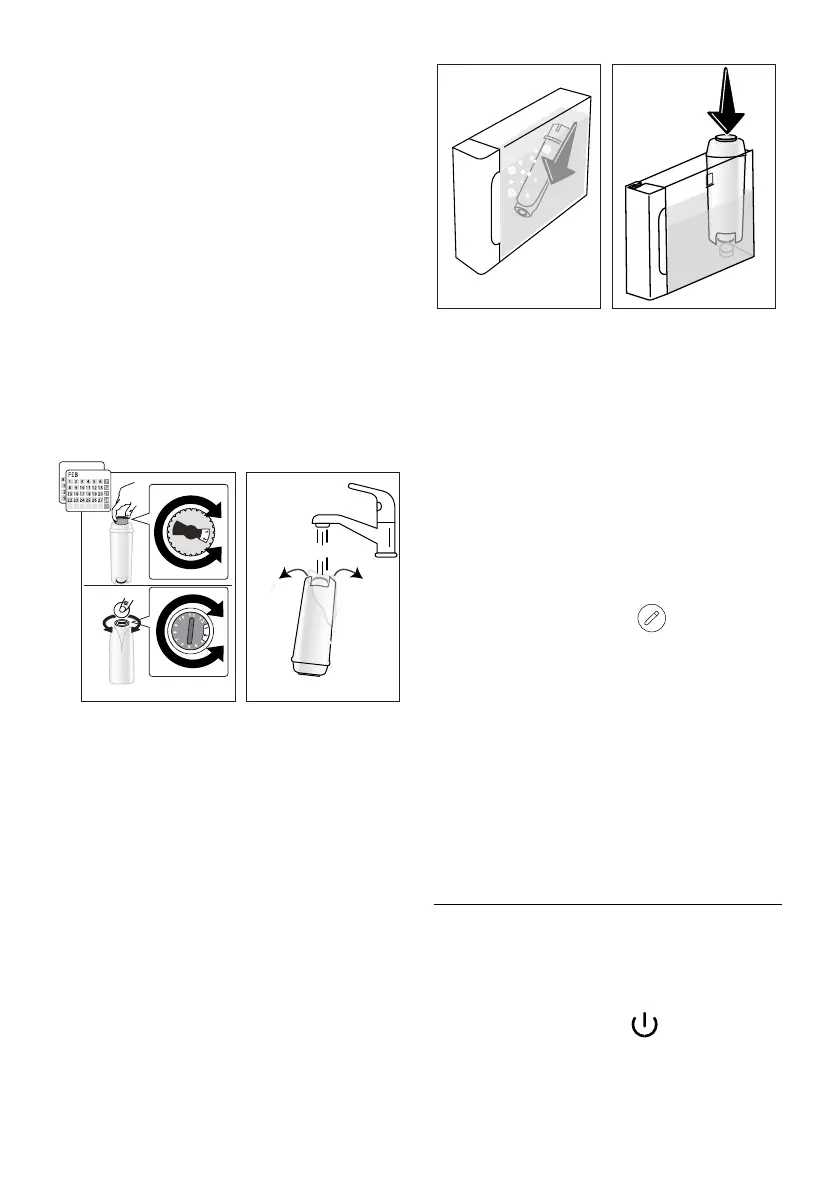
18. Remove the lter from the packaging and turn the date
indicator so that it shows the next 2 months (g. 9). Press
"Next";
9 10
2
0,5 L
Please note:
The lter lasts about two months assuming normal use of the ma
-
chine; if on the other hand the machine remains idle with the lter
installed, it will not last more than three weeks, at most.
19. To activate the lter, run tap water through the hole in the
centre of the lter until water comes out of the openings at
the side for more than a minute (g. 10); Press "Next".
20. Insert
the lter in the water tank and immerse it completely
for about ten seconds, angling and pressing it lightly so that
the air bubbles can escape (g. 11). Press "Next".
21. Insert the lter in the lter hous
ing (g. 12) and press fully
home. P
ress “Start”
;
11 12
MAX
22. Close
the tank with the lid (A8);
23. Reposition the water tank in the machine and press "Next".
24. Position an empty container of at least 0.5 litres capacity
under the hot water spout (g. 7) and press "Yes" to activate
the lter;
25. The machine delivers hot water, then stops automatically.
26. The lter is now active and the machine can be used.
27. Now that all the technical aspects have been covered, press
“Start” to get to know the machine.
Setting of proles
28. Select
the number of people who will be using the machine.
Press "Next".
29. The machine automatically creates a prole for each user:
to customize the prole, press
(press the “Change”
or “Prole” button). Having made the desired changes, press
“ S av e”.
30. Press "Next".
31. Press “Start” to run an introductory video.
32. At the end of the video, a QR code appears: scan this to access
manuals/support services. Press "Next”.
33. Press “Start”:
the machine is now ready for use.
Please note:
The rst time the machine is used, it will be necessary to make
4-5 cappuccinos before the drink in the cup tastes as it should.
4. TURNING THE MACHINE ON
Please note:
• Each time the machine is turned on, it performs an auto-
matic preheat and rinse cycle which cannot be interrupted.
The machine is not ready for use until the cycle has been
completed.
1. To turn the machine on, press
(B1)(g. 13): the ma-
chine will switch on;




 To Next Page