8
13
2. Once preheated to a preset temperature, a rinse cycle takes
place and hot water ows from the coee spouts (A16); in
addition to heating the boiler, this has the eect of heating
the internal circuits by circulating hot water through them.
5. TURNING THE APPLIANCE OFF
Whenever the machine is turned o after being used to make
coee, it performs an automatic rinse cycle.
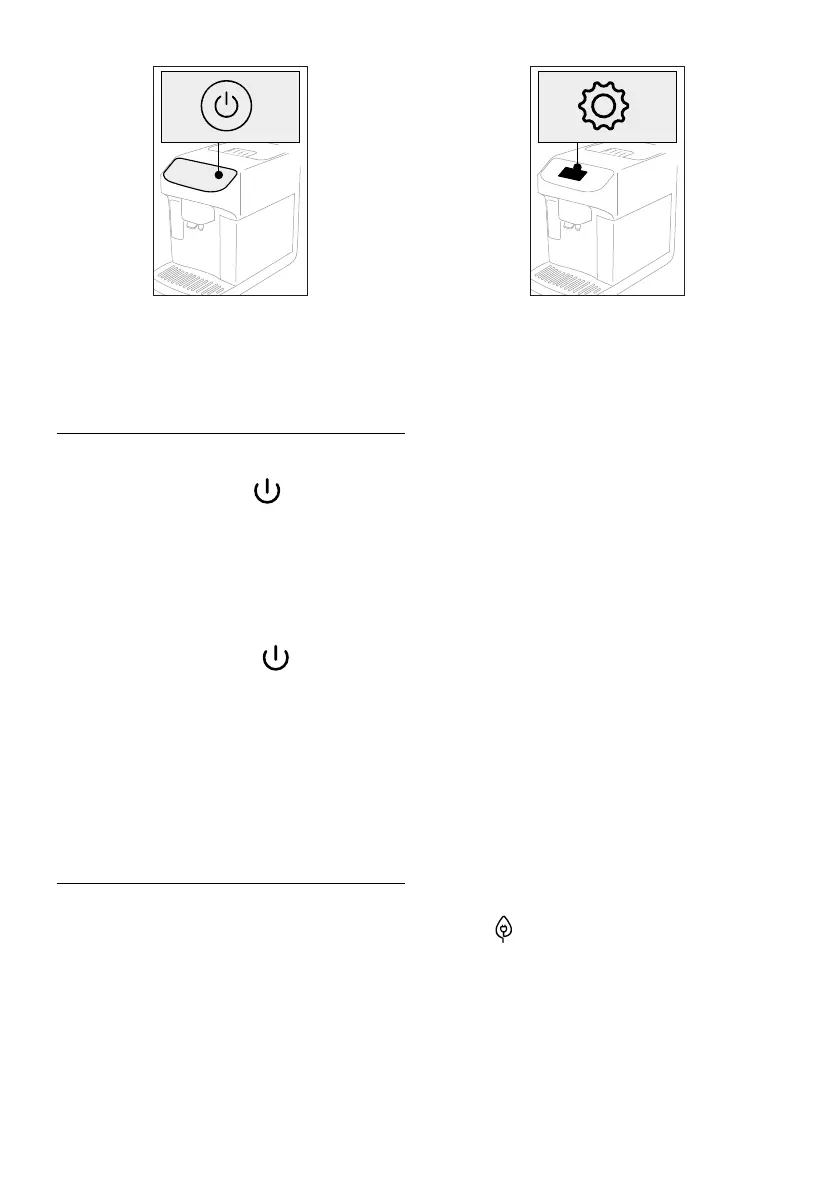
1. To turn the machine o, press
(B1) (g. 13).
2. If envisaged
, the machine runs a rinse cycle, delivering
hot water from the coee spout(A16), before switching o
(stand-by).
5.1 Switching o for extended periods:
If the machine is not going to be used for any length of time (e.g.
before going on holiday):
1. turn the appliance o, pressing
(B1) (g. 13).
2. empty
out and clean the grounds container (A10) and the
water tank (A9);
3. remove the plug (A7) from the power socket. (Important!
Never unplug the machine while is it still switched on)
Please note:
When turning the machine on again, ll the water tank and,
before making any kind of drink, run 3 rinse cycles as indicated
in section “6.1 Rinsing”
6. MENU SETTINGS
6.1 Rinsing
Using this function, hot water can be delivered from the coee
spouts (A16) (and, if tted, the hot water spout (D5)) to clean
and heat the appliance’s internal circuit.
Place a container of at least 200ml capacity under the spouts
(g. 6).
To activate the function:
1. Press the settings menu (C6) (g. 14);
14
2. Select the item "Rinse";
3. Press "Yes" to start the rinse cycle: after a few seconds, hot
water is delivered to clean and heat the internal circuit of
the machine (g. 8);
4. To stop rinsing, press "Stop" or wait for rinsing to stop
automatically.
Please note:
• If the machine is not used for more than 3-4 days, it is high-
ly advisable, when turning it on again, to run 2-3 rinses
before use;
• Water may nd its way into the grounds container (A10)
during the rinse procedure: this is quite normal.
6.2 Descaling
For instructions on descaling, see section “14. Descaling”.
6.3 Water lter
For instructions on the lter (D4), see section “15. Water soften-
er lter”.
6.4 General
1. Press the settings menu (C6) (g. 14);
2. Scroll through the menu pages until “General” is displayed;
In this section of the menu, the following functions can be acti-
vated or deactivated with a simple tap:
- "Audible warning": when enabled, the machine beeps
whenever an operation is performed.
- "Energy saving": use this function to activate or deactivate
energy saving mode. When activated, the function reduces
energy consumption in compliance with European regula-
tions.
is displayed on the homepage to show it is active.
3. Press "X" to save the new selections and go back to the
homepage (C).
The screen also shows the serial number of the machine, which
is an essential item of information should it be necessary for
customer service to identify the machine precisely.




 To Next Page