8
TOOL AND CHISEL HOLDER
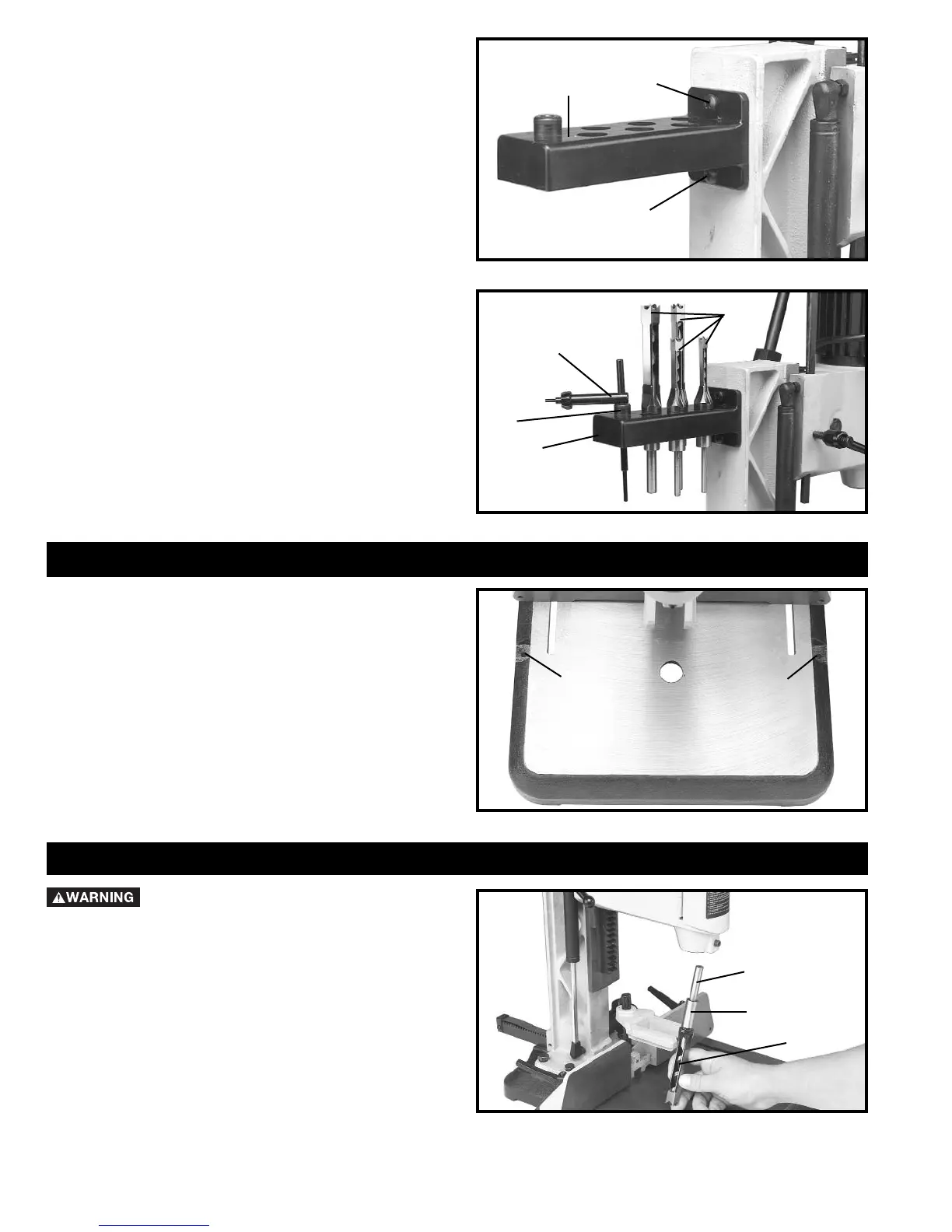
1. Assemble tool and chisel holder (A) Fig. 7, to back of
column using the two M6x1x25mm screws (B) and M6
lockwashers as shown.
Fig. 7
Fig. 8
2. Fig. 8, illustrates the chuck key/wrench (C), bushing
(F) for use with extra long chisels, and chisels and bits
(E) in holes of tool and chisel holder (A) when not in use.
FASTENING MACHINE TO SUPPORTING SURFACE
If during operation there is any tendency for the mortiser
to tip over, slide or walk on the supporting surface, the
base must be secured to the supporting surface with
fasteners (not supplied), through the two holes (A) Fig. 9,
located in the mortiser base.
Fig. 9
ASSEMBLING CHISEL AND BIT
DISCONNECT MACHINE FROM POWER
SOURCE.
1. Insert bit (A) Fig. 10, into chisel (B). NOTE: The
opening (C) on the side of the chisel should always be to
the right or left, never to the front or rear. The opening
allows chips to escape during operation.
Fig. 10
A
B
B
C
E
A
A
A
A
B
C
F



 To Next Page