TT-2000, TTD-2000, TT-4000 Ticket Eaters™ by Deltronic Labs June 2019
Printers & Loading Paper
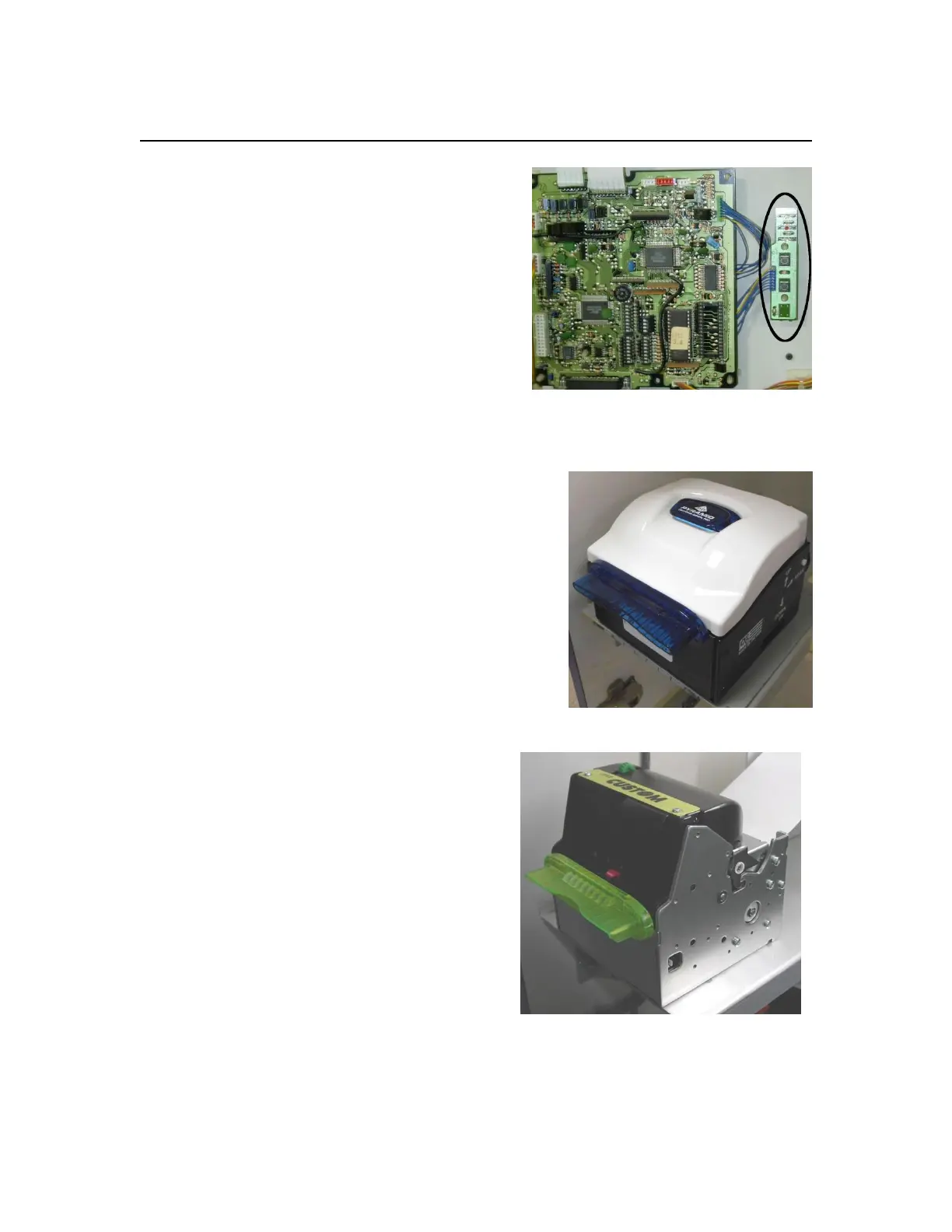
Star thermal printer
This printer is used in some older machines. The
printer is mounted on the inside of the top door.
The printer control board (circled in photo) has 3
LEDs. The top LED is a green “power on”
indicator. The middle LED is a red “error”
indicator. It is lit when there is a problem such
as out of paper.
The bottom LED is a green “on line” indicator.
The printer control board has two switches. The
top switch is an on-line / off-line toggle. The
bottom switch feeds paper.
Pyramid REL-80 thermal printer
The printer sits on a shelf inside the cabinet.
To load paper:
1. Start with the printer on.
2. Make sure the paper comes from the
bottom of the roll.
3. Make sure the paper end has a clean
square cut.
4. Insert the paper into the slot in the white
guides in the back of the printer. The
printer will detect the paper and load it.
Custom VKP80II thermal printer
This printer is has replaced the obsolete PPU-
231. The printer sits on a shelf inside the
cabinet. To load paper:
5. Start with the printer on.
6. Make sure the paper comes from the
bottom of the roll.
7. Make sure the paper end has a clean
square cut.
8. Insert the paper between the green guides
in the back of the printer. The printer will
detect the paper and load it.


 To Next Page