26
NOTE:
• TUNER, V. AUX cannot be selected.
Setting the Digital In assignment
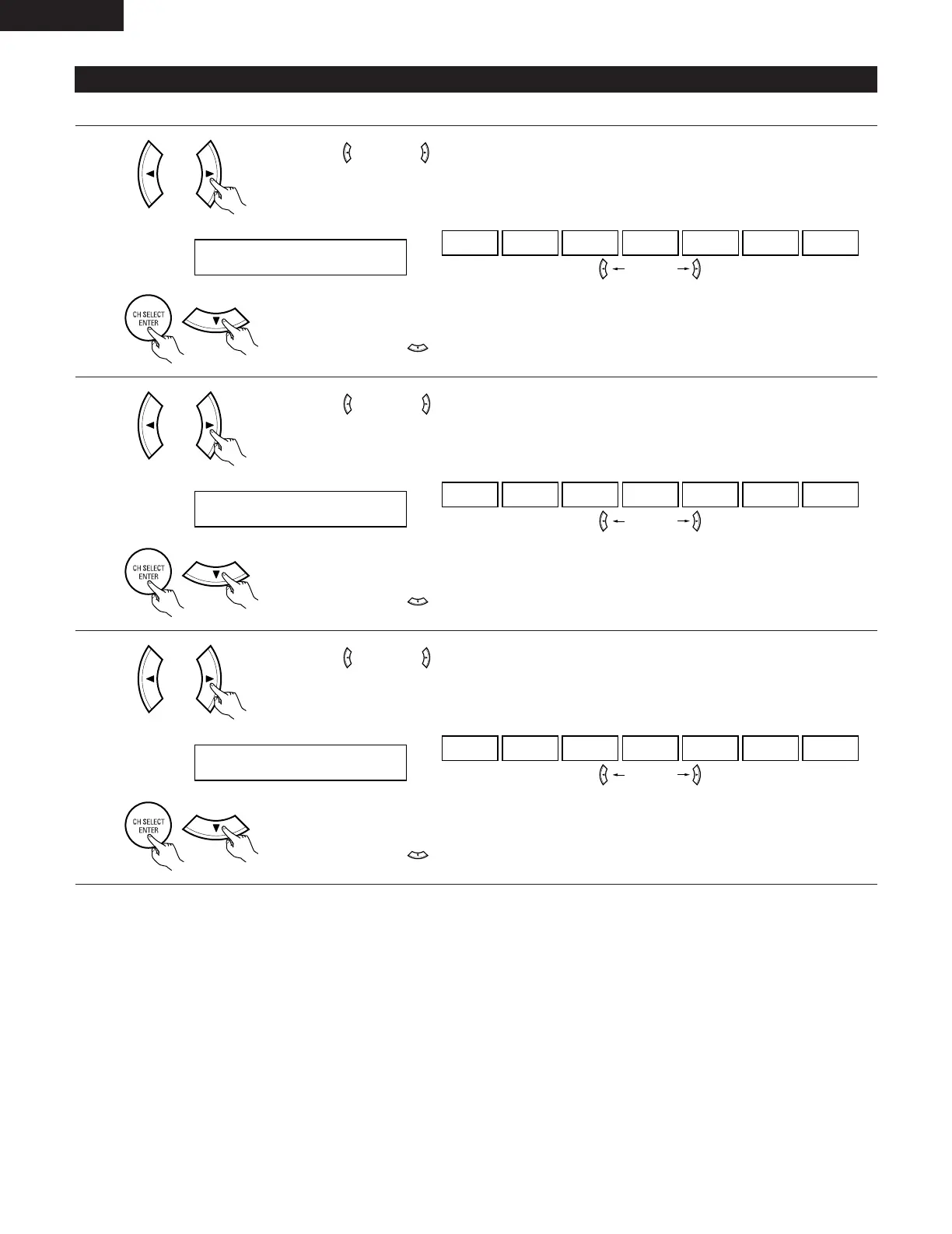
Input the type of components connected to the digital input terminals.
1
Use the (left) and (right) buttons to assign the input function connected to the COAXIAL input
(COAXIAL) terminal.
16 COAX CD
CD AUX DVD TV VCR CDR OFF
• Select “OFF” if nothing is connected.
Press the ENTER or (down) button to switch the optical input 1 (OPT 1) setting.
(left) button (right) button
2
Use the (left) and (right) buttons to assign the input function connected to the optical input 1
(OPTICAL 1) terminal.
17 OPT1 DVD
CD AUX DVD TV VCR CDR OFF
• Select “OFF” if nothing is connected.
Press the ENTER or (down) button to switch the optical input 2 (OPT 2) setting.
(left) button (right) button
(Initial)
(Initial)
3
Use the (left) and (right) buttons to assign the input function connected to the optical input 2
(OPTICAL 2) terminal.
18 OPT2 TV
CD AUX DVD TV VCR CDR OFF
• Select “OFF” if nothing is connected.
Press the ENTER or (down) button to switch the Video Input Mode setting.
(left) button (right) button
(Initial)
ENGLISH


 To Next Page