EasyManua.ls Logo

Denon 685 - Punch through

Denon 685
75 pages
Print Icon
To Next Page IconTo Next Page
To Previous Page IconTo Previous Page
Loading...
33
Table 1
Punch Through
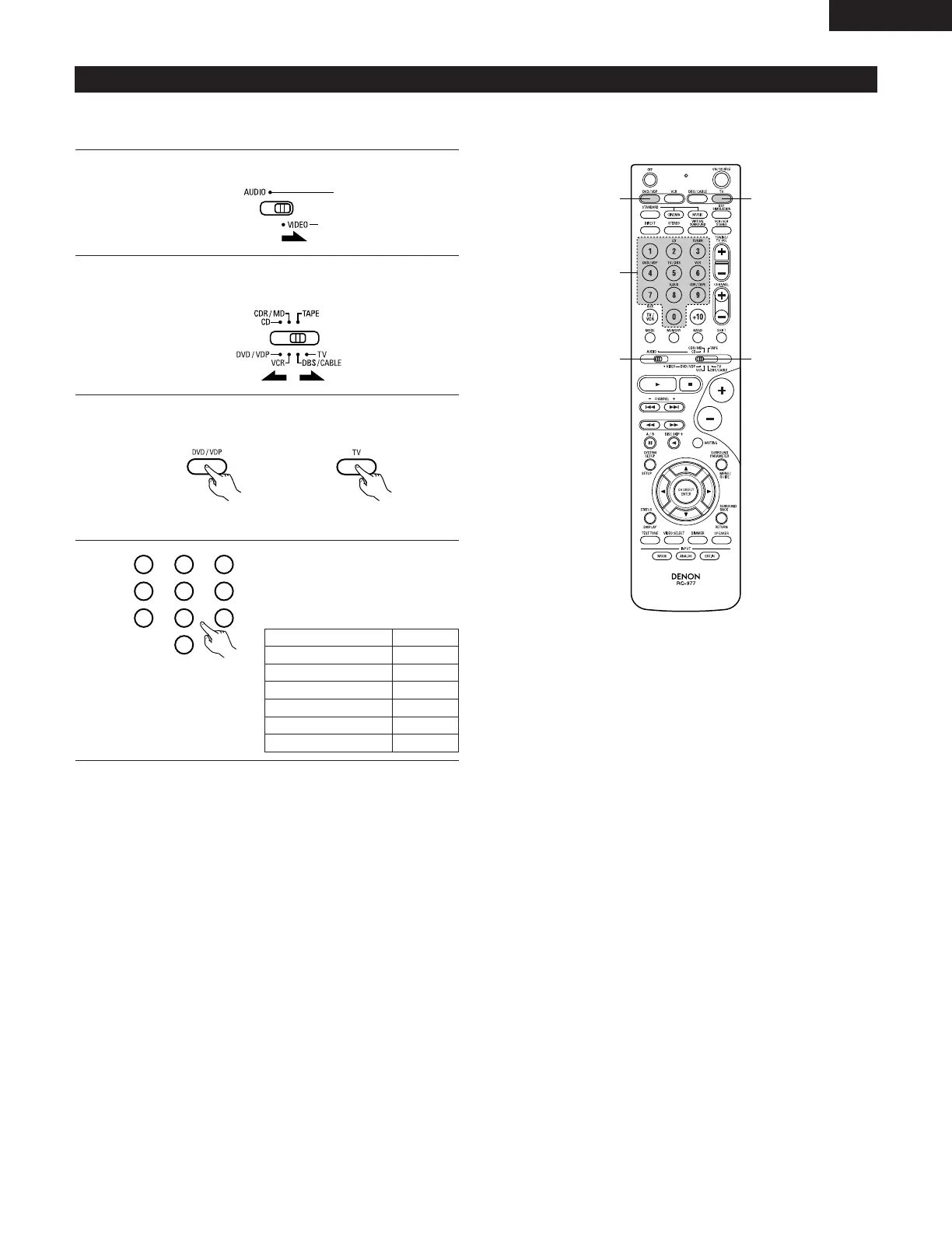
“Punch Through” is a function allowing you to operate the PLAY, STOP, MANUAL SEARCH and AUTO SEARCH buttons on the CD, TAPE,
CDR/MD, DVD/VDP or VCR components when in the DBS/CABLE or TV mode. By default, nothing is set.
1
2
Set mode switch 1 to “VIDEO”.
Set mode switch 2 to the component to be registered
(DBS/CABLE or TV).

3
2
1
4
3
3
Press the DVD/VDP power button and the TV power button at
the same time.
•Indicator flash.
4
Input the number of the
component you want to set. (See
Table 1)
1
2
3
456
789
0
CD
TAPE
CDR/MD
DVD/VDP
VCR
No setting
No.
1
2
3
4
5
0
ENGLISH

Related product manuals