EasyManua.ls Logo

Denon AVC-1530 - Names of Parts; Installation Precautions

Denon AVC-1530
15 pages
Print Icon
To Next Page IconTo Next Page
To Previous Page IconTo Previous Page
Loading...
Mi
We
greatly
appreciate
your
purchase
of
the
AVC-1530/1530G.
@
To
be
sure
you
take
maximum
advantage
of
all
the
features
the
AVC-1530/
1530G
has
to
offer,
read
these
instructions
carefully
and
use
the
set
properly.
Be
sure
to
keep
this
manual
for
future
reference
should
any
questions
or
problems
arise.
e
ACCESSORIES
Check
that
the
following
parts
are
included
in
addition
to
the
main
unit:
@®
Operating
instructions
...
@
AC
Plug
Adapter
{for
multi
voltage
model
o
@
Remote
contros
unit
(RC-167)
@
R6P/AA
battéries
.....
INSTALLATION
PRECAUTIONS
Using
this
amplifier
or
other
electronic
equipment
containing
microprocessors
simultaneously
with
a
tuner
or
TV
may
result
in
noise
in
the
sound
or
picture.
.
If
this
should
happen,
take
the
following
steps:
Install
the
amplifier
as
far
as
possible
from
the
tuner
or
TV
set.
Keep
the
antenna
lines
of
the
tuner
or
TV
as
far
as
possible
"
from
the
amptifier's
power
cord
and
connection
cables.
4
=}
=}
This
problem
is
especially
frequent
when
using
indoor
anten-
nas
or
300
ohm
feeder
fines.
We
recommend
using
outdoor
antennas
and
75
ohm
coaxial
cables.
TABLE
OF
CONTENTS
intraduction
...
Safety
Precautions
#Note
on
Use
Names
of
Parts
~
1
(Front
Panel
and
Remote
Controt
Unit}
Remote
Control
Unit
Multi
Function
Display
{(MFD)
.
Names
of
Parts
~
2
(Rear
Panel)
.
Connections
...
Playback
wc.
eeecigen
Preparations
for
Playback
.
#
Playing
the
Program
Source
.
Simulcast
Playback
...
Using
the
Muting
Function
Recording
Tape
Monitor
Function
won
fg
(F=3}
CD
Player
FEEOES
Besse
OP?
10
cm
or
greater
2)
AVC-1530/1530G
{This
amplifier}
ont
Ee
Siem]
C)
7
a
=
For
cooling
purposes,
do
not
place
another
AV
component
directly
on
top
of
the
amplifier.
Be
sure
to
leave
a
space
of
at
least
10
cm.
Using
Headphones
Surround
Playback
DSP
Modes
Using
Dolby
Pro
Logic
Surround
..
©
Other
DSP
Surround
Modes
..
«Using
the
Personal
Memory
..
Operations
Possible
in
the
Various
Surround
Modes
....
12}
Last
Function
Memory
..
25
[33]
Troubleshooting
....
:
14)
initialization
of
the
Microprocessor
...
eed.
einitialization
of
the
Individual
Modes
.
27
fa
Specifications
..
DENON
SERVICE
NETWORK...
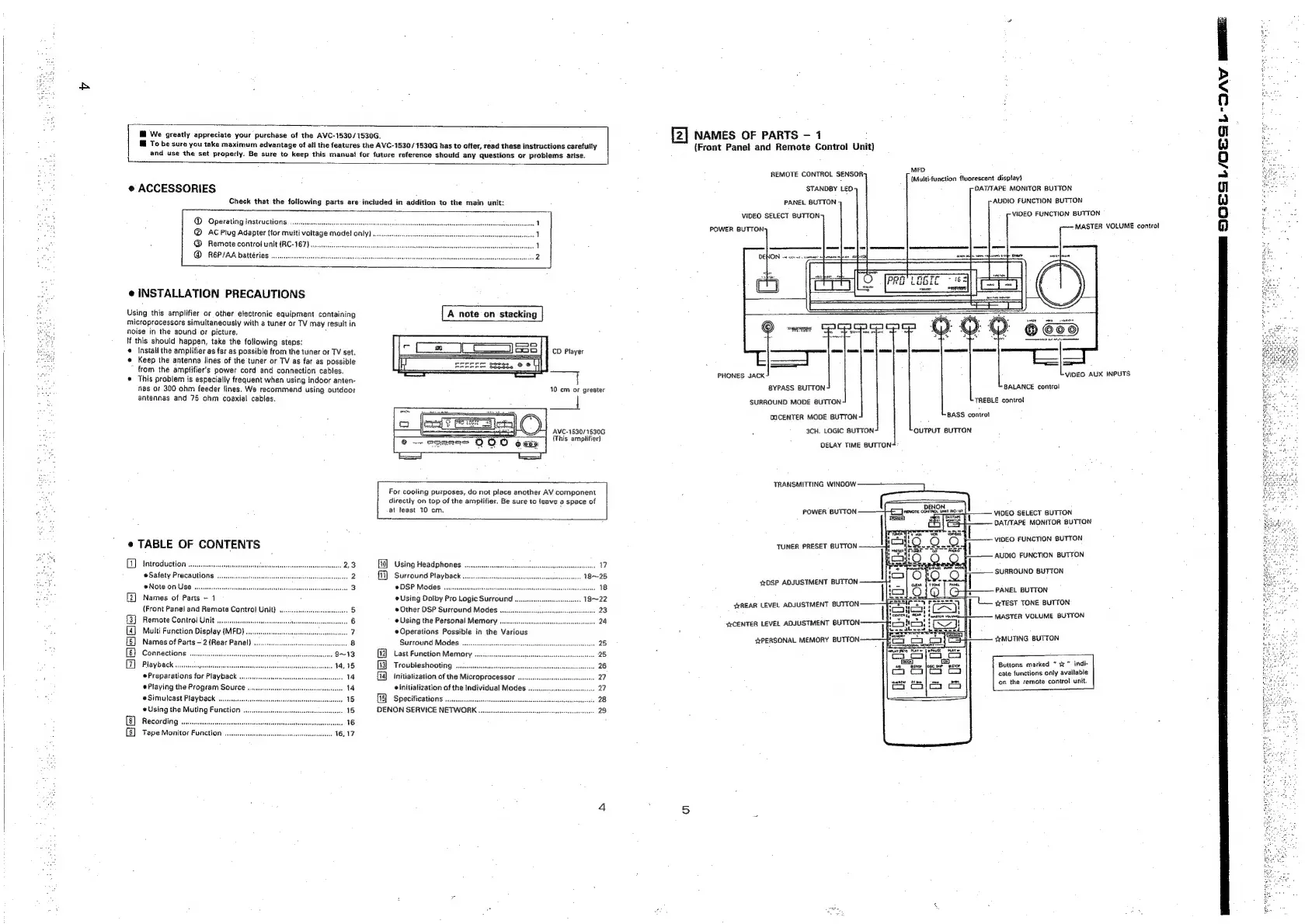
[2]
NAMES
OF
PARTS
-
1
(Front
Panel
and
Remote
Control
Unit)
MFD.
{Multi-function
fluorescent
display}
DAT/TAPE
MONITOR
BUTTON
AUDIO
FUNCTION
BUTTON
VIDEO
FUNCTION
BUTTON
MASTER
VOLUME
control
REMOTE
CONTROL
SENSOR:
STANDBY
LEO
PANEL
BUTTON
VIDEO
SELECT
BUTTON:
PHONES
JACK
VIDEO
AUX
INPUTS
BYPASS
BUTTON
BALANCE
control
SURROUND
MODE
BUTTON
TREBLE
controt
OOCENTER
MODE
BUTTON
BASS
control
3CH.
LOGIC
BUTTON OUTPUT
BUTTON
DELAY
TIME
BUTTON:
TRANSMITTING
WINDOW
+
POWER
BUTTON
——}-£—Jrevore
cbittoo
mr
nce
|
Tera}
G
|
onerare
VIDEO
SELECT
BUTTON
DAT/TAPE
MONITOR
BUTTON
VIDEO
FUNCTION
BUTTON
TUNER
PRESET
BUTTON
AUDIO
FUNCTION
BUTTON
SURROUND
BUTTON
sDSP
ADJUSTMENT
BUTTON
————4
REAR
LEVEL
ADJUSTMENT
BUTTON
|
PANEL
BUTTON
TEST
TONE
BUTTON
—-
MASTER
VOLUME
BUTTON
s¥CENTER
LEVEL
ADJUSTMENT
BUTTON:
wrPERSONAL
MEMORY
BUTTON
¢trMUTING
BUTTON
Buttons
marked
*
%”
indi-
cate
functions
only
available
on
the
remote
control
unit.
Ra
a
a
EES
OQOSSL/OLSSL-
OA
Meee: