EasyManua.ls Logo

Denon AVC-1530 - Remote Control Unit

Denon AVC-1530
15 pages
Print Icon
To Next Page IconTo Next Page
To Previous Page IconTo Previous Page
Loading...
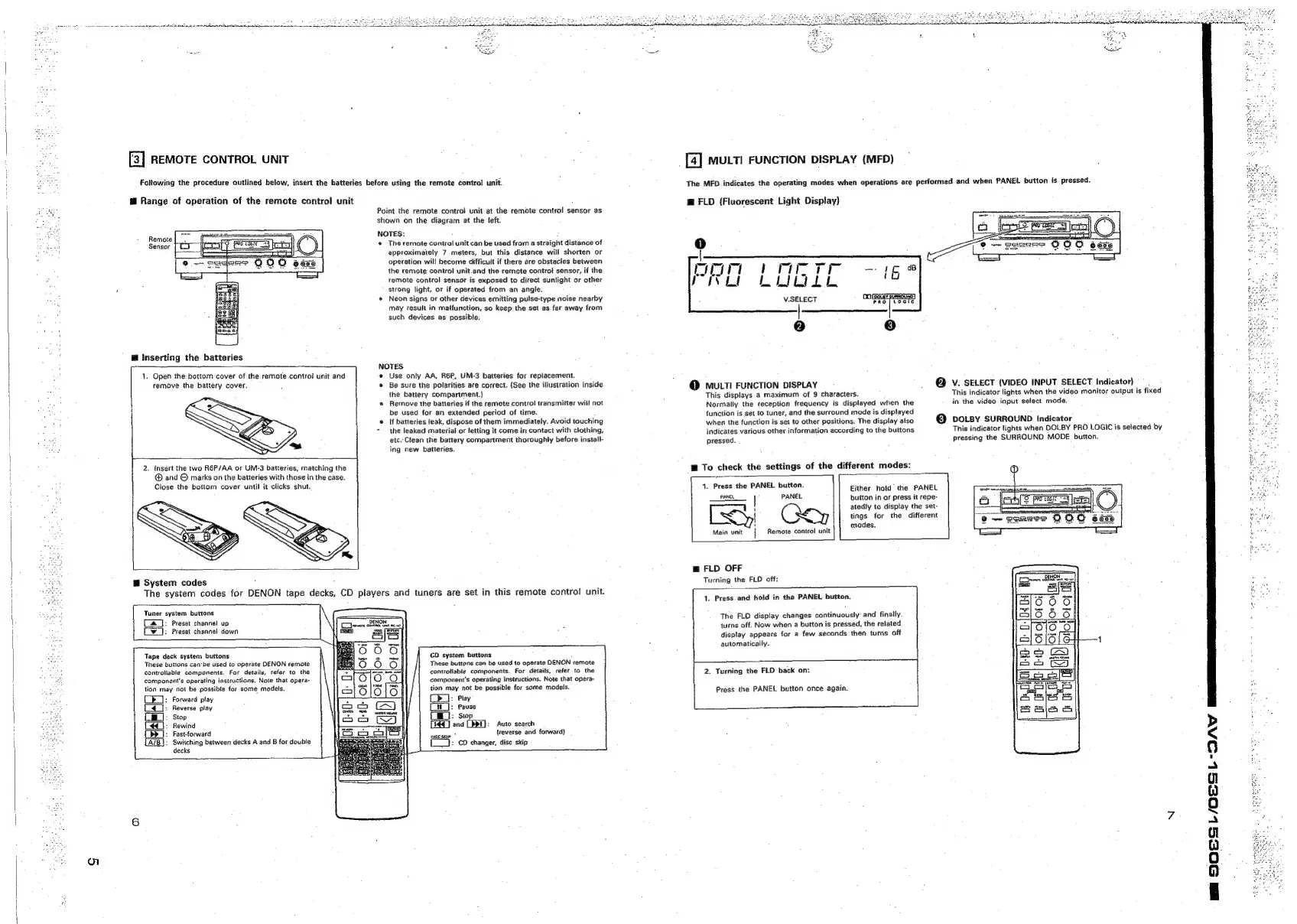
[3]
REMOTE
CONTROL
UNIT
Follawing
the
procedure
outlined
below,
insert
the
batteries
before
using
the
remote
control
unit.
@
Range
of
operation
of
the
remote
control
unit
Remote
Sensor
@
Inserting
the
batteries
1.
Open
the:
bottom
cover
of
the
remote
control
unit
and
remove
the
battery
cover.
2.
Insert
the
two
R6P/AA
or
UM-3
batteries,
matching
the
@®
and
©
marks
on
the
batteries
with
those
in
the
case.
Close
the
bottom
cover
until
it
clicks
shut.
@
System
codes
Tuner
system
buttons
&
|:
Preset
channel
up
[
(v5):
Preset
channel
down
Tape
deck
system
buttons
These
buttons
canbe
used
to
operate
DENON
remote
controtiable
components.
For
details,
refer
to
the
component's
operating
instructions,
Note
that
opera-
tion
may
not
be
possible
for
some
models.
b_]:
Forward
play
£4]:
Reverse
play
Ci]:
Stop
(4):
Rewind
Cbd
|:
Fast-forward
[AIB}:
Switching
between
decks
A
and
B
for
double
decks
Point
the
remote
control
unit
at
the
remote
control
sensor
as
shown
on
the
diagram
at
the
left.
NOTES:
«
The
remote
control
unit
can
be
used from
a
straight
distance
of
approximately
7
meters,
but
this
distance
will
shorten
or
operation
will
become
difficult
if
there
are
obstacles
between
the
remote
control
unit.and
the
remote
control
sensor,
if
the
remote
control
sensor
is
exposed
to
direct
sunlight
or
other
strong
light,
or
if
operated
from
an
angle.
Neon
signs
or
other
devices
emitting
pulse-type
noise
nearby
may
result
in
malfunction,
so
keep
the
set
as
far
away
from
such
devices
as
possible:
NOTES
e
Use
only
AA,
R6P,
UM-3
batteries
for
replacement.
©
Be
sure
the
polarities
are
correct.
(See
the
illustration
inside
the
battery
compartment.)
«
Remove
the
batteries
if
the
remote
control
transmitter
will
not
be
used
for
an
extended
period
of
time.
If
batteries
leak,
dispose
of
them
immediately.
Avoid
touching
the
leaked
material
or
letting
it
come
in
contact
with
clothing,
etc.
Clean
the
battery
compartment
thoroughly
before
install-
ing
new
batteries.
The
system
codes
for
DENON
tape
decks,
CD
players
and
tuners
are
set
in
this
remote
control
unit.
Co
escerte
PEO
ne
ut
CD
system
buttons
These
buttons
can
be
used
to
operate
DENON
remote
controllable
components.
For
details,
refer
to
the
component's
operating
instructions.
Note
that
opera-
tion
may
not
be
possible
for
some
models.
(Cd:
Play
HL}:
Pause
{i
j:
swp
[54]
ang
[BRT]:
Auto
search
Kaus
{reverse
and
forward)
:
CD
changer,
disc
skip
[J
mutti
FUNCTION
DISPLAY
(MFD)
The
MED
indicates
the
operating
modes
when
operations
are
performed
and
when
PANEL
button
is
pressed.
@
FLD
(Fluorescent
Light
Display)
mtr
§
rr
PVG
Labo
V.SELECT
@
MULTI
FUNCTION
DISPLAY
This
displays
a
maximum
of
9
characters.
Normally
the
reception
frequency
is
displayed
when
the
function
is
set
to
tuner,
and
the
surround
mode
is
displayed
when
the
function
is
set
to
other
positions.
The
display
atso
indicates
various
other
information
according
to
the
buttons
pressed.
™
To
check
the
settings
of
the
different
modes:
1.
Press
the
PANEL
button.
PANEL
button
in
or
press
it
repe-
atedly
to
display
the
set-
xy
tings
for
the
different
-
modes.
Remote
control
unit
Either
hold
the
PANEL
@
V.
SELECT
(VIDEO
INPUT
SELECT
Indicator)
This
indicator
lights
when
the
video
monitor
output
is
fixed
in
the
video
input
select
mode.
@
vo.sy
SURROUND
Indicator
This
indicator
lights
when
DOLBY
PRO
LOGIC
is
selected
by
pressing
the
SURROUND
MODE
button.
@
FLD
OFF
Turning
the
FLD
off:
1.
Press.
and
hold
in
the
PANEL
button.
The
FLO
display
changes
continuously:
and
finally.
turns
off.
Now
when
a
button
is
pressed,
the
related
display
appears
for
a
few
seconds
then
turns
off
automatically.
2.
Turning
the
FLD
back
on:
Press
the
PANEL
button
once
again.