EasyManua.ls Logo

Denon AVC-1530 - Page 9

Denon AVC-1530
15 pages
Print Icon
To Next Page IconTo Next Page
To Previous Page IconTo Previous Page
Loading...
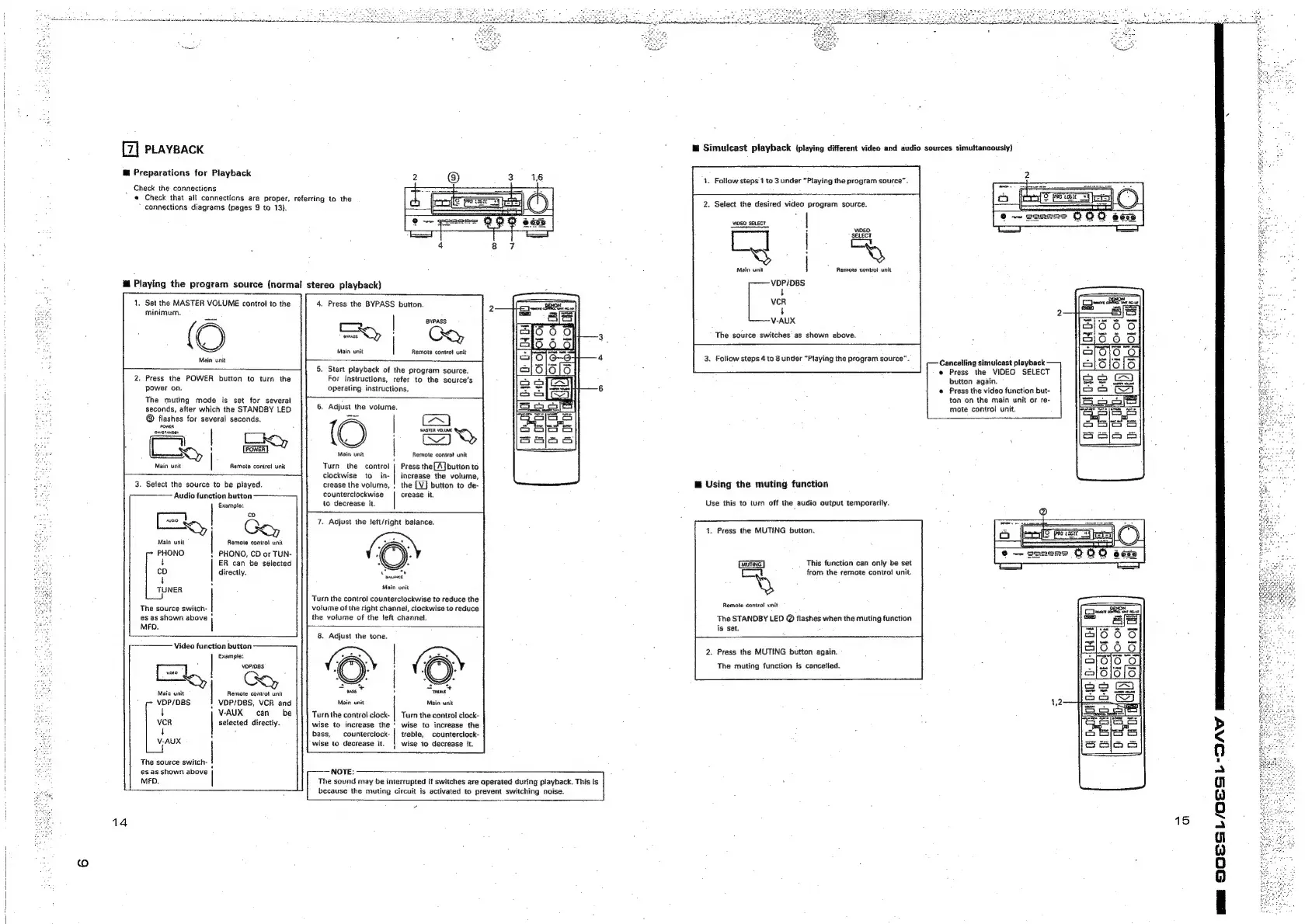
PLAYBACK
@
Preparations
for
Playback
Check
the
connections
«
Check
that
ail
connections
are
proper,
referring
to
the
*
connections
diagrams
{pages
9
to
13).
@
Playing
the
program
source
(normal
stereo
playback)
1,
Set
the
MASTER
VOLUME
control
to
the
minimum.
(O
Main
unit
.
Press
the
POWER
button
to
turn
the
power
on.
The
muting
mode
is
set
for
several
seconds,
after
which
the
STANDBY
LED
@
flashes
for
several
seconds.
ceed
OnrStaNDey
Main
unit
flemote
contro!
unit
Ck,
3.
Select
the
source
to
be
played.
Example:
iy!
“Se,
Main
unit
Remote
control
unit
‘
PHONO
|
PHONO,
CD
or
TUN-
t
ER
can
be
selected
co
directly.
4
4
TUNER
|
‘
The
source
switch-
es as
shown
above
MFO.
Audio
function
button
——~-—],
Video
function
button
Example:
ey)
vi9eo
xy
{
Csy
Main
unit
Remote
control
unit
VDP/DBS
!
VDP/DBS,
VCR
and
4
VAUX
can
be
VCR
selected
directly.
t
:
V-AUX
The
source
switch-
es as
shown
above
MFD.
14
4.
Press
the
BYPASS
button.
|
BYPASS
Main
unit
Remote
control
unit
.
Start
playback
of
the
program
source.
For
instructions,
refer
to
the
source's
operating
instructions.
.
Adjust
the
volume.
(O
|
—
Main
unit
mote
contro!
unit
Turn
the
control
|
Press
the
[A]
button
to
clockwise
to
in-|
increase
the
volume,
crease
the
volume,
,
the
counterclockwise
|
crease
it,
to
decrease
it.
7.
Adjust
the
left/right
batance.
‘
“a
naance
Main
onit
Turn
the
contro!
counterclockwise
to
reduce
the
volume
of
the
right
channel,
clockwise
to
reduce
the
volume
of
the
left
channel.
8.
Adjust
the
tone.
at
wens
Main
unit
Maia
unit
Turn
the
control
clock-
|
Turn
the
control
clock-
wise
to
increase
the
‘
wise
to
increase
the
bass,
counterclock-
|
treble,
counterclock-
wise
to
decrease
it.
|
wise
to
decrease
it.
NOTE:
|
because
the
muting
circuit
is
activated
to
prevent
switching
noise.
The
sound
may
be
interrupted
if
switches
are
operated
during
playback.
This
is
|
2.
Select
the
desired
video
program
source.
VIDEO
SELECT
VIDEO
SELECT
[
|
CY
aes
Q
Main
unit
Remote
contro!
unit
VDP/DBS
t
VCR
$
V-AUX
The
source
switches
as
shown
above.
3.
Follow
steps
4
to
8
under
“Playing
the
program
source”.
@
Using
the
muting
function
Use
this
to
turn
off
the
audio
output
temporarily.
1.
Press
the
MUTING
button.
This
function
can
only
be
set
from
the
remote
contro!
unit.
Remote
control
unit
The
STANDBY
LED
@
flashes
when
the
muting
function
is
set.
2.
Press
the
MUTING
button
again.
The
muting
function
is
cancelled.
lm
Simulcast
playback
{playing
different
video
and
audio
sources
simultaneously)
Cancelling
simulcast
playback
e
Press
the
VIDEO
SELECT
button
again.
*
Press
the
video
function
but-
ton
on
the
main
unit
or
re-
mote
control
unit.
p
Ot
OFOF
O;
a
15