40
Multi-source recording/playback
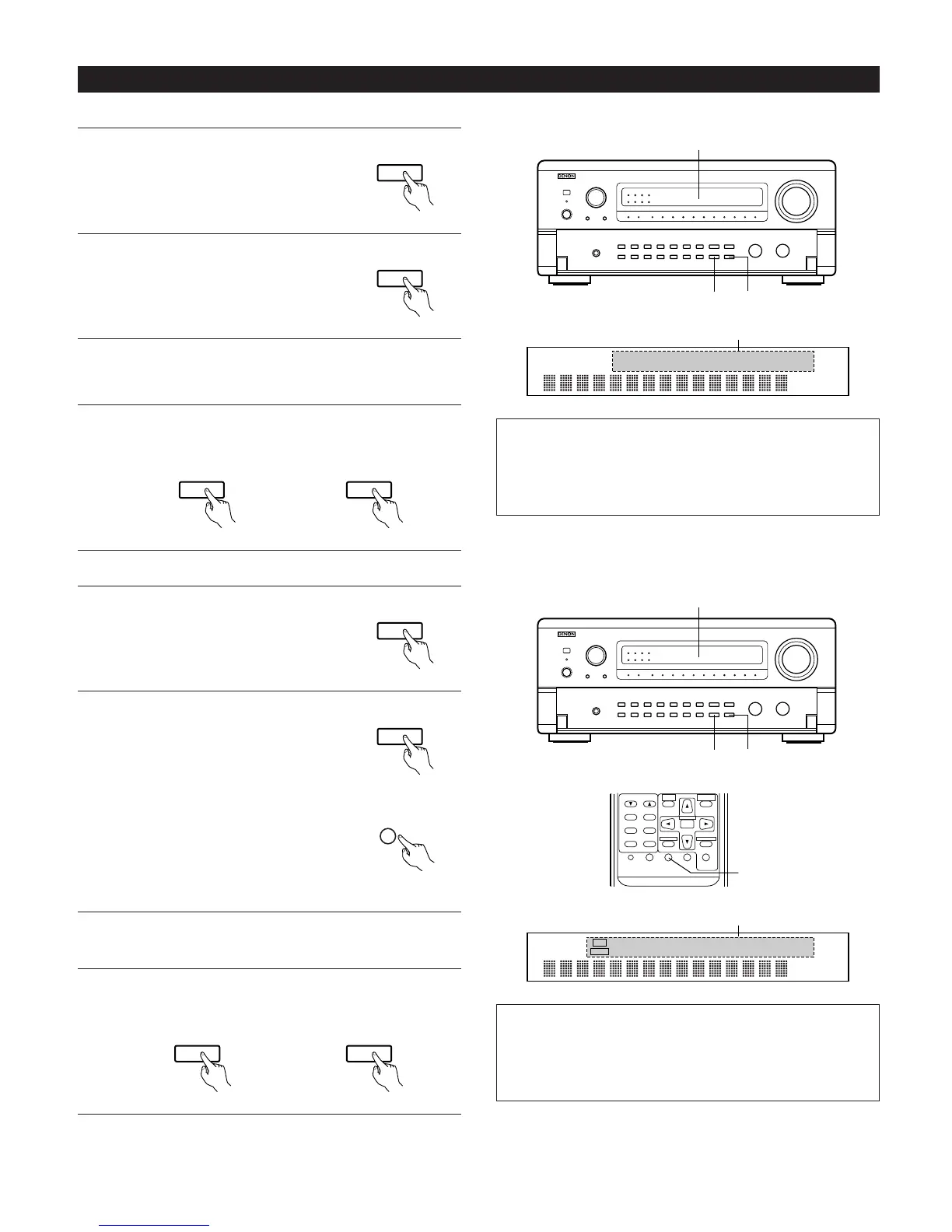
[1] Playing one source while recording another (REC OUT mode)
1
Press the REC/MULTI MODE button
until “REC OUT SOURCE” appears on
the set’s display.
2
Press the REC/MULTI SOURCE button
until the source you want to record
appears on the set’s display.
• The indicator for the selected
program source lights.
3
Set the recording mode.
• For operating instructions, refer to the manual of the
component on which you want to record.
4
To cancel, press the REC/MULTI MODE button or press the
REC/MULTI SOURCE button until “SOURCE” appears on the
display.
Or
[2] Outputting a program source to an amplifier, etc., in a different room (MULTI mode)
1
Press the REC/MULTI MODE button
until “M-SOURCE SOURCE” appears
on the set’s display.
2
Press the REC/MULTI SOURCE button
until the source you want to output
appears on the set’s display.
• The “MULTI” indicator lights.
• The indicator for the selected
program source lights.
• When the AVR-5700 is in the REC
OUT mode, the source cannot be
output using the MULTI button on
the remote control unit.
3
Start playing the source to be output.
• For operating instructions, refer to the manuals of the
respective components.
4
To cancel, either press the REC/MULTI MODE button or
press the REC/MULTI SOURCE button until “SOURCE”
appears on the display.
VCR -1 -2 V.AUX MD / TAPE -1 -2
PHONO CD TUNER AUX DVD / VDP TV / DBS
2
NOTES:
• Recording sources other than digital inputs selected in the REC
OUT mode are also output to the multi source audio/video
output jacks.
• Digital signals are not output from the REC SOURCE or
audio/video output jacks.
TUNING
BAND
TITLE
MENU/GUIDE
MODE
MEMORY
USE/LEARN T.TONE MULTI DVD
SET UP
RETURN
PANEL
DISPLAY
ON SCREEN
SYSTEM
SETUP
SURROUND
PARAMETER
CH SELECT
SELECT
ENTER
2
VCR -1 -2 V.AUX MD / TAPE -1 -2
PHONO CD TUNER AUX DVD / VDP TV / DBS
2
REC
MULTI
NOTES:
• The signals of the source selected in the MULTI mode are also
output from the DAT/TAPE-1 and VCR recording output
terminals.
• Digital signals are not output from the multi source audio
output jacks.



 To Next Page
 Loading...