EasyManua.ls Logo

Denon COCOON - PC;Mac Network Setup; Reboot Unit and Select Network

Denon COCOON
77 pages
Print Icon
To Next Page IconTo Next Page
To Previous Page IconTo Previous Page
Loading...
e
CONNECTING TO YOUR
HOME
NETWORK
USING A
PC OR
MAC
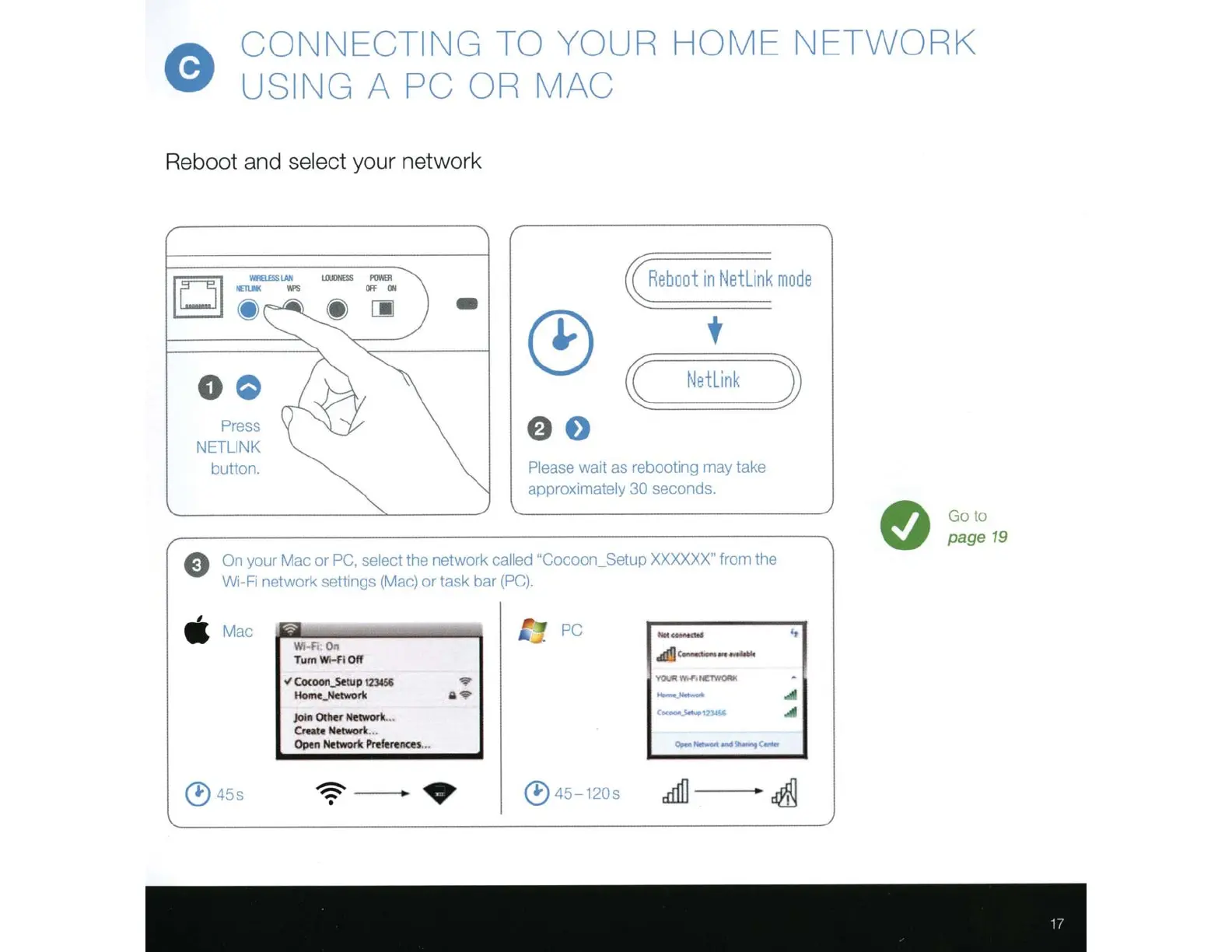
Reboot and select
your network
Press
N
ETLINK
button.
LllllliiESS
I'OMII
Off
ON
-
Re
b
oo
t in
Net
link
mo
de
Please
wa1t
as
reboot1ng
may
take
approximately 30
seconds.
E)
On
your Mac or
PC,
select
the network
called "Cocoon_
Setup
XXXXXX"
from the
W1-F1
network
sett1ngs
(M
ac)
or
task bar
(PC)
.
Mac
~
·
PC
--
\\'
r
o....
.d!!J
c-
--
Tum
Wl..fl
Off
.t
Cocoon_.sttup
123&56
'1'01.1111'1'0~
·
~
Homt_Ndwork
a
--
4l
join Other
Network.
..
Ce<~1n-Si
..
Create Nttworlt.
..
()pen
Network
Pn!ferencu
...
,.,__,...so-..,
c-
(!)
45s
~
(!)
45-120s
cd11]
~
Go to
page
19

Related product manuals