EasyManua.ls Logo

Denon COCOON - Enjoying Your Music; Connecting and Docking Your iOS Device

Denon COCOON
77 pages
Print Icon
To Next Page IconTo Next Page
To Previous Page IconTo Previous Page
Loading...
ENJOYING YOUR MUSIC
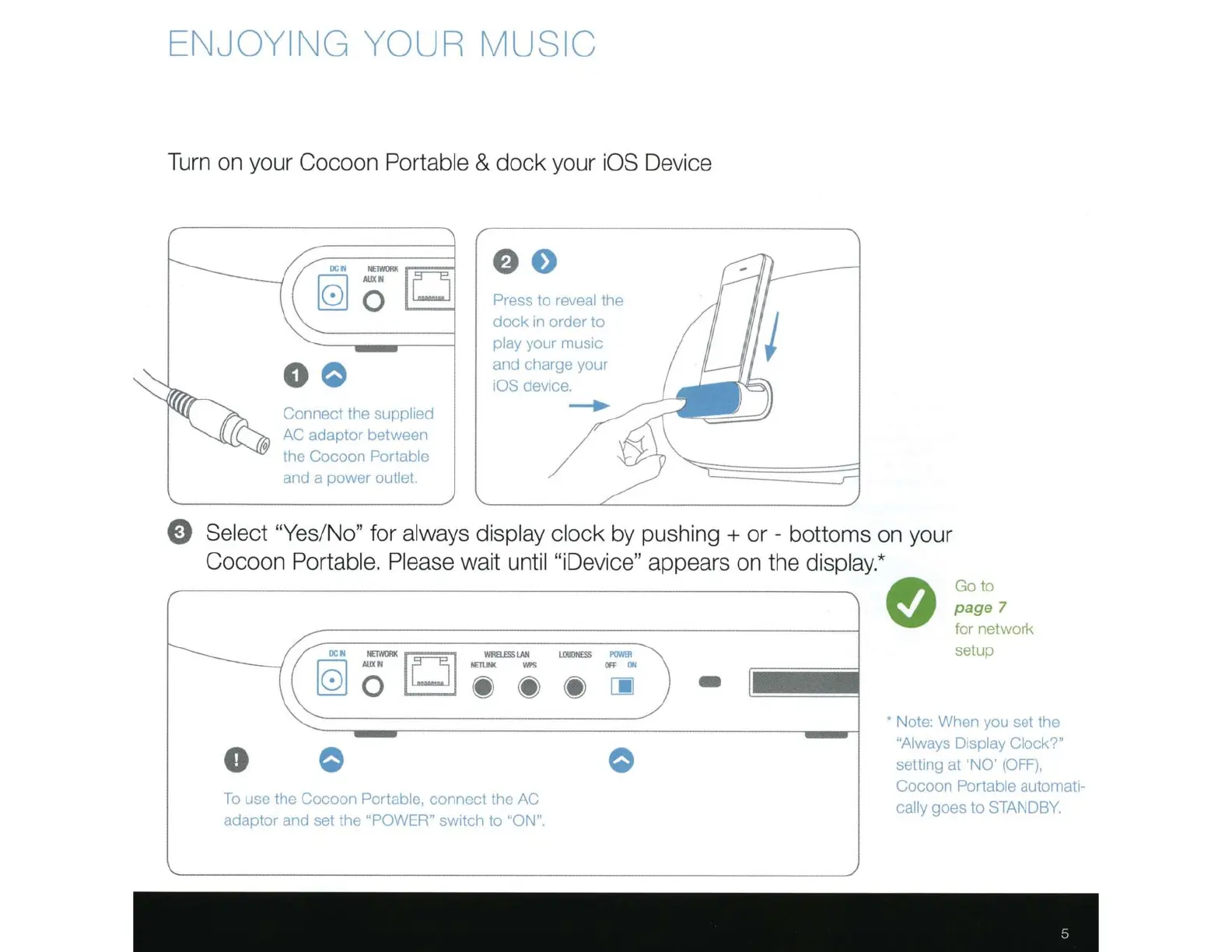
Turn on your Cocoon
Portable
&
dock
your
iOS
Device
D
0 0
Connect the
supp
lied
AC
adaptor between
·he
Cocoon Portable
and a power
outlet.
e o
Press
to
reveal
the
dock
rn
order to
pl
ay
your rnusrc
and charge your
iOS
devrce.
__,.
Select "Yes/No"
for
always display clock
by pushing
+
or
- bottoms on your
Cocoon
Portable. Please wait
until "iDevice"
appears on the
display.*
0 0
To
use the Cocoon
Portable,
connect the
AC
adaptor and set the "POWER"
switch
to
"ON".
-
e
Go
to
page
7
tor
network
setup
Note: When you set the
"Always Display Clock?"
settrng at
'NO'
(OFF),
Cocoon
Portable
autornatr-
cally
goes to
STANDBY.

Related product manuals