EasyManua.ls Logo

Denon DCD-695 - Remote Control

Denon DCD-695
70 pages
Print Icon
To Next Page IconTo Next Page
To Previous Page IconTo Previous Page
Loading...
ENGLISH
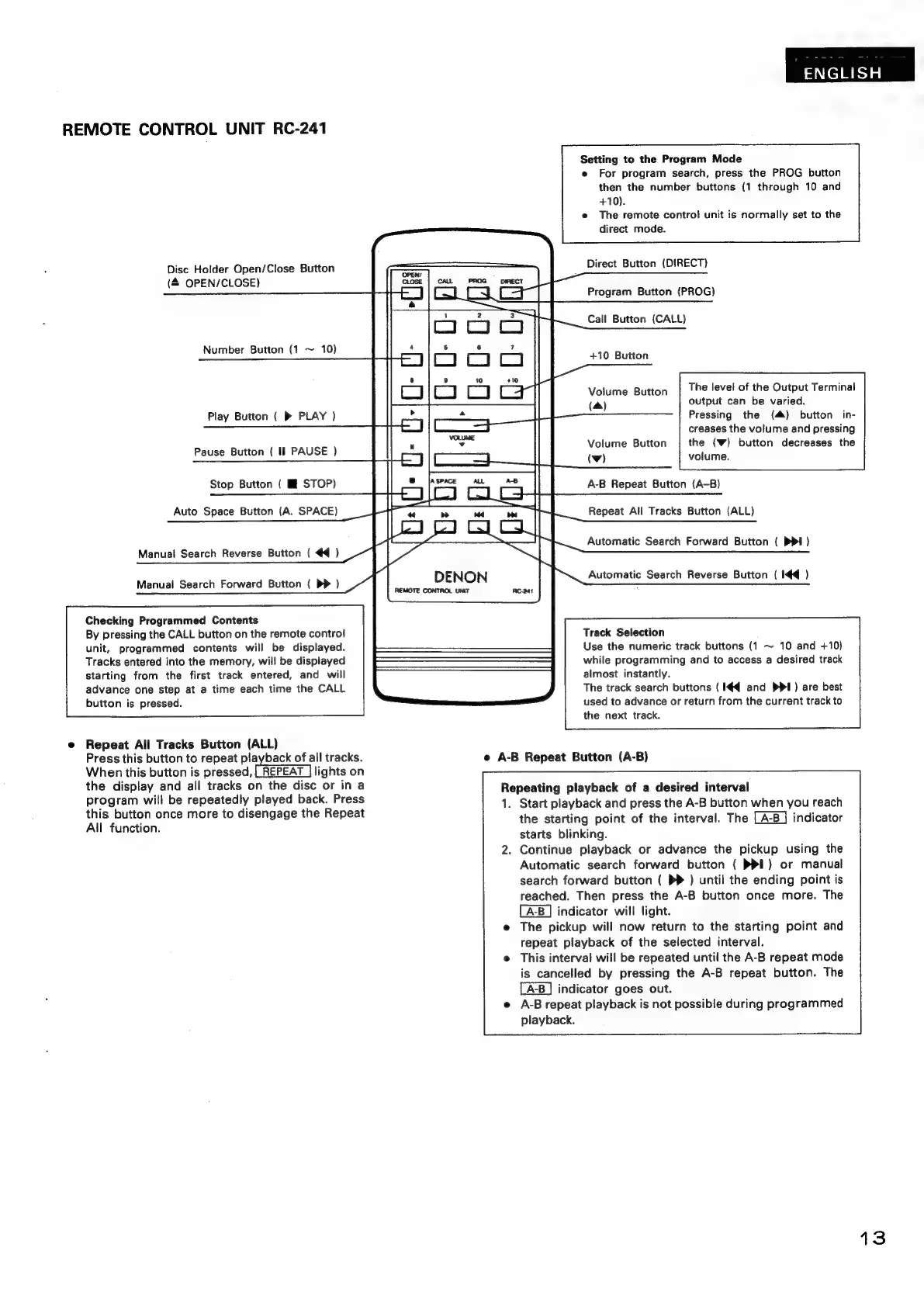
REMOTE
CONTROL
UNIT
RC-241
Setting
to
the
Program
Mode
e
For
program
search,
press
the
PROG
button
then
the
number
buttons
(1
through
10
and
+10).
The
remote
control
unit
is
normally
set
to
the
direct
mode.
Disc
Holder
Open/Close
Button
Direct
Button
(DIRECT)
(&
OPEN/CLOSE)
Program
Button
(PROG)
Call
Button
(CALL)
Number
Button
(1
~
10)
+10
Button
Volume
Button
The
level
of
the
Output
Terminal
(a)
output
can
be
varied.
Pressing
the
(4)
button
in-
creases
the
volume
and
pressing
Volume
Button
the
(Ww)
button
decreases
the
Play
Button
(
»
PLAY
)
Pause
Button
(
Il
PAUSE
)
Stop
Button
(
Hi
STOP)
Auto
Space
Button
(A.
SPACE)
Manual
Search
Reverse
Button
(
44
)
Manual
Search
Forward
Button
(
DP
)
Checking
Programmed
Contents
By
pressing
the
CALL
button
on
the
remote
control
unit,
programmed
contents
will
be
displayed.
Tracks
entered
into
the
memory,
will
be
displayed
starting
from
the
first
track
entered,
and
will
advance
one
step
at
a
time
each
time
the
CALL
button
is
pressed.
Repeat
All
Tracks
Button
(ALL)
Press
this
button
to
repeat
playback
of
all
tracks.
When
this
button
is
pressed,
[REPEAT
|
lights
on
the
display
and
all
tracks
on
the
disc
or
in
a
program
will
be
repeatedly
played
back.
Press
this
button
once
more
to
disengage
the
Repeat
All
function.
REMOTE
CONTROL
UNIT
(wv)
volume.
A-B
Repeat
Button
(A-B)
Repeat
All
Tracks
Button
(ALL)
Automatic
Search
Forward
Button
({
PPI)
Automatic
Search
Reverse
Button
(
I€q
)
Track
Selection
Use
the
numeric
track
buttons
(1
~
10
and
+10)
while
programming
and
to
access
a
desired
track
almost
instantly.
The
track
search
buttons
(
I€q
and
Ppl)
are
best
used
to
advance
or
return
from
the
current
track
to
the
next
track.
e
A-B
Repeat
Button
(A-B)
Repeating
playback
of
a
desired
interval
1.
Start
playback
and
press
the
A-B
button
when
you
reach
the
starting
point
of
the
interval.
The
indicator
starts
blinking.
.
Continue
playback
or
advance
the
pickup
using
the
Automatic
search
forward
button
{
PPI)
or
manual
search
forward
button
{
PP
)
until
the
ending
point
is
reached.
Then
press
the
A-B
button
once
more.
The
indicator
will
light.
The
pickup
will
now
return
to
the
starting
point
and
repeat
playback
of
the
selected
interval.
This
interval
will
be
repeated
until
the
A-B
repeat
mode
is
cancelled
by
pressing
the
A-B
repeat
button.
The
indicator
goes
out.
A-B
repeat
playback
is
not
possible
during
programmed
playback.