EasyManua.ls Logo

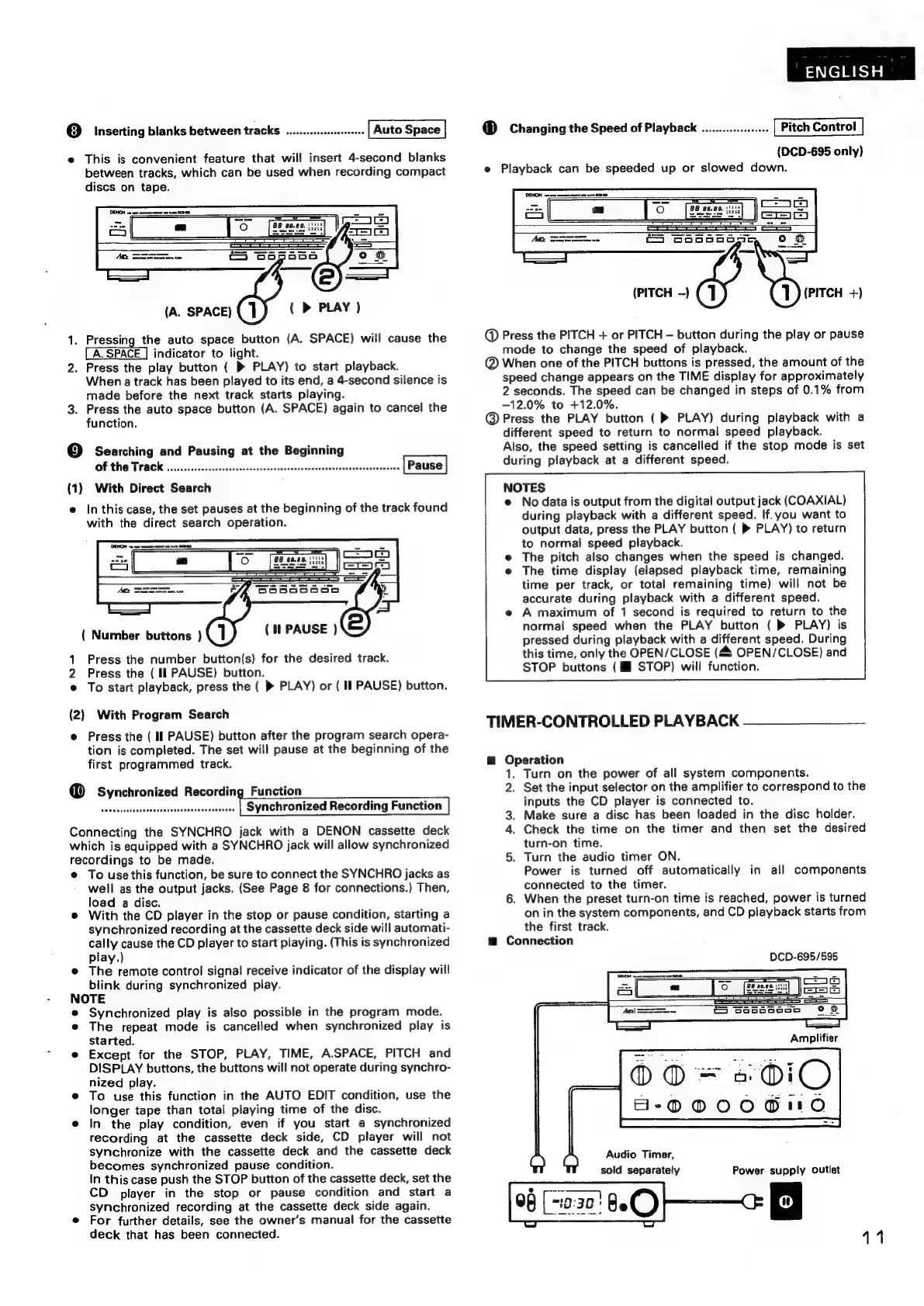
Denon DCD-695 - Timer-Controlled Playback

Denon DCD-695
70 pages
Print Icon
To Next Page IconTo Next Page
To Previous Page IconTo Previous Page
Loading...
@
inserting
blanks
between
tracks
............se0
e
This
is
convenient
feature
that
will
insert
4-second
blanks
between
tracks,
which
can
be
used
when
recording
compact
discs
on
tape.
(
>
PLAY
)
(A.
SPACE)
1.
Pressing
the
auto
space
button
(A.
SPACE)
will
cause
the
indicator
to:
light
2.
Press
the
play
button
(
»
PLAY)
to
start
playback.
When
a
track
has
been
played
to
its
end,
a
4-second
silence
is
made
before
the
next
track
starts
playing.
3.
Press
the
auto
space
button
(A.
SPACE)
again
to
cancel
the
function.
9]
Searching
and
Pausing
at
the
Beginning
Of
the
Track
....c.cccessecsoorscovesssasssesconssrscesenseseseenscosssosescesese
(1)
With
Direct
Search
e
In
this
case,
the
set
pauses
at
the
beginning
of
the
track
found
with
the
direct
search
operation.
(
Number
buttons
)
(it
PAUSE
)
1
Press
the
number
button(s)
for
the
desired
track.
2
Press
the
(
II
PAUSE)
button.
e
To
start
playback,
press
the
(
»
PLAY)
or
(
Il
PAUSE)
button.
(2)
With
Program
Search
e
Press
the
(
I]
PAUSE)
button
after
the
program
search
opera-
tion
is
completed.
The
set
will
pause
at
the
beginning
of
the
first
programmed
track.
Connecting
the
SYNCHRO
jack
with
a
DENON
cassette
deck
which
is
equipped
with
a
SYNCHRO
jack
will
allow
synchronized
recordings
to
be
made.
e
To
use
this
function,
be
sure
to
connect
the
SYNCHRO
jacks
as
well
as
the
output
jacks.
(See
Page
8
for
connections.)
Then,
load
a
disc.
e
With
the
CD
player
in
the
stop
or
pause
condition,
starting
a
synchronized
recording
at
the
cassette
deck
side
will
automati-
cally
cause
the
CD
player
to
start
playing.
(This
is
synchronized
play.)
@
The
remote
control
signal
receive
indicator
of
the
display
will
blink
during
synchronized
play.
NOTE
e
Synchronized
play
is
also
possible
in
the
program
mode.
e
The
repeat
mode
is
cancelled
when
synchronized
play
is
started.
e
Except
for
the
STOP,
PLAY,
TIME,
A.SPACE,
PITCH
and
DISPLAY
buttons,
the
buttons
will
not
operate
during
synchro-
nized
play.
e
To
use
this
function
in
the
AUTO
EDIT
condition,
use
the
longer
tape
than
total
playing
time
of
the
disc.
e
In
the
play
condition,
even
if
you
start
a
synchronized
recording
at
the
cassette
deck
side,
CD
player
will
not
synchronize
with
the
cassette
deck
and
the
cassette
deck
becomes
synchronized
pause
condition.
In
this
case
push
the
STOP
button
of
the
cassette
deck,
set
the
CD
player
in
the
stop
or
pause
condition
and
start
a
synchronized
recording
at
the
cassette
deck
side
again.
e
For
further
details,
see
the
owner's
manual
for
the
cassette
deck
that
has
been
connected.
ENGLISH
®
Changing
the
Speed
of
Playback
...................
Pitch
Control
(DCD-695
only)
e
Playback
can
be
speeded
up
or
slowed
down.
(PITCH
—)
(PITCH
+)
@
Press
the
PITCH
+
or
PITCH
button
during
the
play
or
pause
mode
to
change
the
speed
of
playback.
@
When
one
of
the
PITCH
buttons
is
pressed,
the
amount
of
the
speed
change
appears
on
the
TIME
display
for
approximately
2
seconds.
The
speed
can
be
changed
in
steps
of
0.1%
from
-12.0%
to
+12.0%.
@
Press
the
PLAY
button
(
»
PLAY)
during
playback
with
a
different
speed
to
return
to
normal
speed
playback.
Also,
the
speed
setting
is
cancelled
if
the
stop
mode
is
set
during
playback
at
a
different
speed.
NOTES
e
No
data
is
output
from
the
digital
output
jack
(COAXIAL)
during
playback
with
a
different
speed.
If.
you
want
to
output
data,
press
the
PLAY
button
(
®
PLAY)
to
return
to
normal
speed
playback.
The
pitch
also
changes
when
the
speed
is
changed.
The
time
display
(elapsed
playback
time,
remaining
time
per
track,
or
total
remaining
time)
will
not
be
accurate
during
playback
with
a
different
speed.
A
maximum
of
1
second
is
required
to
return
to
the
normal
speed
when
the
PLAY
button
(
»
PLAY)
is
pressed
during
playback
with
a
different
speed.
During
this
time,
only
the
OPEN/CLOSE
(48
OPEN/CLOSE)
and
STOP
buttons
(M
STOP)
will
function.
TIMER-CONTROLLED
PLAYBACK
@
Operation
1.
Turn
on
the
power
of
all
system
components.
2.
Set
the
input
selector
on
the
amplifier
to
correspond
to
the
inputs
the
CD
player
is
connected
to.
3.
Make
sure
a
disc
has
been
loaded
in
the
disc
holder.
4.
Check
the
time
on
the
timer
and
then
set
the
desired
turn-on
time.
Turn
the
audio
timer
ON.
Power
is
turned
off
automatically
in
all
components
connected
to
the
timer.
6.
When
the
preset
turn-on
time
is
reached,
power
is
turned
on
in
the
system
components,
and
CD
playback
starts
from
the
first
track.
g
Connection
oe
DCD-695/595
Audio
Timer,
sold
separately
()
C)
Power
supply
outlet
11