(4) Clearing the Program
• The entire program is cleared when the PROG/DIRECT button is
pressed again. lhe program is also cleared when the (
~
OPEN/
CLOSE) button is pressed.
• If the PROG/DIRECT button is pressed during programmed play, the
program is cleared and playback continues normally through to the last
track on the disc.
NOTES
• If programming is done in the play or pause mode, the track
currently playing is programmed at the first position. Other
tracks can be added to the program, but the number of
programmed tracks and the playing time will not be displayed.
• Direct search is not possible during programmed play. If the
number buttons are pressed, that track is added to the end of the
program.
• Programming is possible with the disc holder open. Track
numbers greater than the number of tracks recorded on the disc
can be programmed, but will be automatically cleared before
playback begins.
• The remaining time per track will only be displayed for track
numbers 1 through 20.
• The total program time and remaining program time are not
displayed. if tracks greater than track number 20 are prog-
rammed.
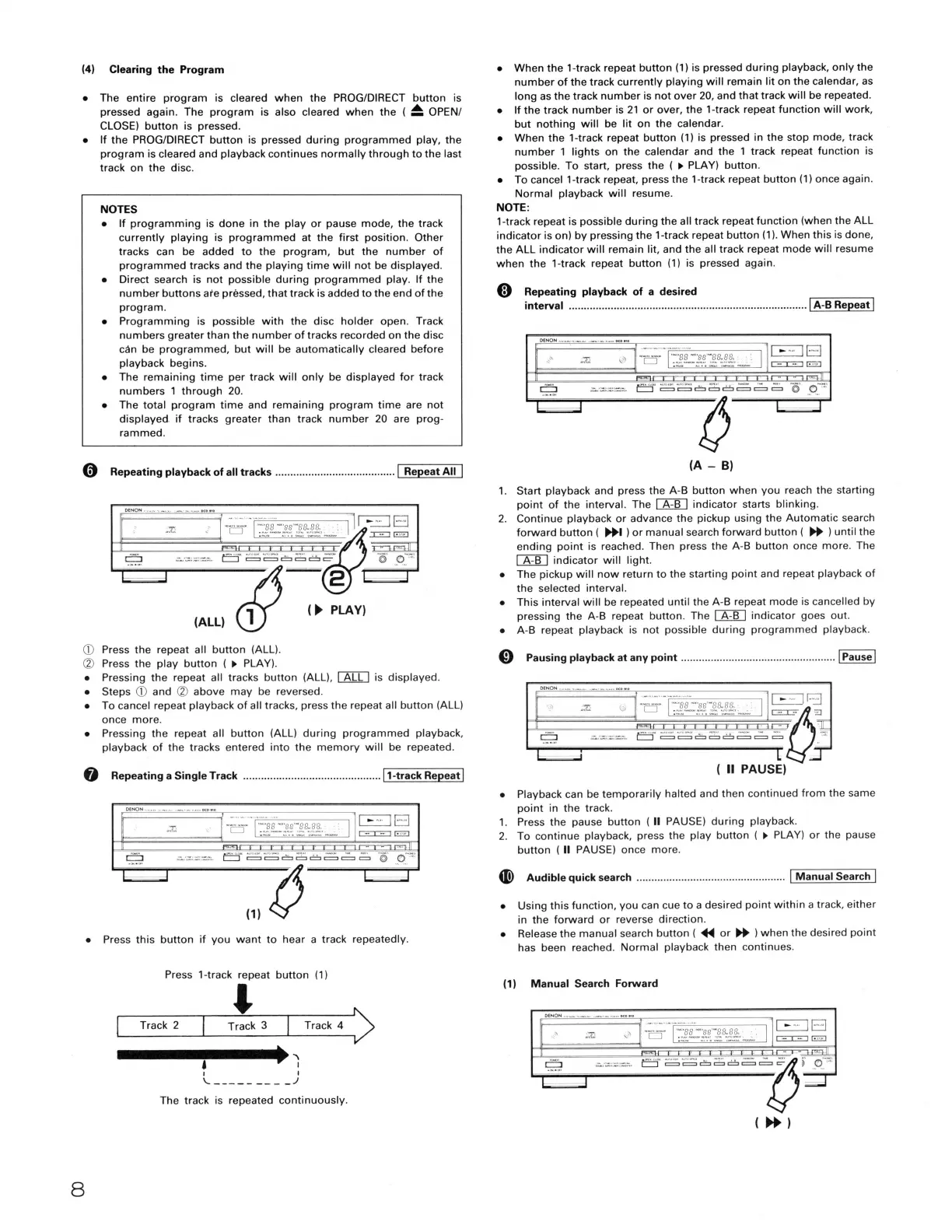
0 Repeating playback of all tracks ........................................ I Repeat All I
CD Press the repeat all button (ALL).
CV Press the play button (
►
PLAY).
• Pressing the repeat all tracks button (ALL), I ALL I is displayed.
• Steps CD and CV above may be reversed.
• To cancel repeat playback of all tracks, press the repeat all button (ALL)
once more.
• Pressing the repeat all button (ALL) during programmed playback,
playback of the tracks entered into the memory will be repeated.
@ Repeating a Single Track .............................................. 11-track Repeat I
8
• Press this button if you want to hear a track repeatedly.
Press 1-track repeat button (1)
'
Track 2 Track 3 Track 4 '
~__.______.________,✓
'
I
I I
\.. _________ .)
The track is repeated continuously.
• When the 1-track repeat button (1) is pressed during playback, only the
number of the track currently playing will remain lit on the calendar, as
long as the track number is not over 20, and that track will be repeated.
• If the track number is 21 or over, the 1-track repeat function will work,
but nothing will be lit on the calendar.
• When the 1-track repeat button (1) is pressed in the stop mode, track
number 1 lights on the calendar and the 1 track repeat function is
possible. To start, press the (
►
PLAY) button.
• To cancel 1-track repeat, press the 1-track repeat button (1) once again.
Normal playback will resume.
NOTE:
1-track repeat is possible during the all track repeat function (when the ALL
indicator is on) by pressing the 1-track repeat button (1 ). When this is done,
the ALL indicator will remain lit, and the all track repeat mode will resume
when the 1-track repeat button (1) is pressed again.
@ Repeating playback of a desired
interval ................................................................................ 1 A-B Repeat I
(A - B)
1. Start playback and press the A-B button when you reach the starting
point of the interval. The [AID indicator starts blinking.
2. Continue playback or advance the pickup using the Automatic search
forward button ( ~I ) or manual search forward button (
~
) until the
ending point is reached. Then press the A-B button once more. The
I A-B I indicator will light.
• The pickup will now return to the starting point and repeat playback of
the selected interval.
• This interval will be repeated until the A-B repeat mode is cancelled by
pressing the A-B repeat button. The [AID indicator goes out.
• A-B repeat playback is not possible during programmed playback.
0 Pausing playback at any point .................................................... I Pause I
-□
-I '1.§:'.P,1/,I;_ I
~
E:5~~6~8~~,;:, U"''
( II PAUSE)
• Playback can be temporarily halted and then continued from the same
point in the track.
1. Press the pause button ( II PAUSE) during playback.
2. To continue playback, press the play button (
►
PLAY) or the pause
button ( II PAUSE) once more.
4D) Audible quick search .................................................. I Manual Search I
• Using this function, you can cue to a desired point within a track, either
in the forward or reverse direction.
• Release the manual search button (
~
or
~
) when the desired point
has been reached. Normal playback then continues.
(1) Manual Search Forward
= ,,,, e;s ~,, 8
~
.;e,B ._ p-~
( .,. )


 To Next Page
 Loading...