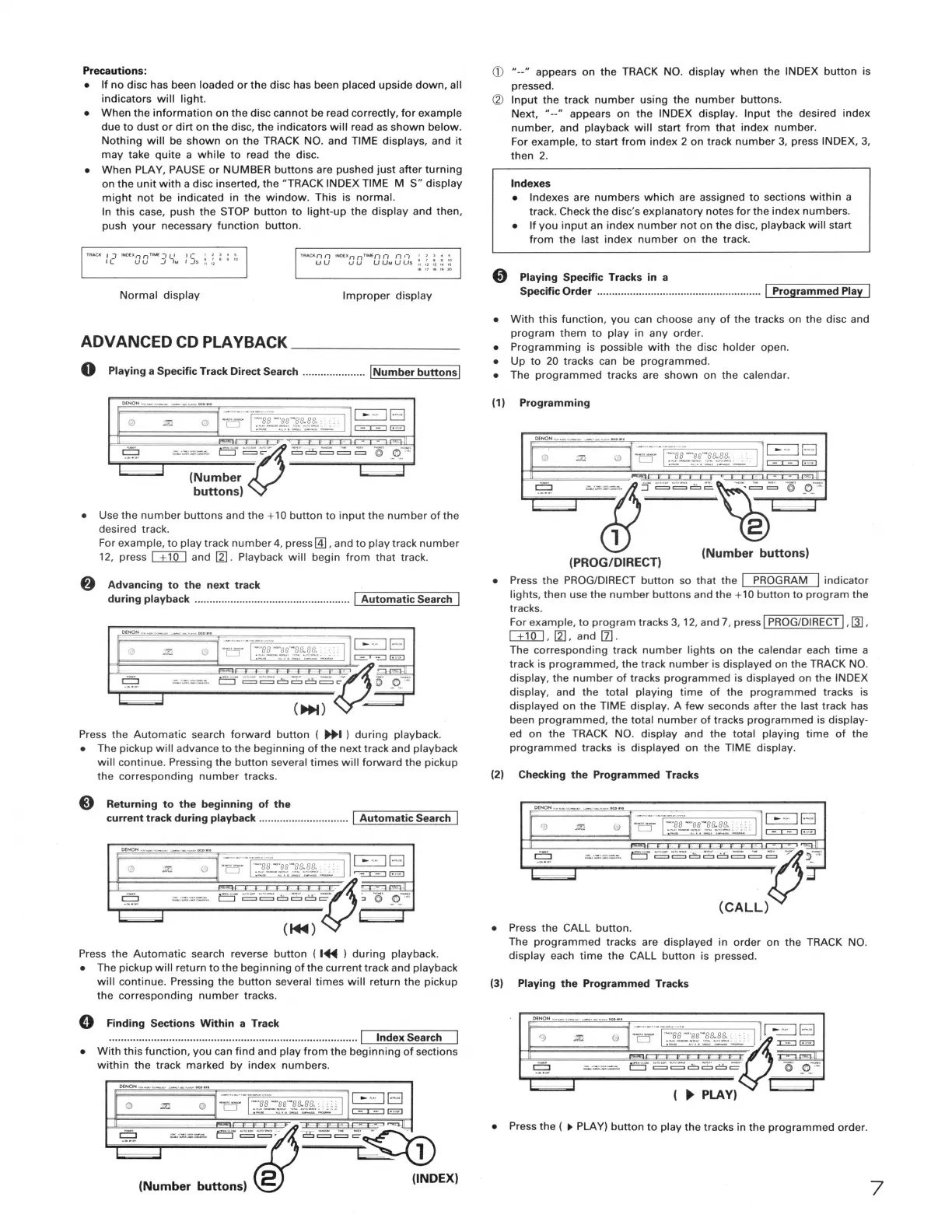
Precautions:
• If no disc has been loaded or the disc has been placed upside down, all
indicators will light.
• When the information on the disc cannot be read correctly, for example
due to dust or dirt on the disc, the indicators will read as shown below.
Nothing will be shown on the TRACK NO. and TIME displays, and it
may take quite a while to read the disc.
• When PLAY, PAUSE or NUMBER buttons are pushed just after turning
on the unit with a disc inserted, the "TRACK INDEX TIME M S" display
might not be indicated in the window. This is normal.
In this case, push the STOP button to light-up the display and then,
push your necessary function button.
TRACK,, '7 IN0On nTIMEn n n ,; I 1 ) •
~
U U u u U Ut.1 U Us
~
;,
~
!
~
Normal display
Improper display
ADVANCED CD PLAYBACK ______ _
0 Playing a Specific Track Direct Search ..................... !Number buttons I
""""" --~-·--~ ., ..
~
:._ ·- _: -'11'· _"', .-... ,
-"M•-•--• L.......J =c- c:::i=== c:::i \\:>'
~
(Number
buttons)
• Use the number buttons and the+ 10 button to input the number of the
desired track.
For example, to play track number 4, press@], and to play track number
12, press u1QJ and 12]. Playback will begin from that track.
f) Advancing to the next track
during playback .................................................... I Automatic Search I
·a:-r:1i::;~~1,~r~~ 1 5¥2
~
E:::J-
~ ~
C!:J
~
8
~
~- ~· _o_::
,-,.----------------
~~
(ll+I) -
Press the Automatic search forward button ( IJ+I ) during playback.
• The pickup will advance to the beginning of the next track and playback
will continue. Pressing the button several times will forward the pickup
the corresponding number tracks.
Returning to the beginning of the
current track during playback .............................. I Automatic Search I
Press the Automatic search reverse button ( I~ ) during playback.
• The pickup will return to the beginning of the current track and playback
will continue. Pressing the button several times will return the pickup
the corresponding number tracks.
0 Finding Sections Within a Track
··················································································· I Index Search
• With this function, you can find and play from the beginning of sections
within the track marked by index numbers.
- - = _;;:~-
~
:::~ - ·-½J22P~- •
.::..:.=.::::=-L.......J==· c:::ic:::::::::ic::::::::::ic::-
~,
2 (INDEX)
(Number buttons)
(j) "--" appears on the TRACK NO. display when the INDEX button is
pressed.
CV Input the track number using the number buttons.
Next, "--" appears on the INDEX display. Input the desired index
number, and playback will start from that index number.
For example, to start from index 2 on track number 3, press INDEX, 3,
then 2.
Indexes
• Indexes are numbers which are assigned to sections within a
track. Check the disc's explanatory notes for the index numbers.
• If you input an index number not on the disc, playback will start
from the last index number on the track.
0 Playing Specific Tracks in a
Specific Order ....................................................... J Programmed Play I
• With this function, you can choose any of the tracks on the disc and
program them to play in any order.
• Programming is possible with the disc holder open.
• Up to 20 tracks can be programmed.
• The programmed tracks are shown on the calendar.
(1)
Programming
.:::l
••~5,e;,e;6;e~e, 1' !'-'
(PROG/DIRECT) (Number buttons)
• Press the PROG/DIRECT button so that the J PROGRAM I indicator
lights, then use the number buttons and the +10 button to program the
tracks.
For example, to program tracks 3, 12, and 7, press I PROG/DIRECT I, Q],
uNJ, 12], and [Z].
The corresponding track number lights on the calendar each time a
track is programmed, the track number is displayed on the TRACK NO.
display, the number of tracks programmed is displayed on the INDEX
display, and the total playing time of the programmed tracks is
displayed on the TIME display. A few seconds after the last track has
been programmed, the total number of tracks programmed is display-
ed on the TRACK NO. display and the total playing time of the
programmed tracks is displayed on the TIME display.
(2) Checking the Programmed Tracks
• Press the CALL button.
The programmed tracks are displayed in order on the TRACK NO.
display each time the CALL button is pressed.
(3) Playing the Programmed Tracks
----f:ss·-•• ·ea.88. I r-=:JB
CJ ::::..-:,·.:::.,,=- ==
E:l"" ~~c::::::1~8~ @' _<t;_"~~i
(
►
PLAY)
• Press the (
►
PLAY) button to play the tracks in the programmed order.
7


 To Next Page
 Loading...