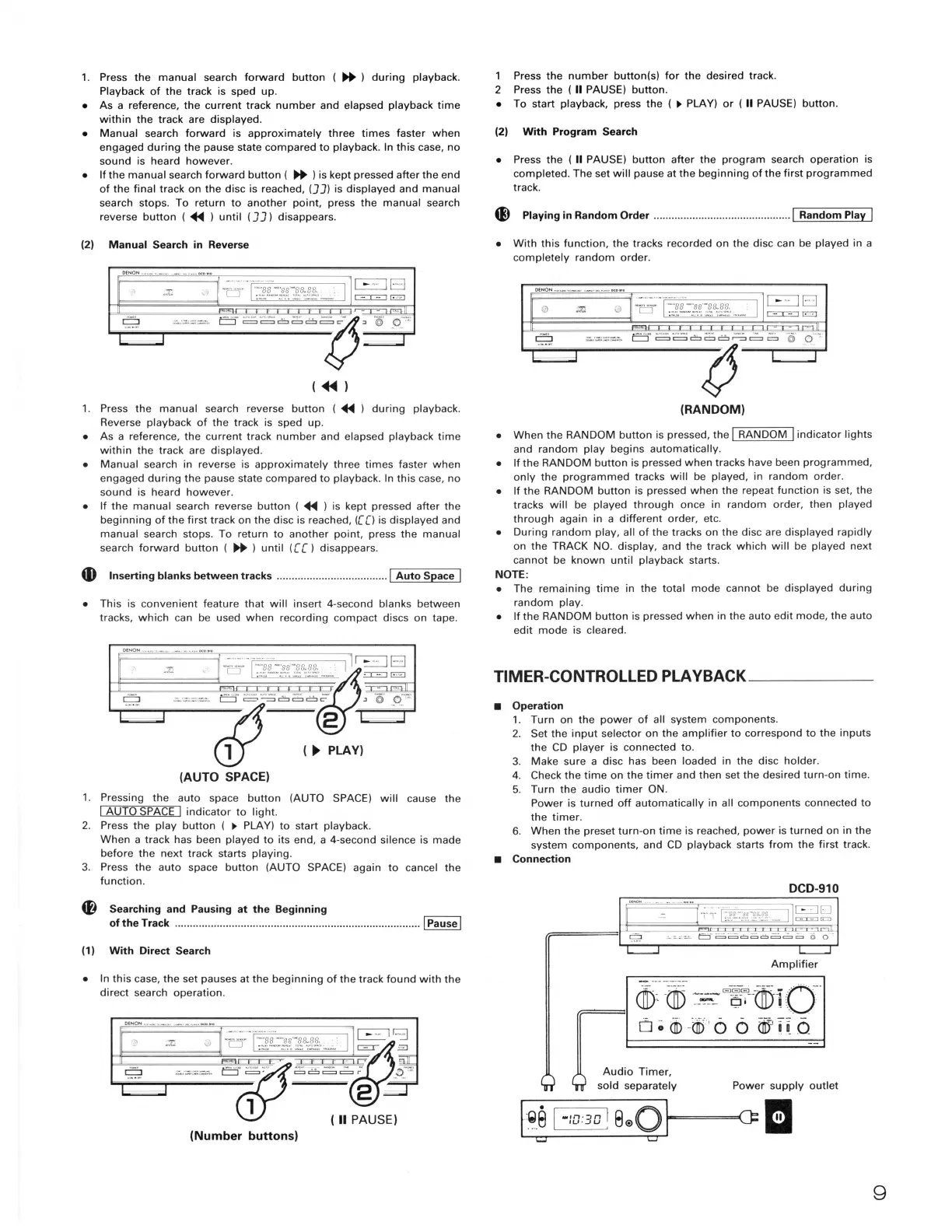
1. Press the manual search forward button (
~
) during playback.
Playback of the track is sped up.
• As a reference, the current track number and elapsed playback time
within the track are displayed.
• Manual search forward is approximately three times faster when
engaged during the pause state compared to playback. In this case, no
sound is heard however.
• If the manual search forward button (
~
) is kept pressed after the end
of the final track on the disc is reached, (J J) is displayed and manual
search stops. To return to another point, press the manual search
reverse button ( .,_ ) until (J J) disappears.
(2) Manual Search in Reverse
.x.
1. Press the manual search reverse button ( .,_ ) during playback.
Reverse playback of the track is sped up.
• As a reference, the current track number and elapsed playback time
within the track are displayed.
• Manual search in reverse is approximately three times faster when
engaged during the pause state compared to playback. In this case, no
sound is heard however.
• If the manual search reverse button ( .,_ ) is kept pressed after the
beginning of the first track on the disc is reached, ([ [) is displayed and
manual search stops. To return to another point, press the manual
search forward button (
~
) until ([[) disappears.
G) Inserting blanks between tracks ..................................... 1 Auto Space I
• This is convenient feature that will insert 4-second blanks between
tracks, which can be used when recording compact discs on tape.
·B ·j··~Ji:;~r?.,~i~•-1
~
~
. . .
g -·--·~·-···· c=J
~
~
□
~
□
;;-
~
@i e-:::
...,._. ........ ..,..... ............
~
(
►
~LAVI
(AUTO SPACE)
1. Pressing the auto space button (AUTO SPACE) will cause the
I AUTO SPACE I indicator to light.
2. Press the play button (
►
PLAY) to start playback.
When a track has been played to its end, a 4-second silence is made
before the next track starts playing.
3. Press the auto space button (AUTO SPACE) again to cancel the
function.
4P} Searching and Pausing at the Beginning
of the Track .................................................................................. I Pause I
(1) With Direct Search
• In this case, the set pauses at the beginning of the track found with the
direct search operation.
(Number buttons)
1 Press the number button(s) for the desired track.
2 Press the ( II PAUSE) button.
• To start playback, press the (
►
PLAY) or ( II PAUSE) button.
(2) With Program Search
• Press the ( II PAUSE) button after the program search operation is
completed. The set will pause at the beginning of the first programmed
track.
~
Playing in Random Order .............................................. 1 Random Play I
• With this function, the tracks recorded on the disc can be played in a
completely random order .
1~
□
==
(RANDOM)
• When the RANDOM button is pressed, the I RANDOM I indicator lights
and random play begins automatically.
• If the RANDOM button is pressed when tracks have been programmed,
only the programmed tracks will be played, in random order.
• If the RANDOM button is pressed when the repeat function is set, the
tracks will be played through once in random order, then played
through again in a different order, etc.
• During random play, all of the tracks on the disc are displayed rapidly
on the TRACK NO. display, and the track which will be played next
cannot be known until playback starts.
NOTE:
• The remaining time in the total mode cannot be displayed during
random play.
• If the RANDOM button is pressed when in the auto edit mode, the auto
edit mode is cleared.
TIMER-CONTROLLED PLAYBACK ____ _
■
Operation
1. Turn on the power of all system components.
2. Set the input selector on the amplifier to correspond to the inputs
the CD player is connected to.
3. Make sure a disc has been loaded in the disc holder.
4. Check the time on the timer and then set the desired turn-on time.
5. Turn the audio timer ON.
Power is turned off automatically in all components connected to
the timer.
6. When the preset turn-on time is reached, power is turned on in the
system components, and CD playback starts from the first track.
■
Connection
DCD-910
Amplifier
-:030 ! s®ol-= =c= I
u
g


 To Next Page
 Loading...